EasyManua.ls Logo

Sony Trinitron KV-35V35 - Page 10

Sony Trinitron KV-35V35
42 pages
Print Icon
To Next Page IconTo Next Page
To Previous Page IconTo Previous Page
Loading...
©
STAT
EE
I
I
ST
I
EE
ET
OE
OS
SS
Connecting
two
VCRs
for
tape
editing
using
MONITOR
OUT
@
KV-27V25/27V35/29V35CI29VE5MI29V75MI3Z2V25/
32V35/34V35CI35V35/35V45/35V75
only
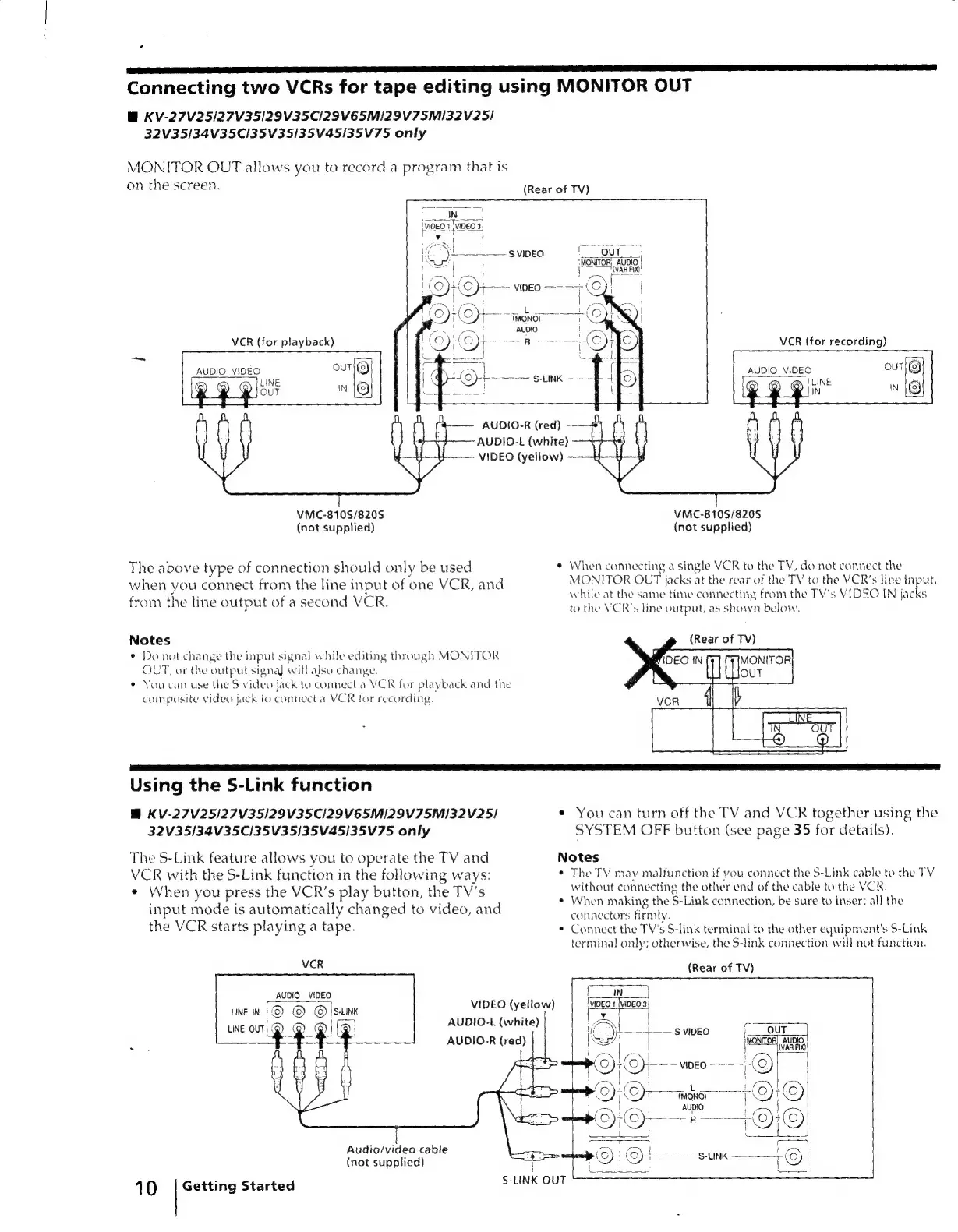
MONITOR
OUT
allows
you
to
record
a
program
that
is
on
the
screen.
IN
pa
i
Teo
3]
3]
VCR
(for
playback)
AUDIO
VIDEO
VMC-810S/8205S
(not
supplied)
The
above
type
of
connection
should
only
be
used
when
you
connect
from
the
line
input
of
one
VCR,
and
from
the
line
output
of
a
second
VCR.
Notes
*
Do
not
change
the
input
signal
while
editing
through
MONITOR
OUT,
or
the
output
signa)
will
also
change.
*
You
can use
the
S
video
jack
to
connect
a
VCR
for
playback
and
the
compasite
video
jack
to
connect
a
VCR
for
recording.
iM
(ae
a
cy
ae
IO
oe
ee
oie
[
-
L
+{0)}-+~
ao
S-LINK
AUDIO-R
(red)
———-
AUDIO-L
(white)
-
VIDEO
(yellow)
~—
(Rear
of
TV)
VCR
(for
recording)
AUDIO
VIDEO
VMC-8105/820S
(not
supplied)
¢
When
connecting
a
single
VCR
to
the
TV,
do
not
connect
the
MONITOR
OUT
jacks
at
the
rear
of
the
TV
to
the
VCR’s
line
input,
while
at
the
same
time
connecting
from
the
TV’s
VIDEO
IN
jacks
to
the
VCR's
line
output,
as
shown
below,
(Rear
of
TV)
DEO
IN
il
FFMONTOR
Using
the
S-Link
function
BM
KV-27V25/27V35/I29V35C/I29VE5MI2Z9V75SM/32V25/
32V35/34V35C/35V35/35V45/35V75
only
The
S-Link
feature
allows
you
to
operate
the
TV
and
VCR
with
the
$-Link
function
in
the
following
ways:
¢
When
you
press
the
VCR’s
play
button,
the
TV's
input
mode
is
automatically
changed
to
video,
and
the
VCR
starts
playing
a
tape.
VCR
AUDIO
VIDEO
LINE
IN
ie
©
©!
S-LINK
|
(g
LINE
our,
®
AUDIO-L
(white)
AUDIO-R
(red)
|
Audio/video
cable
(not
supplied)
Getting
Started
10
VIDEO
(yellow)
S-LINK
QUT
*
You
can
turn
off
the
TV
and
VCR
together
using
the
SYSTEM
OFF
button
(see
page
35
for
details).
Notes
¢
The
TV
may
malfunction
if
you
connect
the
S-Link
cable
to
the
TV
without
connecting
the
other
end
of
the
cable
to
the
VCR.
¢
When
making
the
S-Link
connection,
be
sure
to
insert
all
the
connectors
firmly.
*
Connect
the
TV's
S-link
terminal
to
the
other
equipment's
S-Link
terminal
only;
otherwise,
the
S-link
connection
will
not
function.
(Rear
of
TV)
VIDEO
1
(VIDEO
3!
if?
“yl
ow
OUT
|
{iON
OR,
es
ence
f