33
Notes
• Turn off the power to each device before making any connections.
• Connect the AC power cord last.
• Before making connections, see “Important safeguards/notices for use in the
medical environment” on page 30.
Preparation
Connection
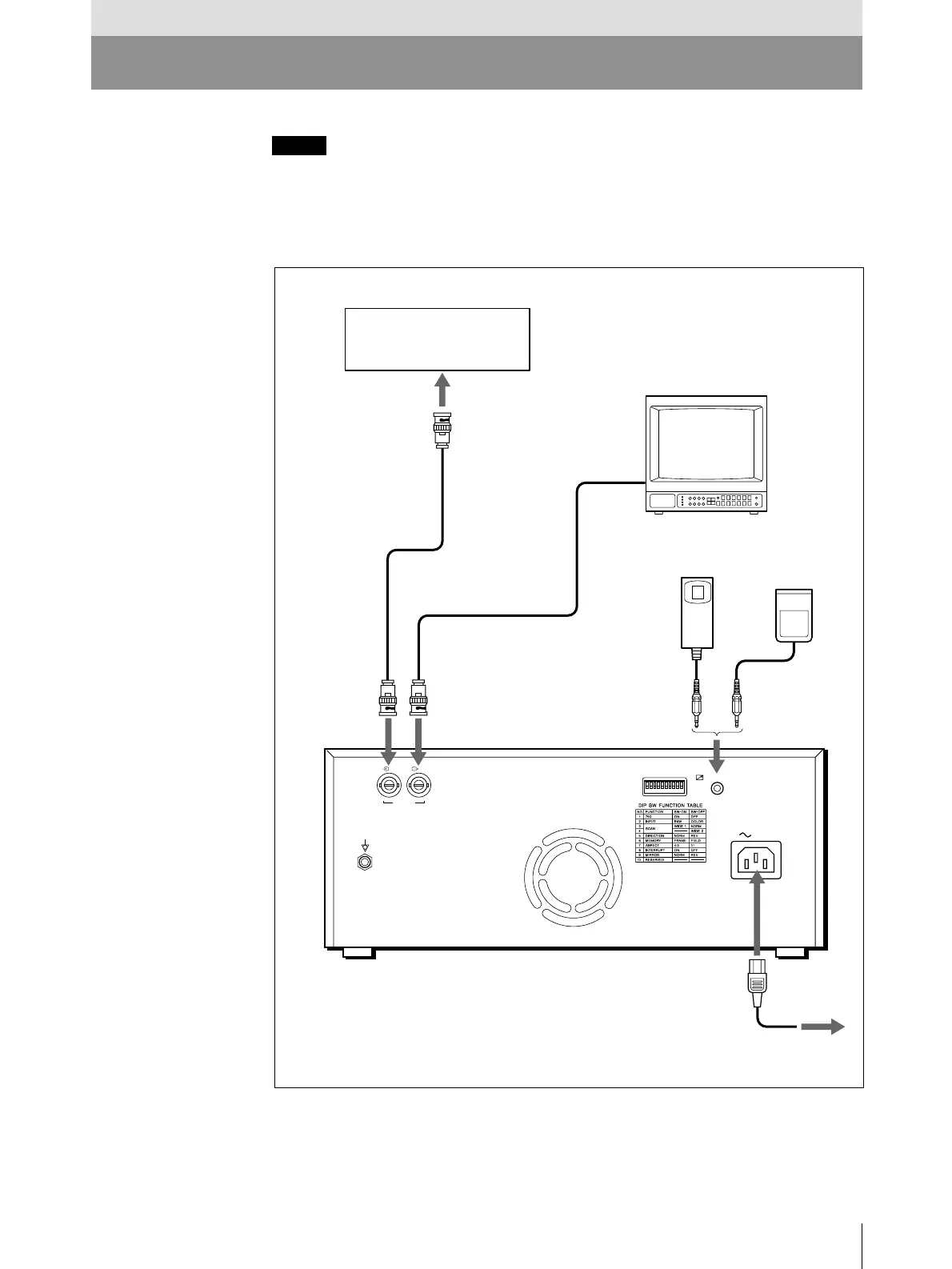
RM-91 remote control
unit (not supllied)
a)
Preparation
FS-20 foot switch
(not supllied)
a)
to REMOTE
to video output connector
Supplied coaxial connecting
cable (BNC ˜ BNC)
to VIDEO IN
Color/black and white
video monitor
Connecting cable
(not supplied)
to video input
connector
to VIDEO OUT
to AC IN
Supplied AC power cord
to wall outlet
a) Connect either the RM-91 remote control
unit or the FS-20 foot switch.
or
REMOTE
AC IN
VIDEO
IN OUT
Video equipment/
Medical equipment



 To Next Page