52
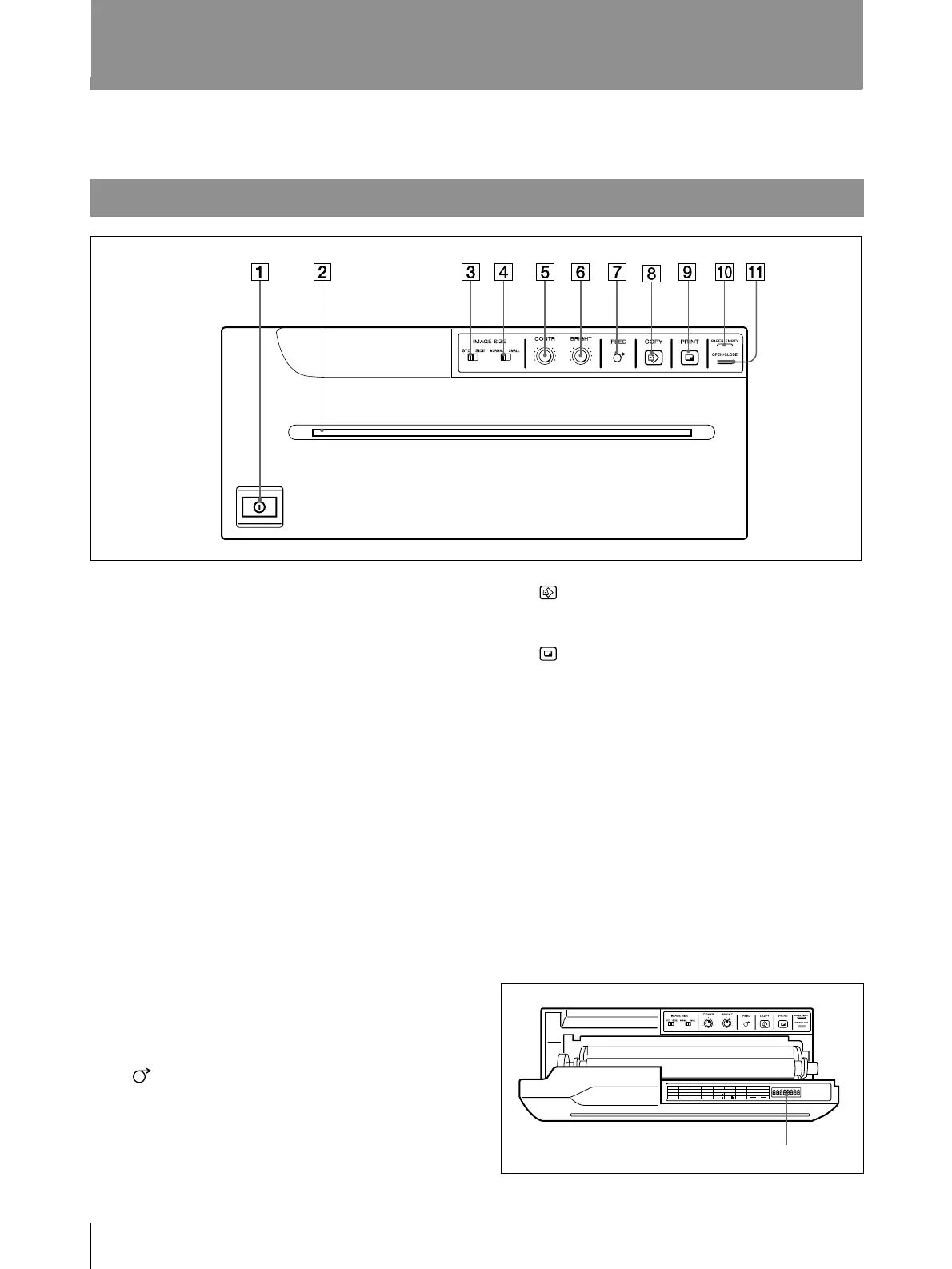
Location and Function of Parts and Controls
For details, refer to the pages indicated in parentheses.
Front
1 UPower ON/OFF switch (39, 41, 47)
Turns the power on.
The FEED, COPY and PRINT buttons light
up.
2 Paper feeder and cutter
Cuts the printing paper.
3 IMAGE SIZE STD (standard)/SIDE
selector (43)
Selects the printing direction.
4 IMAGE SIZE NORMAL/SMALL
selector (43)
Selects the printing size.
5 CONTR (contrast) control (45)
Adjusts the contrast of the printouts.
6 BRIGHT (brightness) control (45)
Adjusts the brightness of the printouts.
7 FEED button (40, 41, 42)
Press to feed the paper. The paper feeds as
long as the FEED button is held down.
Pressing this button during printing results in
interrupting the printing.
8 COPY button (42)
Prints another copy of the previous printout.
9 PRINT button (41, 42)
Prints the picture currently displayed on the
video monitor. The picture displayed when
you press the PRINT button is stored in
memory.
0 PAPER EMPTY indicator (41)
Lights when the printer is out of paper.
!¡ OPEN/CLOSE button (39, 40, 41, 42,
47, 48)
Opens or closes the door panel. Also,
interrupts printing midway.
When the door panel is open, the following
sub panel appears.
For details, see page 34.
DIP switches
Others
OFF
ON
ON
NO
FUNCTION
ON
OFF
12345678
RESERVED RESERVED
ON
OFF
GAMMA
POST FEED
TONE
HARD
IMAGE
SHARPNESS
AGC
POSI SOFT
NEGA
ON
OFF
TONE TONE



 To Next Page