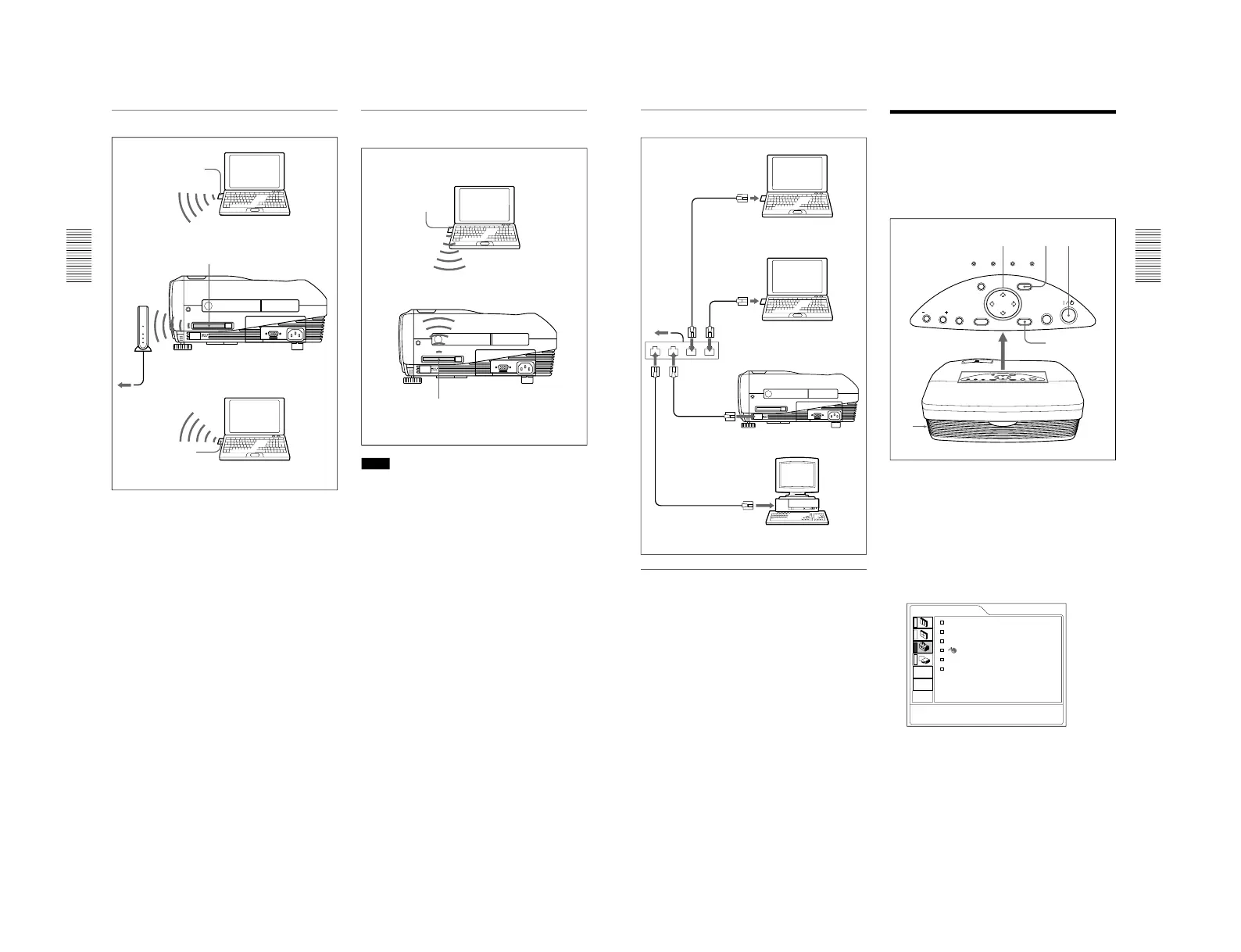
Connecting the Projector
Left side of the projector
Wireless LAN PC card
(IEEE802.11b compliant)
(recommended)
Computer
Wireless LAN
access point
(IEEE802.11b
compliant)
(recommended)
Wireless LAN PC card
(IEEE802.11b compliant) (specified)
to Hub/router
Wireless LAN PC card
(IEEE802.11b compliant)
(recommended)
Computer
Connection using a wireless LAN PC card
(Peer to Peer mode)
Left side of the projector
Wireless LAN PC card
(IEEE802.11b compliant)
(recommended)
Computer
Wireless LAN PC card
(IEEE802.11b compliant) (specified)
Notes
•For details on the recommended PC card or wireless
LAN access point, see the supplied
“Specified/
recommended PC Card/Wireless LAN Access
Point.”
•When you use a LAN, you must set the IP address.
For details on how to set the IP address, etc., see the
supplied “Operating Instructions for Networking.
”
23
(GB)
...............................................................................................................................
..........................................................................
1) PowerPoint is a registered trademark of Microsoft Corporation (U.S.A. and other countries).
Computer
Left side of the projector
to router
LAN cable
Hub
Computer
Computer
LAN cable
LAN cable
LAN cable
Connecting using the ETHER connector
Installing a memory card
If you store a file created with Microsoft PowerPoint
1)
in a memory card and insert it into the INPUT B PC
CARD slot, you can run a presentation without
connecting a computer.
For inserting and removing a memory card, see
“Installing
a PC card” on page 21 (GB).
For details on the recommended memory card, see the
supplied “Specified/recommended PC Card/Wireless LAN
Access Point.”
to INPUT B
EHTER connector
Connecting the Projector / Selecting the Menu Language
Selecting the Menu
Language
You can select the language to be used in the menu
and other on screen displays from 9 languages. The
factory setting is ENGLISH.
1
Plug the AC power cord into the wall outlet.
2
Press the I /
1
key to turn on the power.
3
Press the MENU key.
The menu display appears.
4
Press the M or m key to select the SET SETTING
menu, then press the , or ENTER key.
The SET SETTING menu appears.



 To Next Page