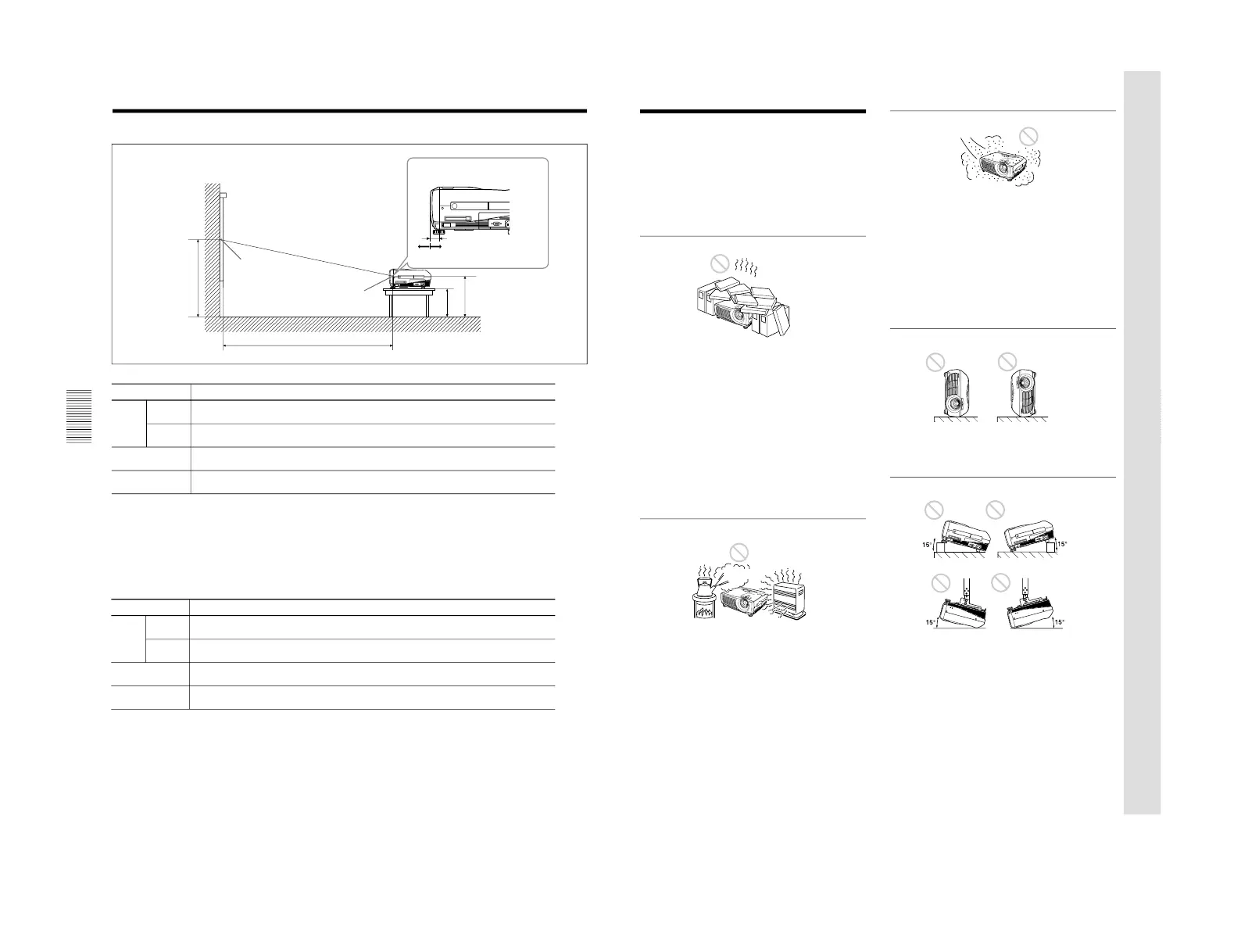
a: Distance between the screen and the center
of the lens
b: Distance from the floor to the center of the
lens
c: Distance from the floor to the foot of the
projector
x: Free
Center of the lens
Center of the screen
Wall
Floor
Distance between the front of the
cabinet and the center of the lens
Standard lens:
–25.4 mm (–1 inch)
Installation Example
Installation Example
SS 40 60 80 100 120 150 180 200 250 300
Minimum
1458 2217 2977 3736 4495 5635 6774 7533 9432 11330
a
(57
1
/
2
) (87
1
/
2
) (117
3
/
8
) (147
3
/
8
) (177
1
/
4
) (221
3
/
4
) (266
5
/
8
) (296
1
/
2
) (371
3
/
8
) (446
1
/
8
)
Maximum
1764 2675 3586 4497 5408 6774 8141 9052 11329 13607
(69
3
/
8
) (105
1
/
4
) (141
3
/
8
) (177
1
/
4
) (213
1
/
8
) (266
5
/
8
) (320
5
/
8
) (356
3
/
8
) (446
1
/
8
) (536)
b
x–305 x–457 x–610 x–762 x–914 x–1143 x–1372 x–1524 x–1905 x–2286
(12) (18) (24) (30) (36) (45) (54) (60) (75
1
/
8
) (90
1
/
8
)
c
x–388 x–541 x–693 x–845 x–998 x–1226 x–1455 x–1607 x–1988 x–2369
(15
3
/
8
) (21
3
/
8
) (27
3
/
8
) (33
3
/
8
) (39
3
/
8
) (48
3
/
8
) (57
3
/
8
) (63
3
/
8
) (78
3
/
8
) (93
3
/
8
)
Unit: mm (inches)
To calculate the installation measurements (unit: mm)
SS: screen size diagonal (inches)
a (minimum) = {(SS × 33.60/0.9071) – 59.7012} × 1.025
a (maximum) = {(SS × 42.376846/0.9071) – 59.62151} × 0.975
b = x – (SS/0.9071 × 6.912)
c = x – (SS/0.9071 × 6.912 + 83.4)
VPL-PX15/PX10
SS 40 60 80 100 120 150 180 200 250 300
Minimum
1461 2221 2982 3742 4503 5644 6784 7545 9446 11348
a
(57
1
/
2
) (87
1
/
2
) (117
3
/
8
) (147
3
/
8
) (177
1
/
4
) (222
1
/
8
) (267) (297
3
/
8
) (372
1
/
8
) (447)
Maximum
1767 2680 3592 4505 5417 6786 8154 9067 11348 13629
(69
3
/
4
) (105
5
/
8
) (141
3
/
8
) (177
1
/
4
) (213
1
/
2
) (267
3
/
8
) (321) (357
1
/
4
) (447) (536
3
/
4
)
b
x–305 x–458 x–611 x–763 x–916 x–1145 x–1374 x–1527 x–1908 x–2290
(12
1
/
8
) (18
1
/
8
) (24
1
/
8
) (30
1
/
8
) (36
1
/
8
) (45
1
/
8
) (54
1
/
8
) (60
1
/
8
) (75
1
/
4
) (90
1
/
4
)
c
x–389 x–541 x–694 x–847 x–999 x–1228 x–1457 x–1610 x–1992 x–2373
(15
3
/
8
) (21
3
/
8
) (27
3
/
8
) (33
3
/
8
) (39
3
/
8
) (48
3
/
8
) (57
3
/
8
) (63
1
/
2
) (78
1
/
2
) (93
1
/
2
)
Unit: mm (inches)
To calculate the installation measurements (unit: mm)
SS: screen size diagonal (inches)
a (minimum) = {(SS × 33.59/0.9055) –59} × 1.025
a (maximum) = {(SS × 42.370377/0.9055) – 58.9761} × 0.975
b = x – (SS/0.9055 × 6.912)
c = x – (SS/0.9055 × 6.912 + 83.4)
VPL-PS10
35
(GB)
Notes for Installation
Unsuitable Installation
Do not install the projector in the following situations.
These installations may cause malfunction or damage
to the projector.
Poorly ventilated
• Allow adequate air circulation to prevent internal
heat build-up. Do not place the unit on surfaces
(rugs, blankets, etc.) or near materials (curtains,
draperies) that may block the ventilation holes.
When internal heat builds up due to blockage of the
ventilation holes, the temperature sensor may
function, a warning message will be displayed, and
the power may be turned off automatically after one
minute.
• Leave space of more than 50 cm (19
3
/
4
inches)
around the unit.
• Be careful that the ventilation holes do not inhale
tiny objects such as pieces of paper.
Highly heated and humid
• Avoid installing the unit in a location where the
temperature or humidity is very high, or the
temperature is very low.
• To avoid moisture condensation, do not install the
unit in a location where the temperature may rise
rapidly.
Very dusty
Avoid installing the unit in a location where there is a
lot of dust; otherwise, the air filter will clog. The dust
blocking the air through the filter may cause the
internal heat level of the projector to rise. Clean the
filter periodically.
Unsuitable Conditions for Use
Do not do any of the following.
Toppling the unit
Avoid standing the unit on its side as the unit may
topple over. This may cause a malfunction.
Tilting the unit more than 15 degrees
Avoid tilting the unit at an angle of more than 15
degrees. Installation of the unit in this manner may
cause a malfunction.



 To Next Page