RC21 Room thermostat with remote control
The RC21 room thermostat is an optional accessory and is normally not included in the scope of supply.
The remote control with integrated thermostat RC21 provides you with easy to use temperature controlled adjustment of
the temperature from within your living space.
Setting options
The RC21 control dial parallel shifts the heating circuit characteristic stored in the controller. The flow temperature (depending the out-
door temperature) is increased or decreased respectively by this. When the dial is turned all the way down, the heat circuit is switched
off. Frost protection stays active to prevent damage.
Temperature Sensors
The RC21 room thermostat has a built-in temperature sensor, the values of which are registered, used and displayed in the controller. If
the settings in the controller allow it, the sensor is used to alter the flow temperature.
Operating Modes
The slider can be moved to the following operating modes.
In automatic mode, the temperature is controlled according to the set thermostat periods.
In continuous day mode, the set times are ignored and the temperature is controlled according to the day settings.
In continuous night mode, the temperature is usually reduced. This setting is suitable, for example, for periods of prolonged
absence (e.g. holidays).
Installation
Carefully remove the dial from the housing with a screwdriver.
Loosen the screw beneath. Remove the light-coloured part of the
housing from the base.
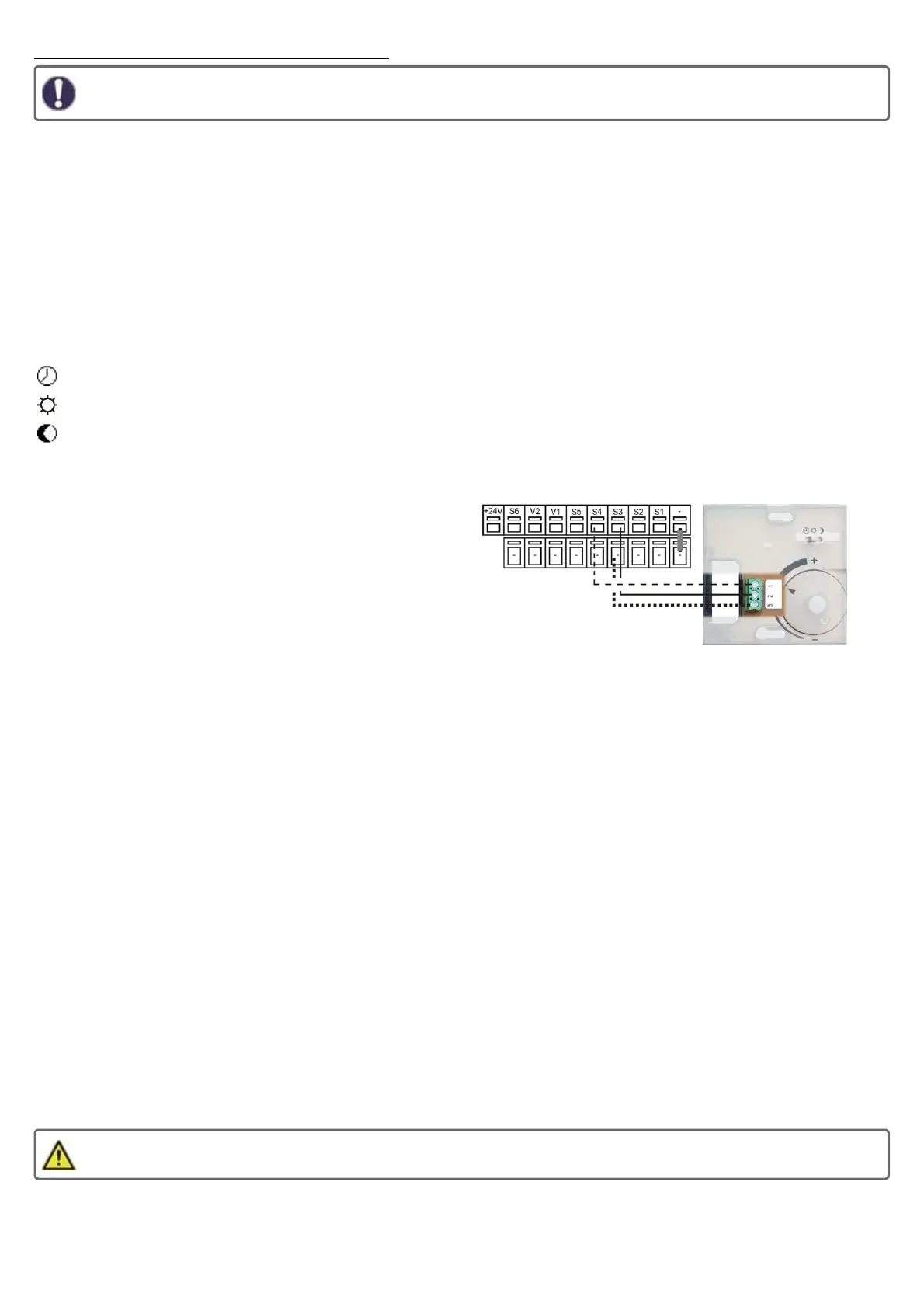
The RC21 is connected to the controller via 3 wires.
1) Remote control -> to a free sensor input (S1-S6)
2) Temperature sensor -> to a free sensor input (S1-S6)
3) GND
The following picture shows exemplary wiring.
The setup of the room controller is done in the following menu:
5. Settings -> 5.1. Heating circuit 1 -> 5.24. Room controller
5....1. Thermostat
Select "RC21-Local 1".
5....10. RC 1 Temp 1
Select here the sensor input that you use for the temperature sensor (Terminal 1) of the RC21.
5....11. RC 1 contr.
Select here the sensor input that you use for the remote control (Terminal 2) of the RC21.
"5....13. Room ref. day“ / "5....14. Room ref. night"
Setting the desired room temperature for day/night operation.
5....12. Room Controller
This value is used to appoint the amount of influence the room temperature has on the reference flow temperature, as a percentage. For
each degree deviation between room temperature and reference temperature, the percentage of the calculated set flow temperature set
here is added to the set flow temperature or subtracted from it up to the min. or max. values set under the protective functions.
Example: Reference room temp.: 25 °C; room temp.: 20 °C = 5 °C deviation. Calculated reference flow temp.: 40 °C: room controller: 10
%= 4 °C 5 X 4 °C= 20 °C. Accordingly, 20 °C are added to the reference flow temperature, giving 60 °C. If the value is higher than the
one set in "Max. flow temp", the resulting temperature will be the one set in "Max. flow temp".
Under "5....2. Thermostat" further °CALEONs can be set optionally as room controllers. The same system as for the first room controller
applies.
5. Settings -> 5.1. Heating circuit 1 -> 5.15. Heating circuit off
If you want the heating circuit to switch off in addition to summer-winter shutdown, even if the room temperature is reached, set "summer
+ room" here.
The RC21 is suited for low voltage only!
26



 To Next Page