SORENSEN DCS SERIES MANUAL INSTALLATION and OPERATION
2-13
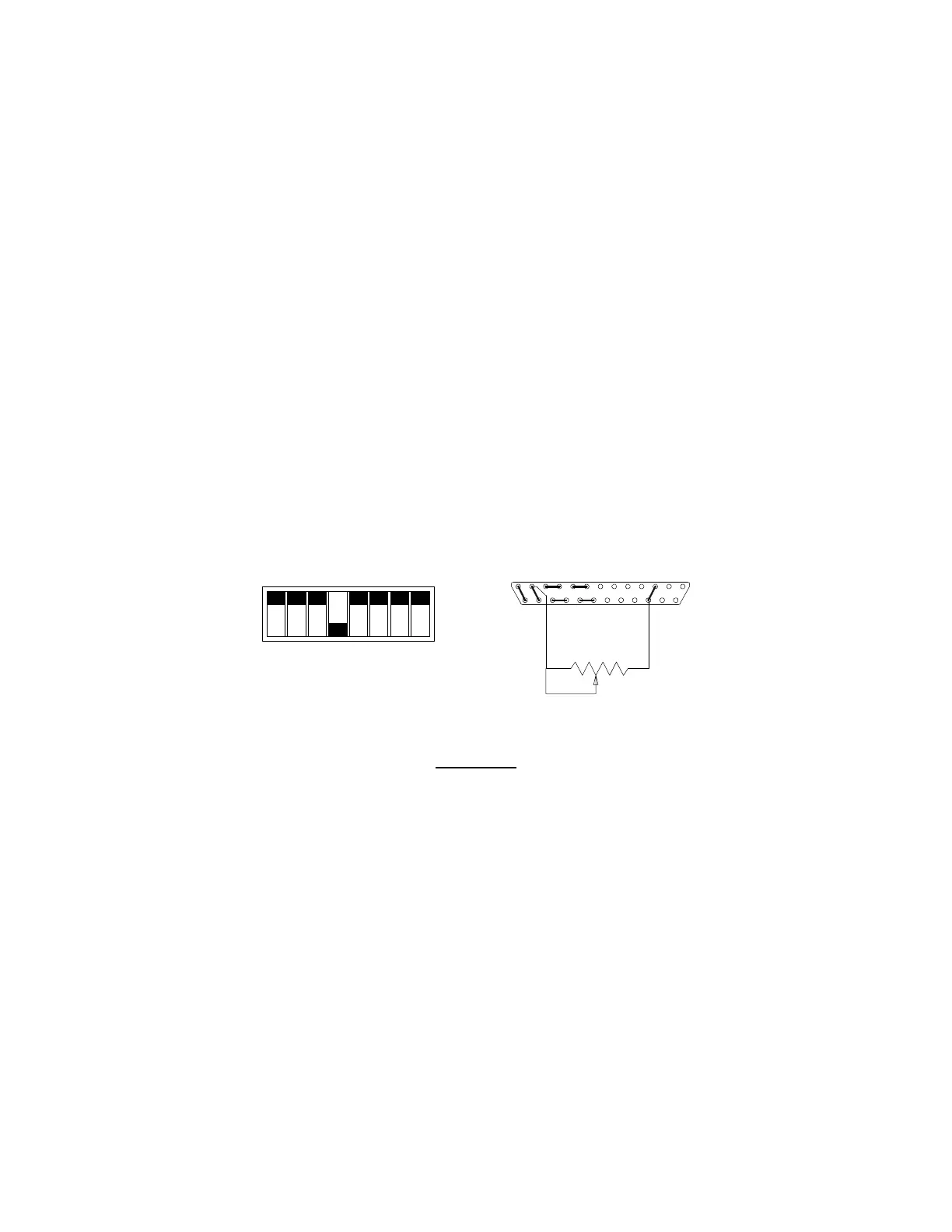
2.9.3 Remote Programming of OVP with an External Resistance
To remotely program the OVP trip level using a 5k ohm external potentiometer use the following procedure.
1. With the unit off and disconnected from its AC source remove the cover, set switch SW1-8 open and
check that switch SW1-4 is closed (default factory setting for switch SW1-4).
2. Connect the counterclockwise end of the 5k potentiometer to pins 3 and 16 of connector J3. Connect
the tap and the clockwise end of the potentiometer to pin 12. Set the potentiometer fully clockwise.
3. Turn the unit on and adjust the output to the desired trip voltage.
4. Slowly turn the potentiometer counterclockwise until the red OVP indicator lamp lights and the
power supply shuts down.
5. Turn the POWER switch to OFF.
6. Turn the voltage control knob to minimum.
7. Turn the POWER switch back ON and increase the voltage to check that the power supply shuts off
the output at the desired voltage.
SW1-1
SW1-2
SW1-3
SW1-4
SW1-5
SW1-6
SW1-7
SW1-8
CLOSED
CCW
1312
25
10
22
1
3
1416
OPEN
Switch SW1
SW1-1 Off (Open)
SW1-2 Off (Open)
SW1-3 Off (Open)
SW1-4 On (Closed)
SW1-5 Off (Open)
SW1-6 Off (Open)
SW1-7 Off (Open)
SW1-8 Off (Open)
Switch SW1 and Connector J3 Configuration
for 0-5k OVP Programming
(J3 sense line, voltage control and current control jumpers shown set for local operation)
www.valuetronics.com



 To Next Page