INSTALLATION and OPERATION SORENSEN DCS SERIES MANUAL
2-20
2.11.3 Programming With an External Current Source
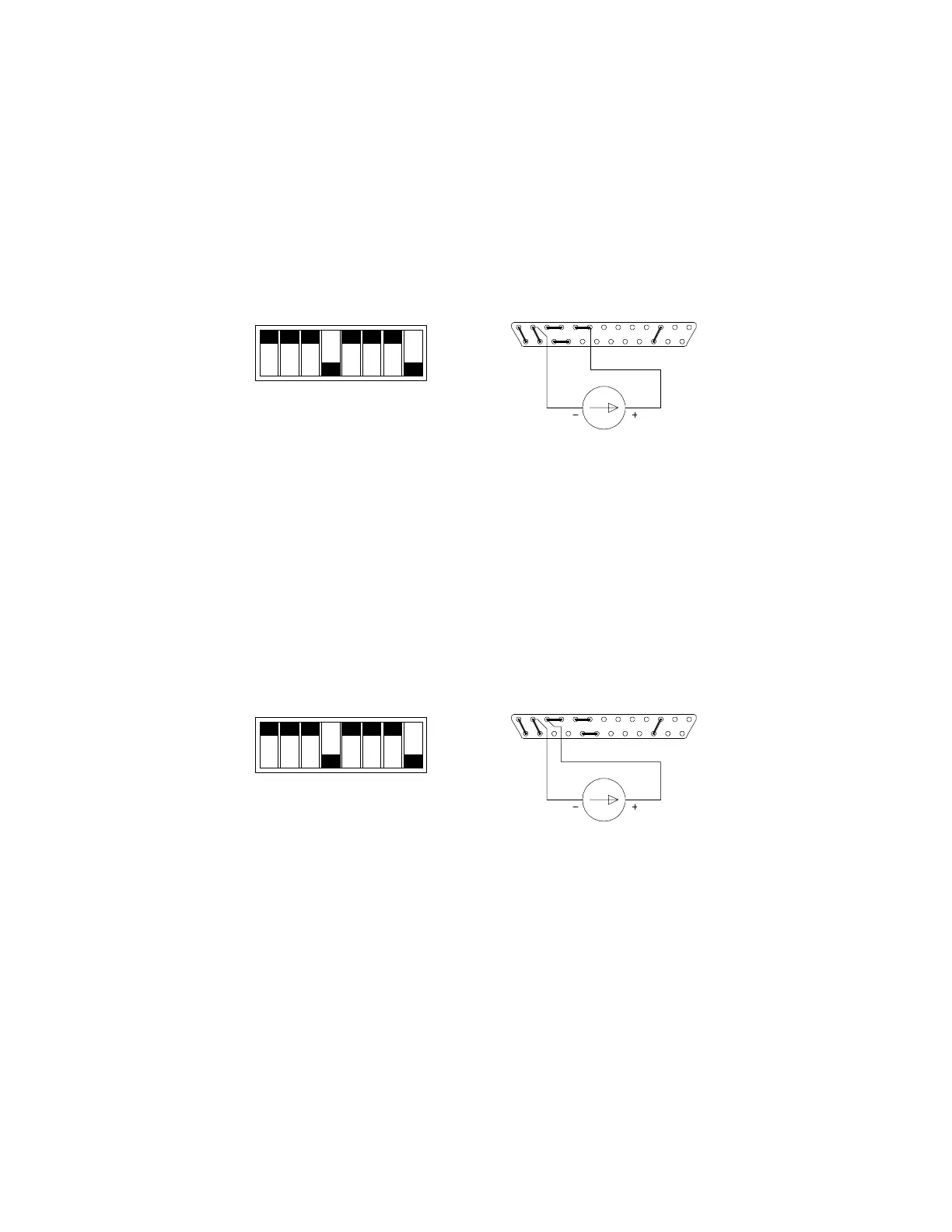
The output voltage and current limit can be programmed using an external 0-1mA current source.
To program the output voltage, set the front panel voltage control to maximum, set switch SW1-3 open (default
factory setting) and remove the jumper between pins 20 and 21 of connector J3. Connect the external current
source between pins 8 (positive) and 12 (return) of connector J3. Varying the current source from 0-1mA will vary
the output voltage from 0-100% of the rated output.
SW1-1
SW1-2
SW1-3
SW1-4
SW1-5
SW1-6
SW1-7
SW1-8
CLOSED
CONNECTOR J3
0-1mA
1312
25
8 1
14
OPEN
Switch SW1 and Connector J3 Configuration
for 0-1mA Current Programming of the Output Voltage
(J3 sense line, OVP and current control jumpers shown set for local operation)
To program the output current limit, set the current control to maximum, set switches SW1-1 and SW1-2 open
(factory setting) and remove the jumper between pins 22 and 23 of connector J3. Connect the external current
source between pins 11 (positive) and 12 (return). Varying the current source from 0-1mA causes the current limit
to vary from 0-100% of rated maximum.
SW1-1
SW1-2
SW1-3
SW1-4
SW1-5
SW1-6
SW1-7
SW1-8
CLOSED
CONNECTOR J3
0-1mA
1312
25
11 1
14
OPEN
Switch SW1 and Connector J3 Configuration
for 0-1mA Current Programming of the Output Current Limit
(J3 sense line, OVP and voltage control jumpers shown set for local operation)
www.valuetronics.com



 To Next Page