Wiring
Connections
Make sure you have good chassis ground. A good ground connection will eliminate most
electrical noise problems. A good chassis ground requires a tight connection to the vehicle's
metal chassis. The area around the ground connection should be clean, bare metal without rust,
paint, plastic, dust,
or
dirt for a good electrical connection.
Caution:
Do not interchange
the connection
ofthewiring!!!
~c-~
__
o_N_:+_1_2V_~~N_e~~·-*_e_~_oo_~_··~~~~-·
:_a7_._~_10_7_.9_M_Hz~-~-·_:_sa_o_~_71_o_~_z~
For some car models you may
need to modify wiring
of
the
supplied power cord. Contact
your authorized car dealer
before installing this unit.
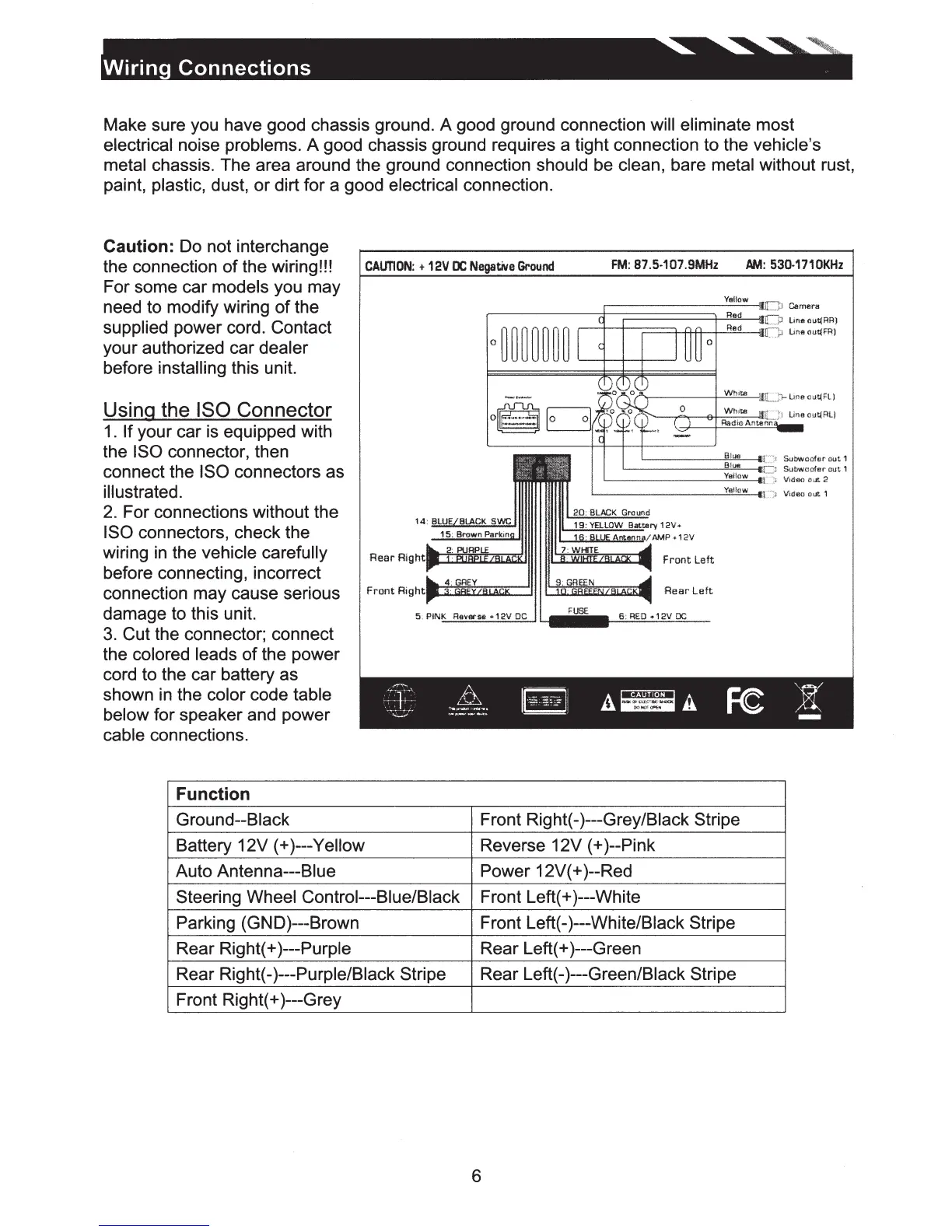
Using the ISO Connector
1.
If your car is equipped with
the ISO connector, then
connect the ISO connectors as
illustrated.
2.
For connections without the
ISO connectors, check the
Ymlow
Uneout(RR!
Bloo
Subwcofer
oot
1
'----------""-'
81
=-ure
__
•n
J
Subwoofew
out
1
Yellow Video
oat
2
Yellow Videc
out
1
wiring
in
the vehicle carefully Rear o
....
h
...
--~~~~
before connecting, incorrect
connection may cause serious
damage to this unit.
3.
Cut the connector; connect
the colored leads
of
the power
cord to the car battery as
shown
in
the color code table
below for speaker and power
cable connections.
Function
Ground--Black
Battery 12V (+)---Yellow
Auto Antenna---Blue
Steering Wheel Control---Blue/Black
Parking (GND)---Brown
Rear Right(+ )---Purple
Rear Right(-)---Purple/Black Stripe
Front Right(+ )---Grey
Front Right(-)---Grey/Black Stripe
Reverse 12V (+)--Pink
Power 12V( +)--Red
Front Left(+ )---White
Front Left(-)---White/Black Stripe
Rear Left(+ )---Green
Rear Left(-)---Green/Black Stripe
6













 To Next Page