Page 15
Section5 Important: Operating Control
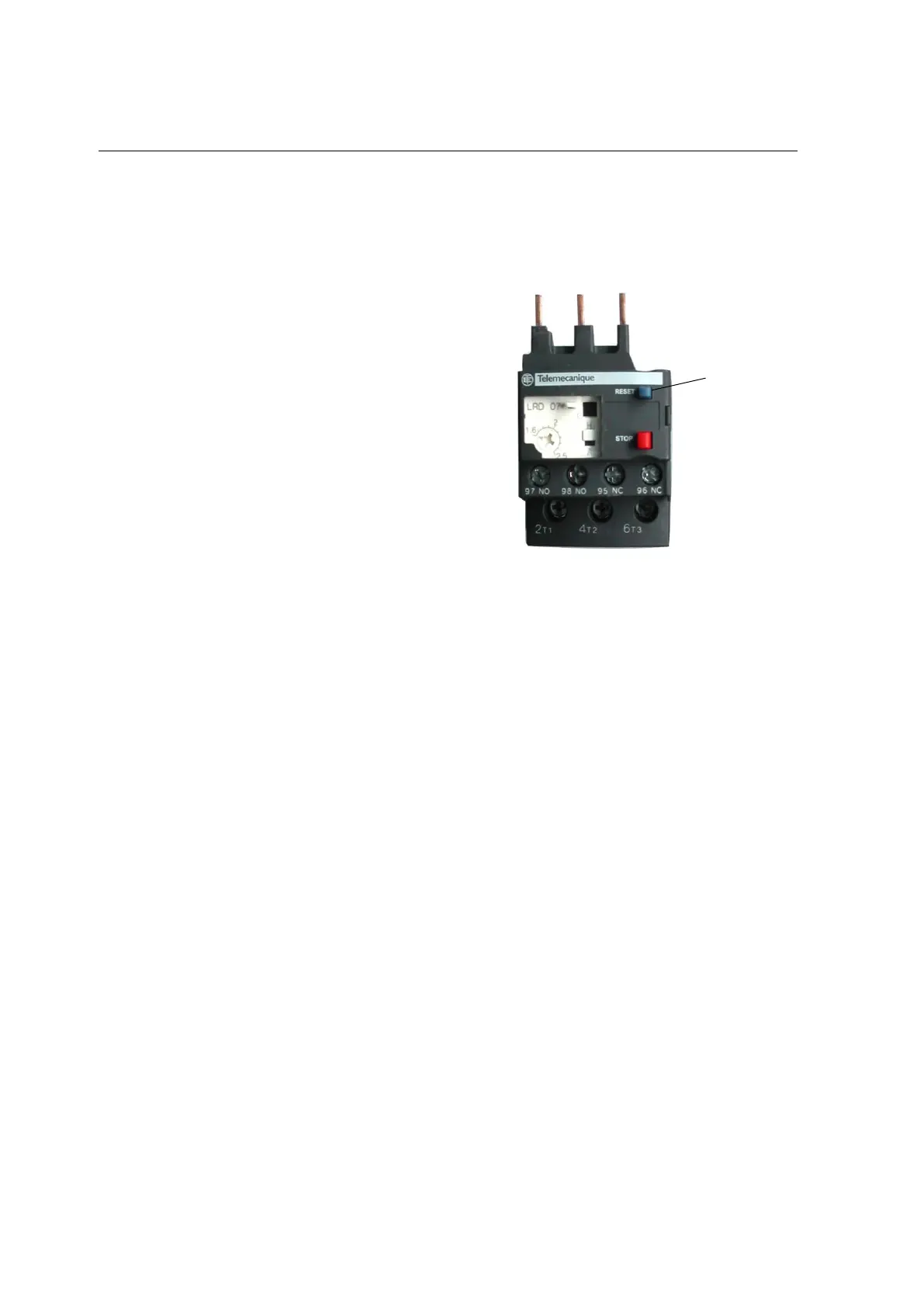
5. Reset Button
The reset protects the beater motor from an overload condition. If an overload
occurs, the reset mechanism will trip. The machine shuts down, it appears no power
supply.
Firstly find out the reason of protection,
solve problem.
Check the power supply, make sure
properly connected with power supply.
Lower viscosity setting in SET MENU item1.
Then press the reset button (blue color
button) in the thermal overload relay.
Figure 5-3.
WARNING:
Do not use metal objects to press the reset button. Failure to comply may result in
severe personal injury or death.
Press the WASH button and observe the machine's performance. If the beater motor
is turning properly, press the RESET button to cancel the cycle. Press other button to
resume normal operation. If the machine shuts down again, contact your authorized
service technician.
6. PRESSURE SWITCH
It protects the refrigeration system and causes the compressor to stop if the pressure
of the system exceeds the pressure switch setting value. This may occur especially
due to a lack of air circulation problems. The switch resets itself automatically.
WARNING:
If the compressor runs for an excessive time or stops and starts repeatedly, this
indicates insufficient condensation; check the causes and contact authorized service
technician.



 To Next Page