H.264 Network Digital Video Recorder User Manual
Page 24
TV adjust Adjust TV upside, downside, nearside, starboard distance
Automatic
maintenance
Set automatic reboot system and automatic deleting files.
Restore Resume setup state: common setup, code setup, recording setup, alarm setup,
network setup, network service, preview playback, serial port setup, user
management
System
information
Hard disk
information
Display hard disk capability and recording time
Code stream
statistics
Display code stream information
Log information Clear all log information according to the log video and time
Edition
information
Display edition information
Shut down Logout or reboot
4.2 Record
4.2.1 Record Config
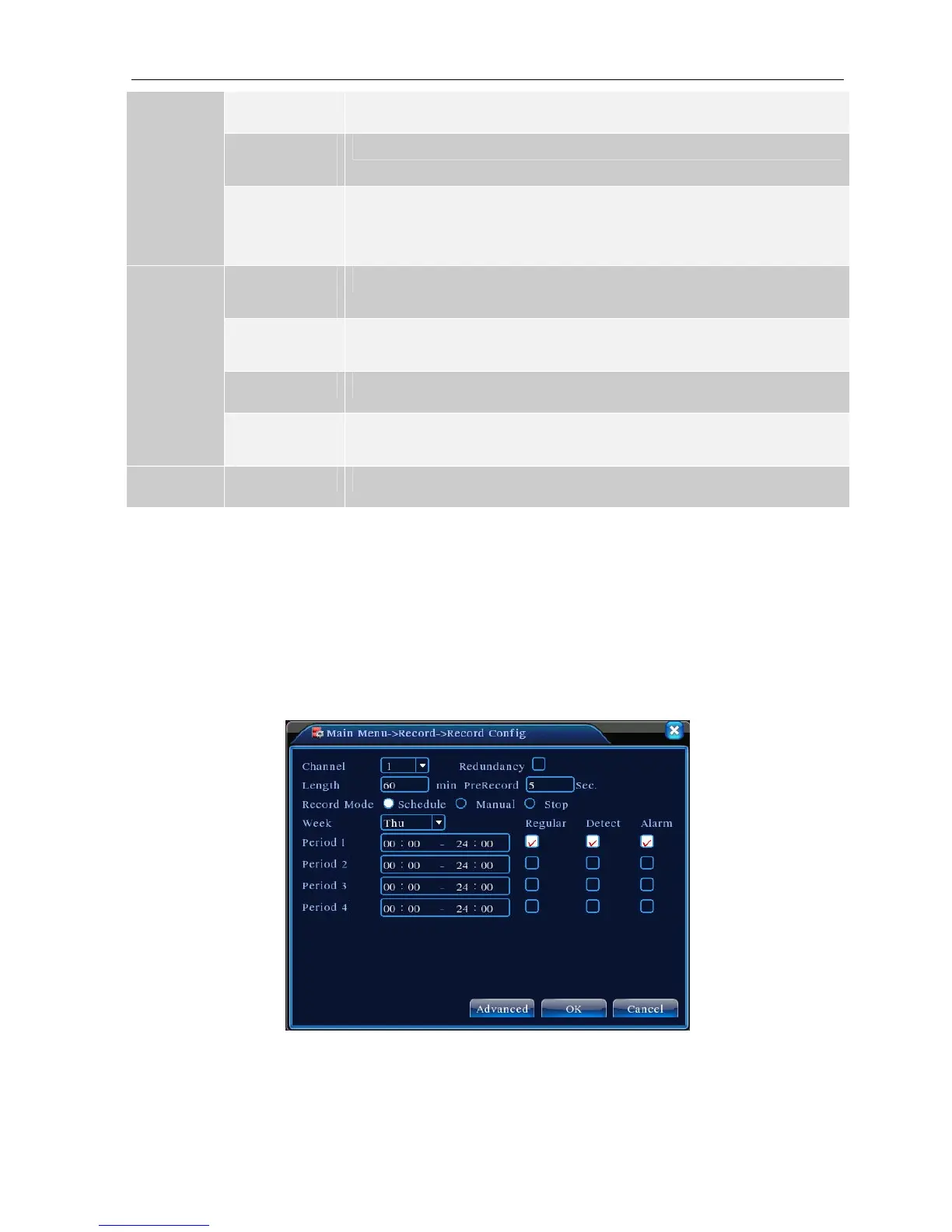
Set the recording parameters in the surveillance channel. The system is set 24 hours consecutive recording in
the first startup. You can enter [main menu]> [recording function]> [recording setup] to set.
Note:There is at least one read-write hard disk.(refer to chapter 4.5.1)
Picture 4.1 Record Config
【Channel】Choose the corresponding channel number to set the channel. Choose the all option to set the
entire channels.



 To Next Page