H.264 Network Digital Video Recorder User Manual
Page 31
4.4.1 General
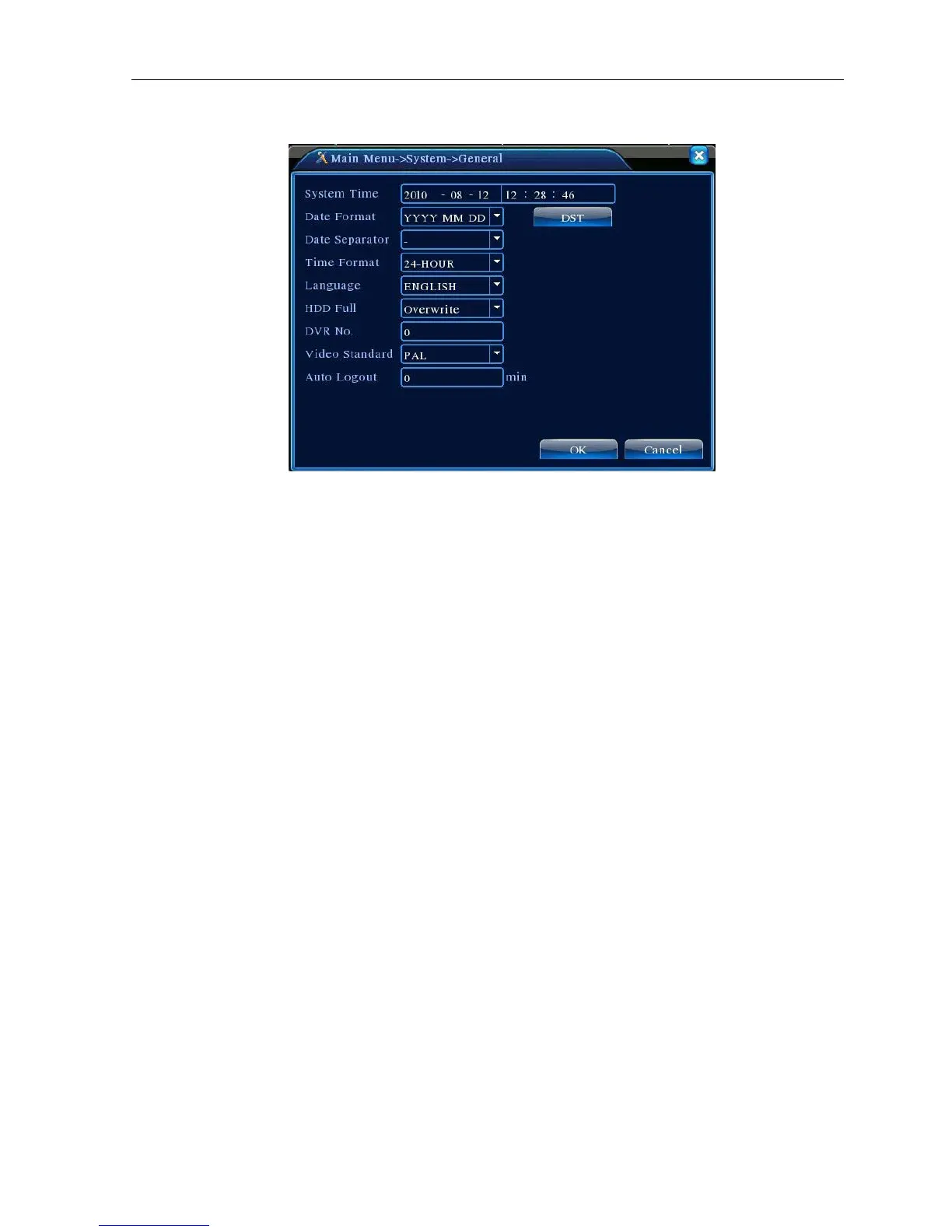
Picture 4.13 General setup
【System time】Set the system data and time.
【Date format】Choose the data format: YMD, MDY, DMY.
【Date Separator】Choose list separator of the data format.
【Time Format】Choose time format: 24-hour or 12-hour.
【Language】
Arabic,Czech,English,Finnish,Greek,Indonesian,Italian,,Japanese,Portuguese,Russian,Thai,T-Chinese,S-Chinese,Turkis
h,Brazilian,Bulgarian,Farsi,French,German,Hebrew,Hungarian,Polish,Romanian,Spanish,Swedish,Vietnamese
【HDD full】Choose stop record: Stop recording when the hard disk is full.
Choose overwrite: Cover the earliest recording files and continue recording when the hard disk is full.
【DVR No.】Only when the address button in the remote controller and the corresponding DVR number is
matched, the remote operation is valid.
【Video Standard】PAL or NTSC.
【Auto Logout】Set the latency time in 0-60. 0 means no latency time.
【DST】Choose the summer time option and pop the dialog box as followed.



 To Next Page