User’s manual EXPERT 1K-FA
Pag. 45 of 76
18. APPENDIX 1
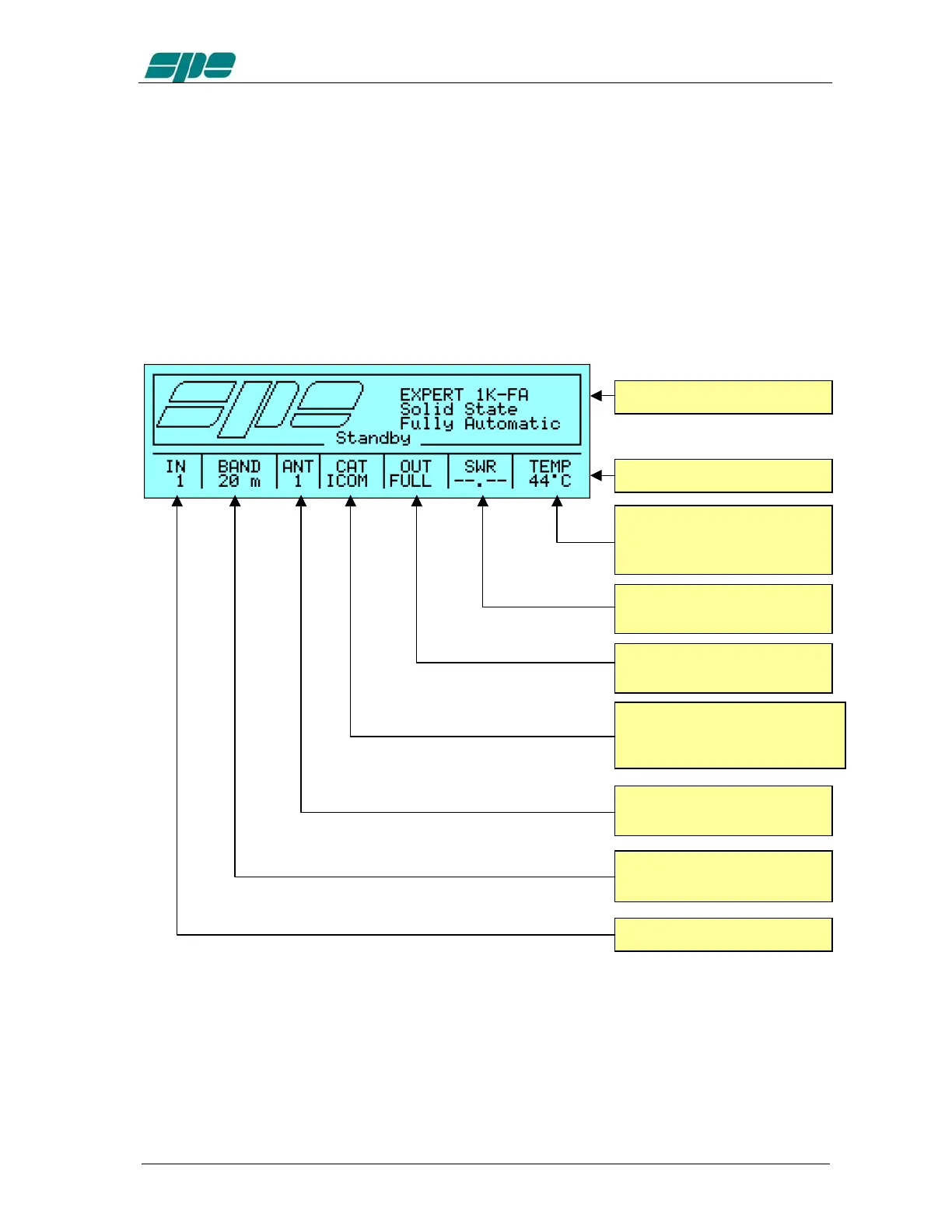
18.1 Main Display Page (STANDBY Mode).
The
Main
Display
Page
, just like any other visual page handled by the system, is
substantially divided into two parts:
· A
User
Area
showing some information/data which vary according to the current
working status.
·
A
Status
Bar
which is committed to displaying either the various status
information or, as for the info pages visualization and setup menus, for user
prompts and for short help notes (contextual helps).
Heatsink temperature shown
either in Celsius degrees (°C)
or in Fahrenheit degrees (°F)
Standing Wave Ratio value
(SWR).
Selected power level.
Status Bar.
User Area.
CAT interface setup (
C
omputer
A
ided
T
ransceiver) relative to
the selected input.
Antenna selection relative to
the tuned band.
Tuned band relative to the
selected input.
Selected input.



 To Next Page