User’s manual EXPERT 1K-FA
Pag. 68 of 76
18.22 OPERATE Mode and FLEX-RADIO CAT interface.
When FlexRadio CAT interface is set, there must be programmed the maximum power
limits for the transceiver in order to avoid the EXPERT’s overdrive protection system
intervention (refer to the Diagnostics section); this is a very important operation since
FlexRadio transceivers don’t have any traditional ALC input.
These settings have to be done while in
OPERATE Mode
according to the followings.
For every ham band two settings are allowed (storage memories):
·
One setting for HALF mode.
· One setting for FULL mode.
The following table shows an overall vision of these settings:
Band 160 m 80 m 40 m 30 m 20 m 17 m 15 m 12 m 10 m 6 m
HALF
Preset
Half
Preset
Half
Preset
Half
Preset
Half
Preset
Half
Preset
Half
Preset
Half
Preset
Half
Preset
Half
Preset
Half
FULL
Preset
Full
Preset
Full
Preset
Full
Preset
Full
Preset
Full
Preset
Full
Preset
Full
Preset
Full
Preset
Full
Preset
Full
The user has to set, for every band of interest, the power limit concerning the input
power limitation (Power Control) using the keyboard and the display of the linear
amplifier.
To make this, obtain a proper band selection using the CAT interface and, without
leaving the RX mode, press one of the arrow keys ([◄▲] [▼►]) from the EXPERT’s
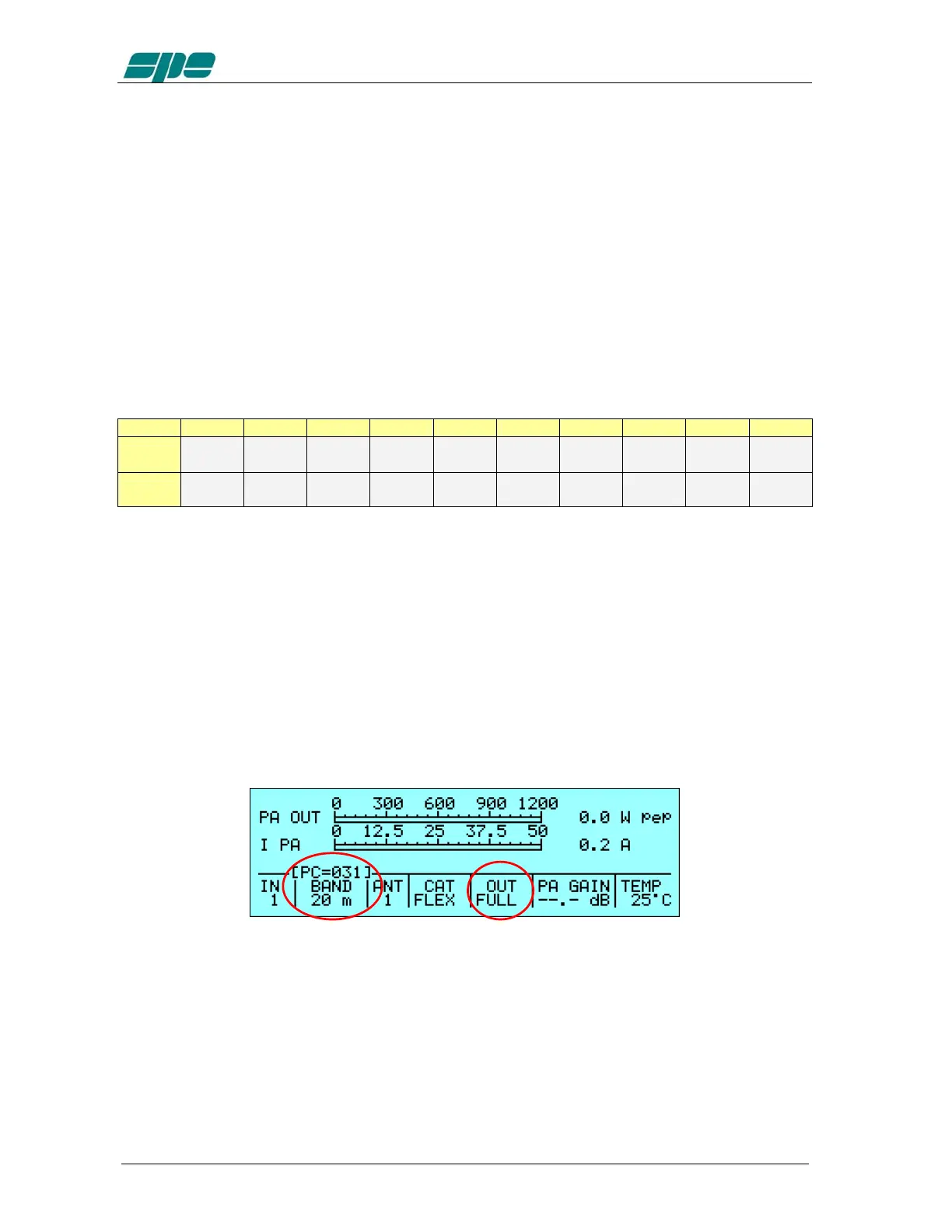
keyboard; a report value having the format “
[PC=xxx]
” (where
xxx
is a numerical value
having a range from
000
to
100
which represents the transceiver’s upper power limit
expressed in percentage) will appear just over the
BAND
label of the
Status
Bar
.
This value is relative to the tuned band and to the selected power mode (HALF/FULL).
In the following picture is shown (as an example) a Power Control equal to 31% in the
20 m
band and in
FULL
power mode:
Pressing the arrow keys ([◄▲] [▼►]) this value can be decremented/incremented
until it reaches the requested value; at the operation completion a time-out period
(about 3 seconds) must be awaited to expire for the “
[PC=xxx]
” indication disappearing
and for, eventually, proceed to another adjusting using the same rules.
The Power Control settings are global since they applies to both inputs.



 To Next Page