User’s manual EXPERT 1K-FA
Pag. 47 of 76
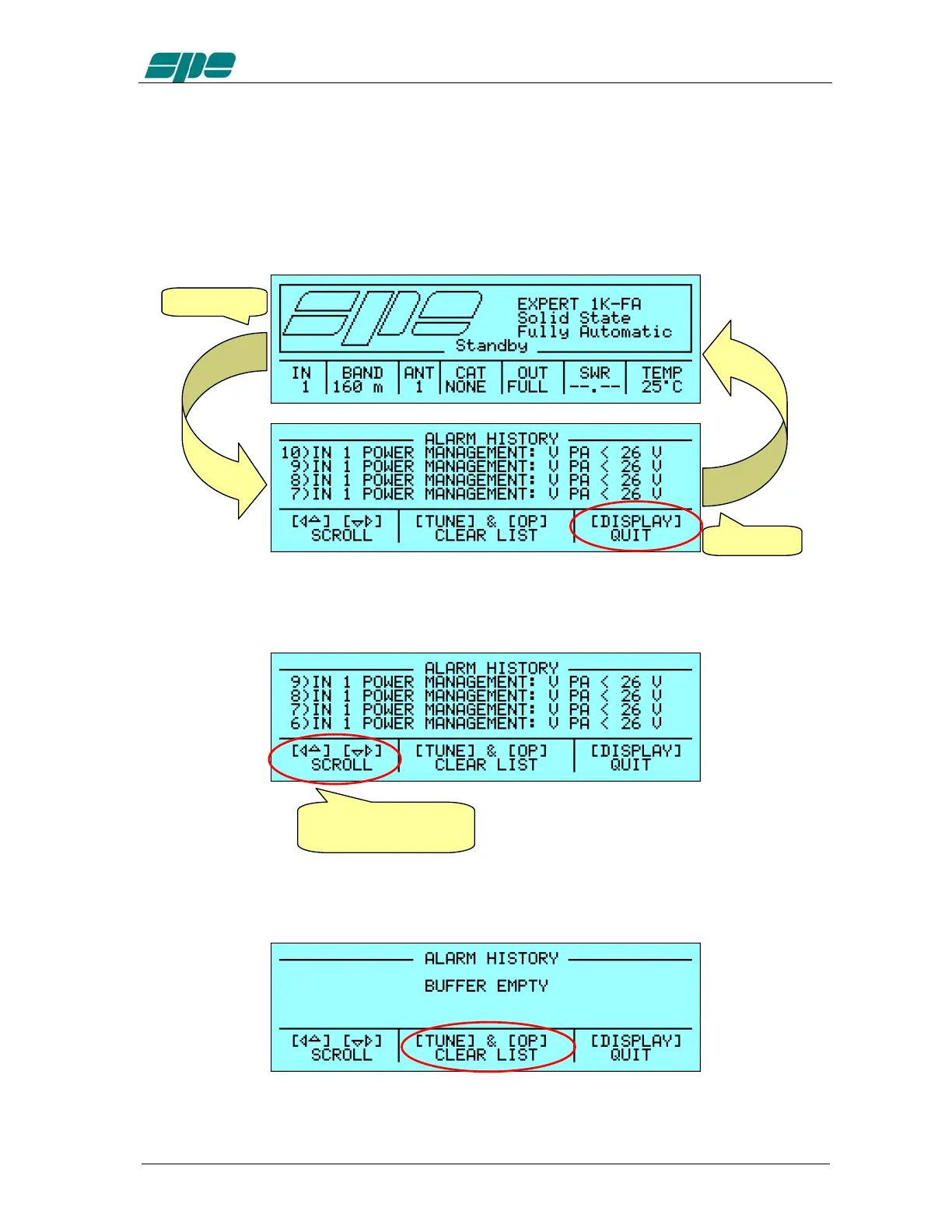
18.3 Alarm History Display Page.
If, in
STANDBY
mode the [
DISPLAY
] key is pressed, the
Alarm
History
Page
report is
displayed; this new page shows in reverse order (the higher numerical index is the last
alarm message) all the stored alarm messages since the last stack reset .
To come back to the
Main
Display
Page
(
STANDBY
mode) all it needed is to press the
[
DISPLAY
] key again.
Due to the small display capability the
Alarm
History
Page
can show only four
message lines at a time so, in order to view any other message “out of sight”, the arrow
keys ([◄▲] [▼►]) must be used to obtain the text scroll.
To empty the whole alarm stack the [
TUNE
] and [
OPERATE
] keys must be pressed and
kept down till the following display page appears:
DISPLAY
DISPLAY
[▼►]: one line down
[◄▲]: one line up



 To Next Page