User’s manual EXPERT 1K-FA
Pag. 51 of 76
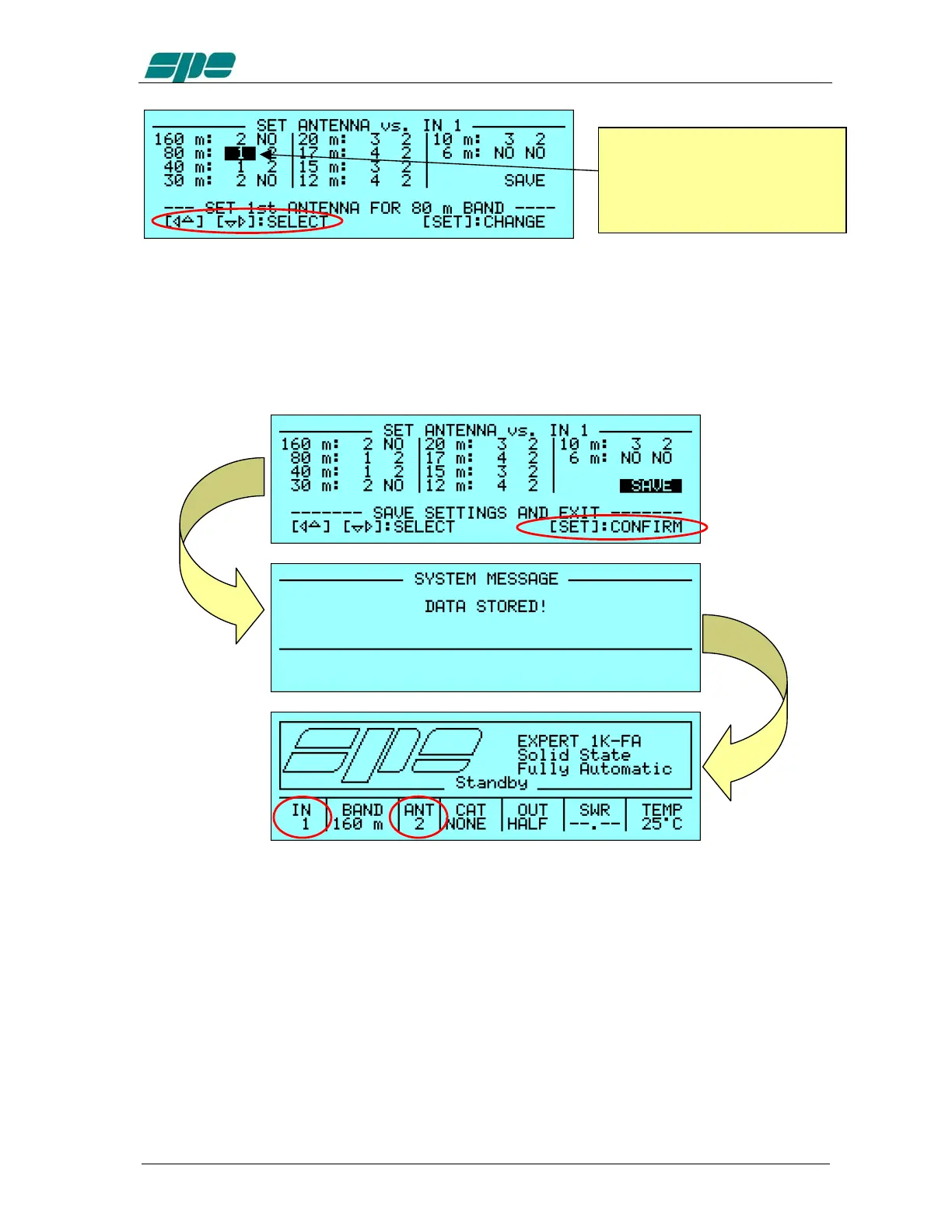
At the end of the desired setting operations, the
SAVE
option must be chosen and
confirmed using the [
SET
] key in order to save all the data relative to the
bands/antennas to the amplifier’s storage memory; these settings will be available until
over-written.
As a confirmation of the data save, the “
DATA STORED!
” message will appear and,
then, the
Main
Display
Page
which restores the system in
STANDBY
mode.
The ANT cell of the Status Bar shows, in this example, the new antenna value (ANT 2)
which has been selected for the tuned 160 m band.
If the user wants to repeat the same kind of operation on the other input (in this example
input 2), the right input must be switched using the [
INPUT
] key just before entering the
Setup
Options
Menu
and repeating the above described procedure.
The
Status
Bar
always shows the updated value of the selected input.
To edit the antenna setting for
another band the arrow key ([◄▲]
[▼►]) must be used to select the
proper choice and, then, repeat
the above described procedure.



 To Next Page