SpectraPure
®
SpectraPure
®
Inc.
480.894.5437 Call us toll-free 1.800.685.2783
2167 East Fifth St, Tempe, Arizona 85281
17
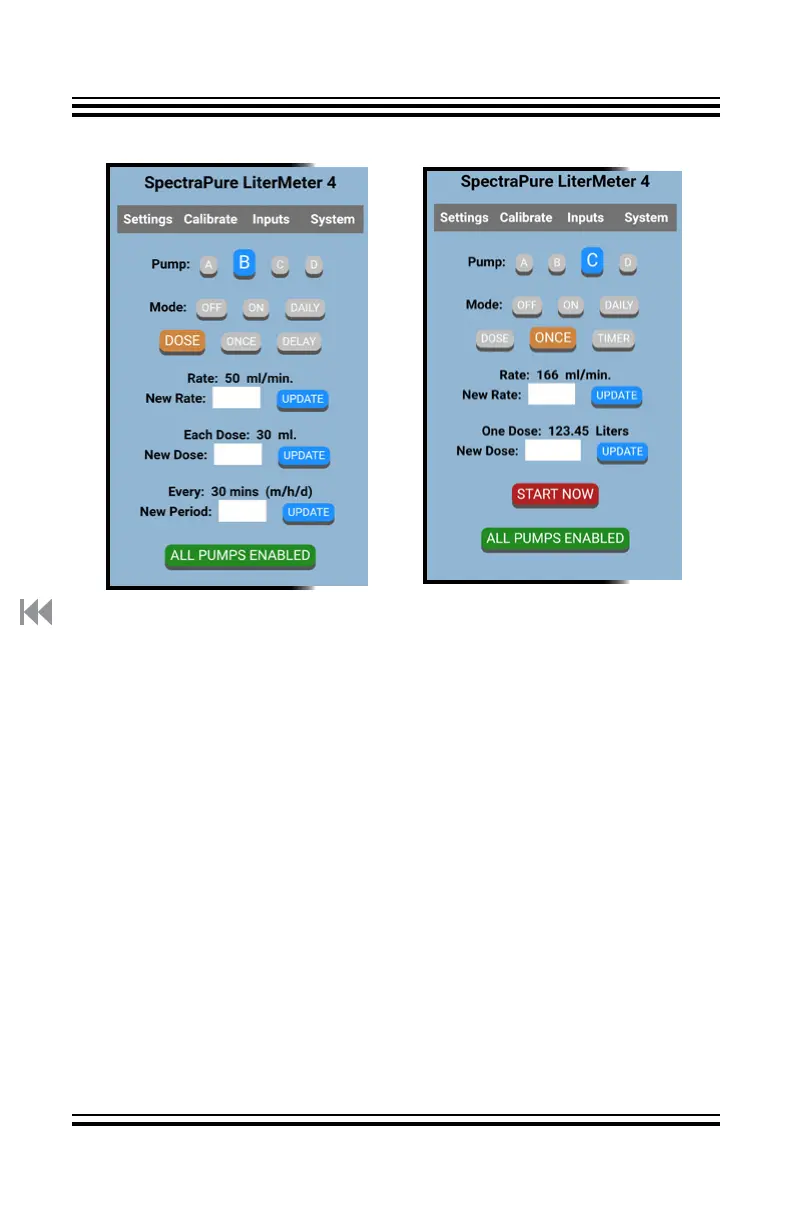
Settings Page:
Pump C in ONCE Mode
Touch the white data entry
box next to “New Rate:”.
Using the keypad that appears,
enter the new Flow Rate. Tap
“Update” to store the Flow
Rate.
As above, enter the desired
“New Dose:” to be delivered.
The dose will be delivered
when “START NOW” is tapped.
Settings Page:
Pump B in DOSE Mode
Touch the white data entry box
next to “New Rate:”.
Using the keypad that appears,
enter the new Flow Rate. Tap
“Update” to store the Flow Rate.
As before, enter the desired
“New Dose:” to be delivered.
Enter a numeric value, followed
by an “m” (minutes - at least 2),
an “h” (hours), or a “d” (days - up
to 28) for “New Period:”.
The LM4 will “round up” to a
preset value for “New Period:”.
See “PreSet Periods and Cycles”



 To Next Page