SpectraPure
®
SpectraPure
®
Inc.
480.894.5437 Call us toll-free 1.800.685.2783
2167 East Fifth St, Tempe, Arizona 85281
39
Quick Start: Pairing the LM4 with Your Phone:
A new LiterMeter4 out-of-the-box will display the following:
(Also, a LM4 that has had its WiFi Credentials Cleared)
Ver:
LM4-2XXXXX
ID:
LM4-XXXX
Using Router,
in Master Mode.
This is the current version of the firmware.
It can be updated.
See “System Page:Firmware Update”.
This is the ID number for the LM4.
It will be a unique 4-digit number, not XXXX.
You will see it again below.
Status of Router/No Router Mode.
Status of Master/Remote Mode.
You now have 6 minutes to:
1. Open WiFi Settings on your phone.
2. Select the LM4-XXXX from the menu.
3. If a password is requested, it is the same ---
“LM4-XXXX”.
4. Open any browser to URL: 192.168.4.1.
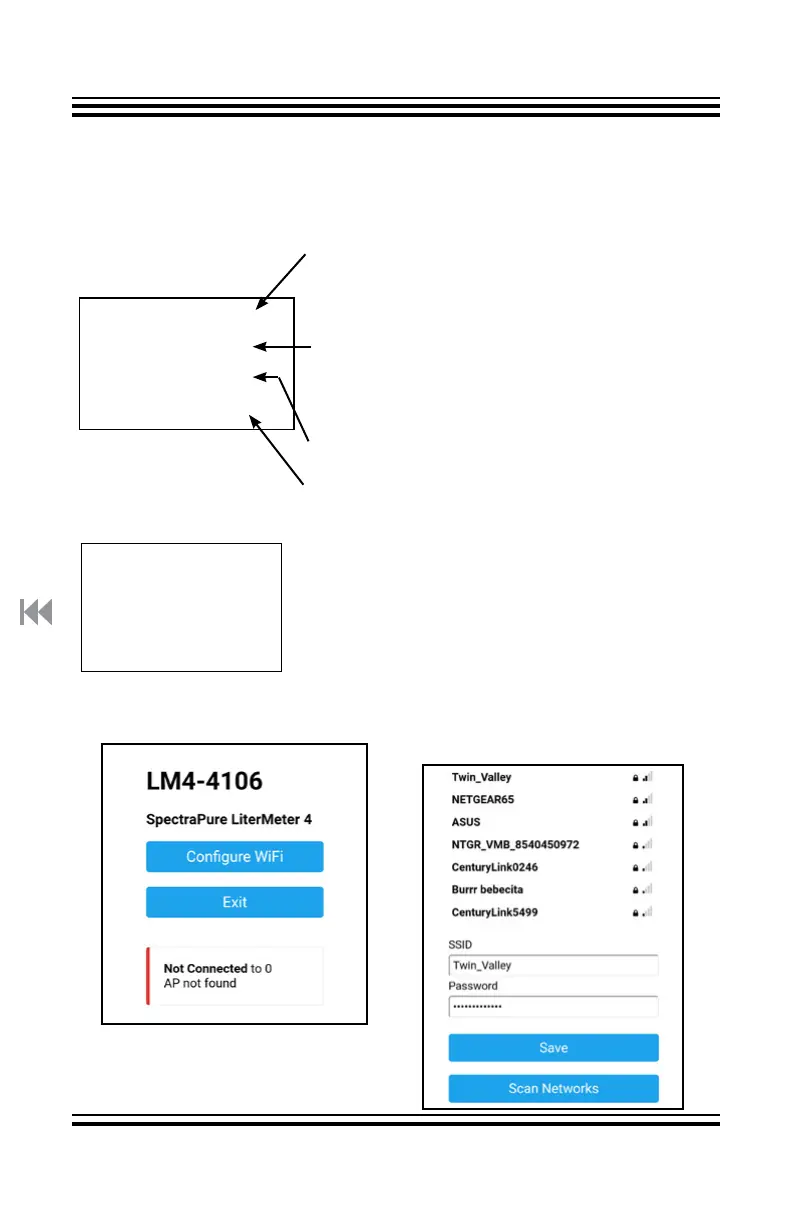
5. You should see the Configure page below:
Network SSID:
LM4-XXXX &
Browser URL:
192.168.4.1
6. Tap on “Configure WiFi”
7. If you do not see your local
router, tap “Scan Networks”.



 To Next Page