SpectraPure
®
SpectraPure
®
Inc.
480.894.5437 Call us toll-free 1.800.685.2783
2167 East Fifth St, Tempe, Arizona 85281
20
Calibrate Page:
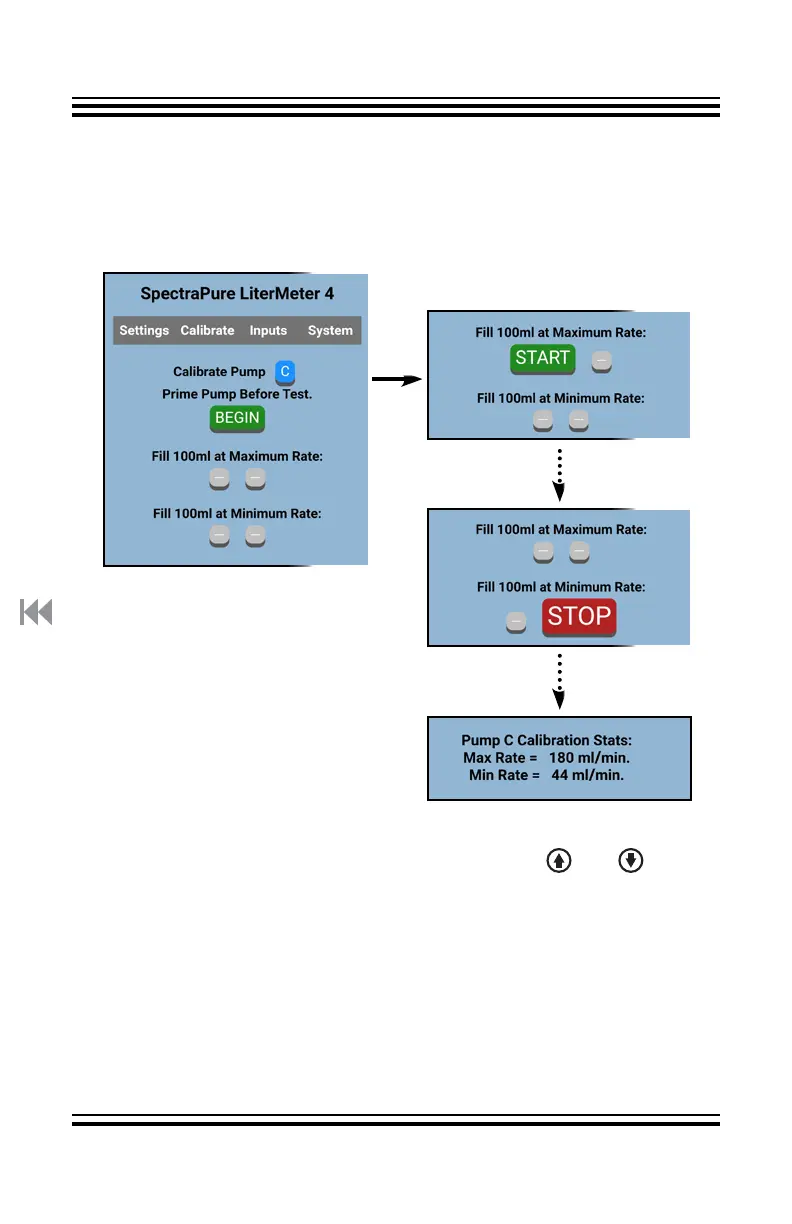
Tap “Begin” to Initialize.
When ready, tap “Start” under
“Fill 100 ml at Maximum Rate:”
Continue Calibrate Sequence:
Stop Max Fill
Start Min Fill
Stop Min Fill
Verify Cal Stats
Return to “Begin”
Calibrate Page on a PD:
“Calibrate” will prepare the “Current Pump” for calibration. See
“Calibrate Page on the LM4” for more details. You can have All
Pumps Off and still perform the Calibration when using the PD.
It is possible that a particular pump may not operate at the lowest default
speed used by the Calibrate function. You can use the and buttons
on the LM4 (only, not available on the PD) and only when you see “Stop
100ml? >” while measuring the minimum rate. Adjust the speed UP until
the pump starts to run. There is a 5-second delay between button presses
(time to empty the measuring device).
You may have a pump that can run slower than the default speed. Adjust
the speed DOWN until the pump stops, then UP until it starts to run again.
This “alternate minimum” is reset to factory default if “Clear and Restore to
Factory Settings” is executed.



 To Next Page