SpectraPure
®
SpectraPure
®
Inc.
480.894.5437 Call us toll-free 1.800.685.2783
2167 East Fifth St, Tempe, Arizona 85281
7
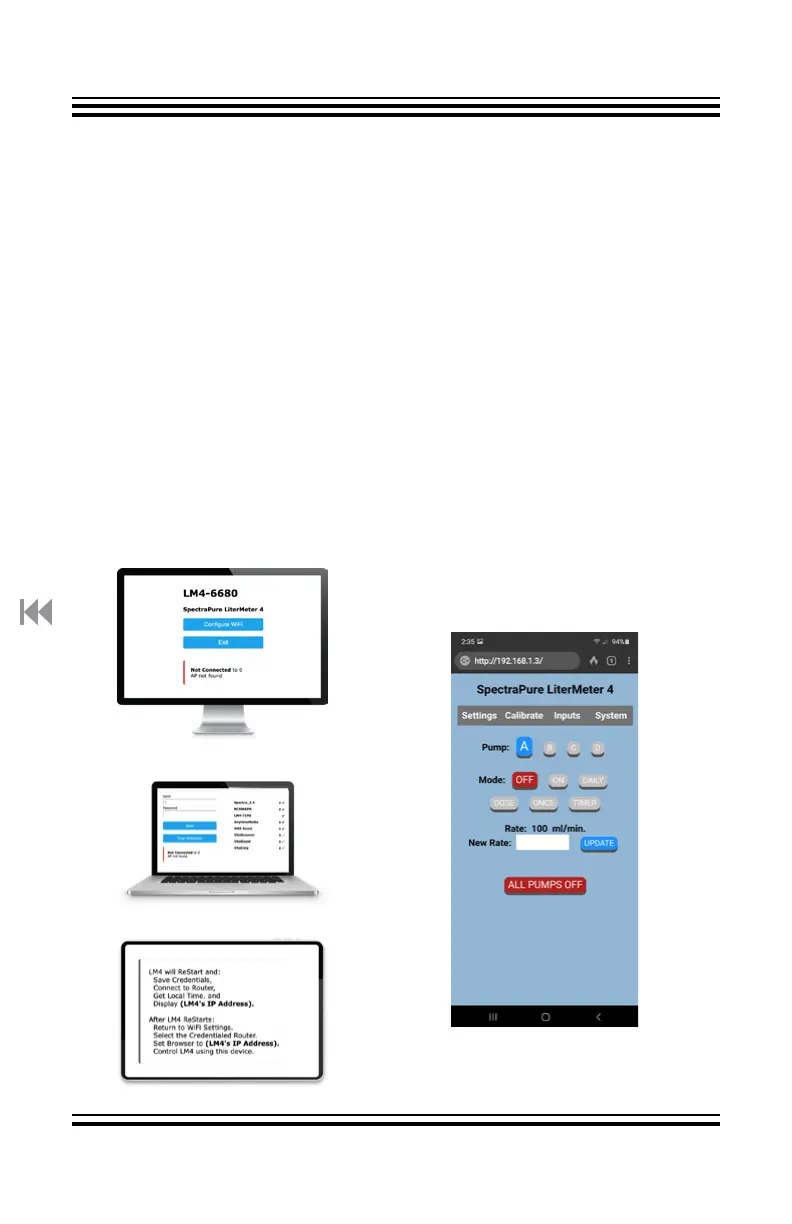
4. The Configure WiFi page should display on your PD’s screen
(see Fig. 1 desktop computer).
5. Click on or tap the blue Configure WiFi button. This will bring up the list
of local networks in your area.
6. From the WiFi network list, select your local router SSID (name) and
enter your WiFi password. (as seen in Fig. 2 laptop)
7. Once you have selected your network and entered your password,
click on or tap the blue Save button to record and Save your router’s
WiFi credentials into the LM4.
8. A confirmation screen will appear on your PD. (see Fig. 3). Important
Note: The router will assign an IP address to the LM4.
9. In WiFi Settings, be sure the local router is now selected. Use the
assigned IP address in your PD’s browser to control the LM4 from your
Personal Device. On the PD, you should now see a screen similar to Fig.
4. For more details on pairing the LM4, see “Quick Start: Pairing the LM4
with Your Phone”.
FIG. 1
FIG. 2
FIG. 3
FIG. 4



 To Next Page