CS4000 Mini Controller with Ethernet
Page
4-10
T-38324-A 39-30-38324
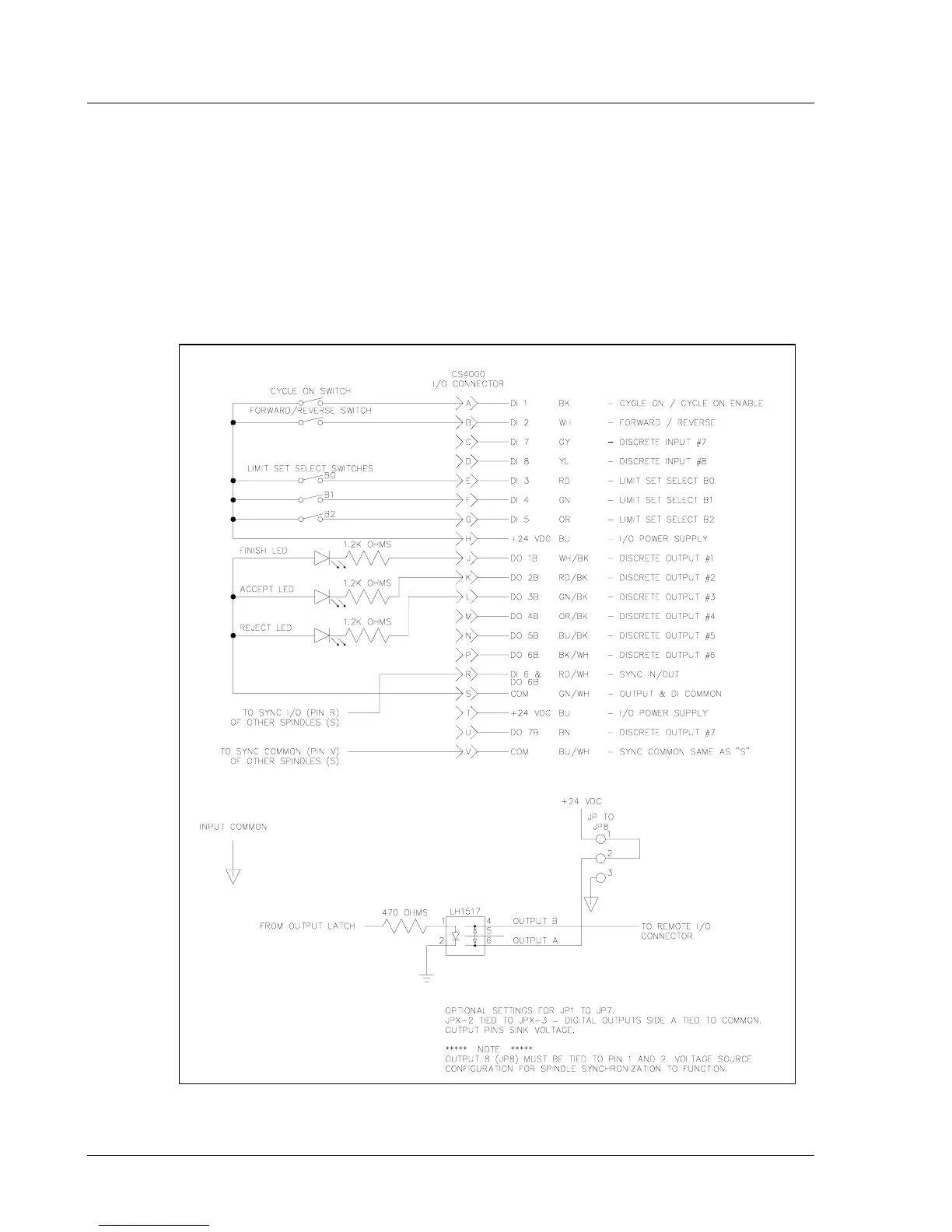
Figure 4-5 is an example of the remote I/O wiring scheme that shows how to change the jumpers for
voltage sink. It shows one of the many ways the remote I/O feature controller can be used. To ensure
that you operate the fastening system properly, refer to the guidelines in Table 4-2 for output
requirements. The locations of jumpers JP1 to JP9 are important, see Figure 3-8 on page 3-11 for the
their locations on the backplane. The jumpers allow you to select between +24V DC applied to an
output or ground applied to an output. To change to voltage sink configuration cut trace from pin 1 to
2 and solder in place a jumper between pins 2 and 3 to take the I/O pin to ground.
NOTE: JP9 ties discrete output 8 to discrete input 6 for spindle
synchronization.
Figure 4-5. Example of CS4000 Controller Remote I/O Wiring −
−−
− Sinking Outputs


 To Next Page