CS4000 Mini Controller with Ethernet
Page
5-6
T-38324-A 39-30-38324
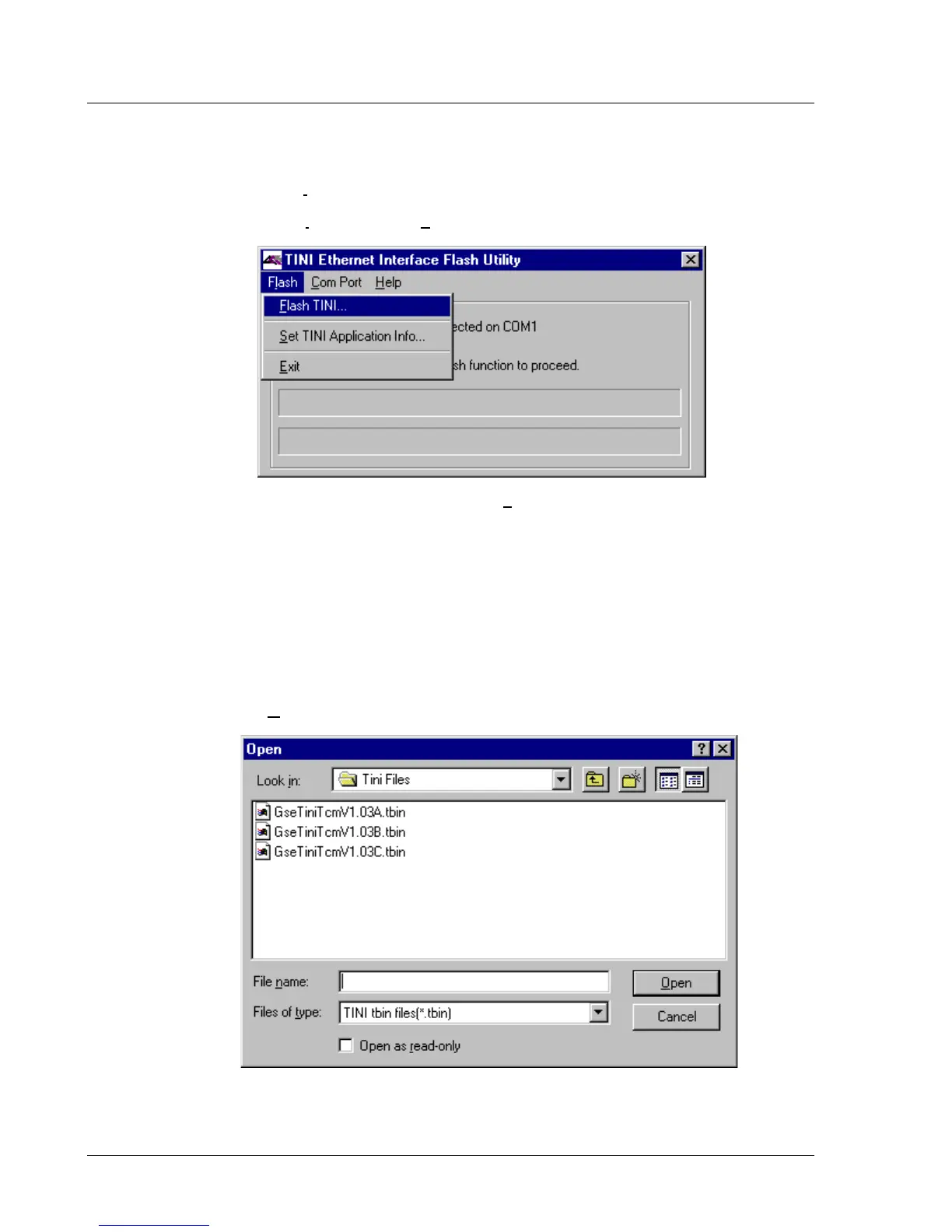
10. Flash the application file to the Ethernet interface card.
a. Click the Flash menu in the TINI Ethernet Interface Utility window.
b. From the Flash menu, click F
lash TINI….
Figure 5-6. Selecting the “Flash TINI…” Option
11. From the list of files displayed to you in the Open window, open the application
file you want to use to flash the Ethernet interface card.
The application file is a binary file that adheres to the following naming convention:
GseTiniTcmV9.99X.tbin, where ‘9.99X’ represents the version number of the application.
For example, GseTiniTcmV1.03C.tbin is the binary file for version 1.03C of the
application.
a. Click on the application file displayed in the Open window. See Figure 5-7.
b. Click Open.
Figure 5-7. Selecting the Application File



 To Next Page