OPENING AND CLOSING
3-5
0
1
2
3
4
5
6
7
8
9
10
11
12
13
14
15
16
Time Lag of Window Operation
The power window can be operated for 30
seconds even after the ignition key is turned
to another position from the “ON” position.
However, the function immediately stops
when one of the front doors is opened.
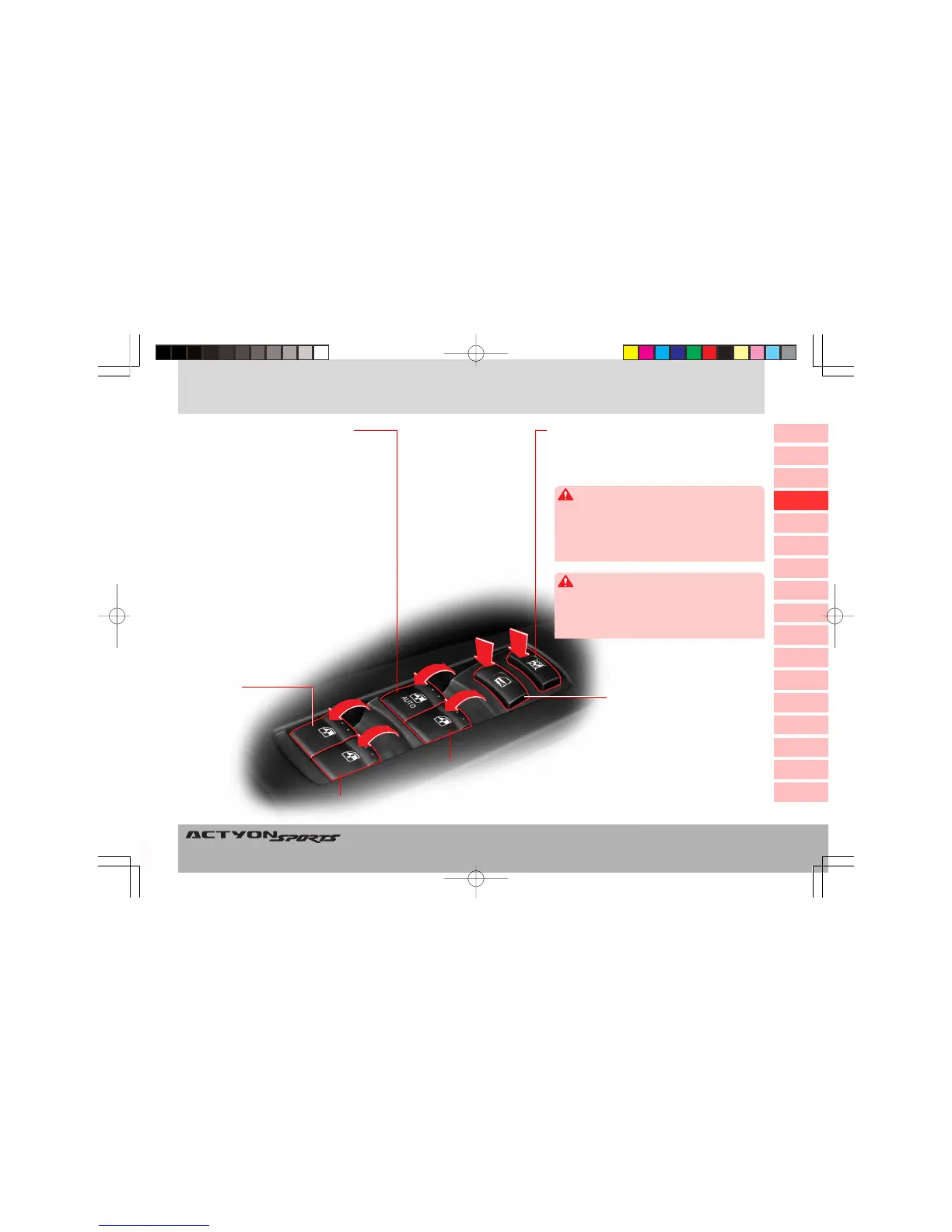
Passenger’s Door
Window Switch
Rear Left
Window Switch
Rear Right Window Switch
Central Door Lock/
Unlock Switch
WINDOWS
Driver’s Door Window Switch
• When the front of the switch is lightly
pressed, the window will be lowered while
the switch is pressed.
• When pressed to its end, the window will
open automatically until it is fully open. If
you want to stop the window while auto-
matic lowering, lightly press the switch
again or pull the switch up.
XX
XX
X When closing the window
• When you lightly pull the switch up, the
window will move up only while the switch
is being operated.
• When pulling the switch up to its end,
the window will be fully closed (auto-up
operation*). If you want to stop the auto-
up function, pull up or gently press the
switch again.
Window Lock Switch
If the window lock switch is pressed down,
passenger’s and rear windows cannot be oper-
ated by their switches.
When closing the passenger’s and rear windows
from driver’s seat, be aware of safety conditions
before operation. Parts of the body can be trapped
by the window.
CAUTION
When carrying children in the rear seat, press the
window lock switch to make the rear window
switches inoperative. Do not allow children to play
with the power window switch and rear door
window switches.
WARNING
Q100-03-Opening and Closing.p65 2006-10-02, ¿ÀÈÄ 3:06Page 5 Adobe PageMaker 6.5K/Win









 To Next Page