INSTRUMENT CLUSTER
5-5
0
1
2
3
4
5
6
7
8
9
10
11
12
13
14
15
16
Trip A
Trip B
DISPLAY
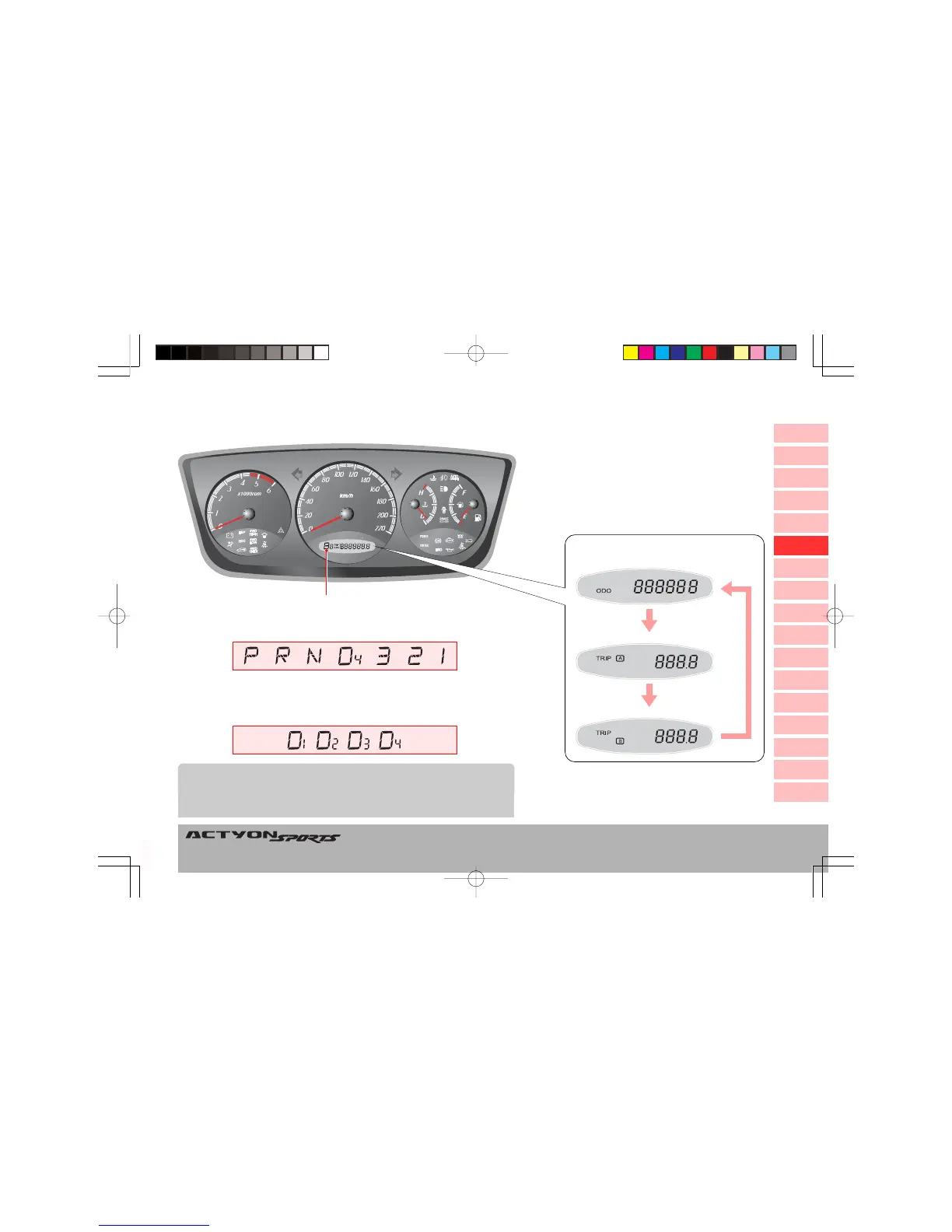
Odometer and Trip Odometer
Display
Each time the TRIP/RESET switch on the
center panel is pressed lightly, the indica-
tors are changed. To reset the trip meter,
press and hold the switch.
Total driving
distance
Unit: 0.0~999.9 km
Unit: 0.0~999.9 km
Unit: 0~999999 km
Auto Shift Indicator (for automatic transmission)
This indicator shows the automatic transmission selector lever position
as below.
* If the meter cluster with “mile” unit is
installed, trip/odo distance is displayed
in “mile”.
Gear Shifting
When the shift lever is engaged in the “D” position, the actual gear num-
ber is displayed in a small font next to the “D” letter.
When a lower gear is needed to secure stabilized driving conditions, some-
times the “D
3
” can directly be shifted into the “D
1
” position, without lowering
into the “D
2
” position.
NOTE
Q100-05-Instrument Panel.p65 2006-10-02, ¿ÀÈÄ 3:06Page 5 Adobe PageMaker 6.5K/Win






 To Next Page