37
_________________________________________________________________________________
OmniaTap xs
basic
; Version August 2023
Subject to technical changes
14.3 Disinfection
To protect the OmniaTap xs system from contamination from biological deposits, disinfection should
be carried out at regular intervals (12 months). For the implementation you need the disinfection kit
article no.: 19200091.
Risk of chemical burns!
The disinfection of the OmniaTap xs system may only be carried out by
appropriately qualified specialist personnel.
Protect yourself from injury by using appropriate safety clothing (at least gloves
and goggles).
It is essential that you observe the safety data sheet enclosed with the
disinfectant and follow the instructions for handling the disinfectant exactly.
Only use the disinfectant approved for the OmniaTap xs system.
The procedure for disinfection is described below. The duration of the disinfection process is about 30
minutes.
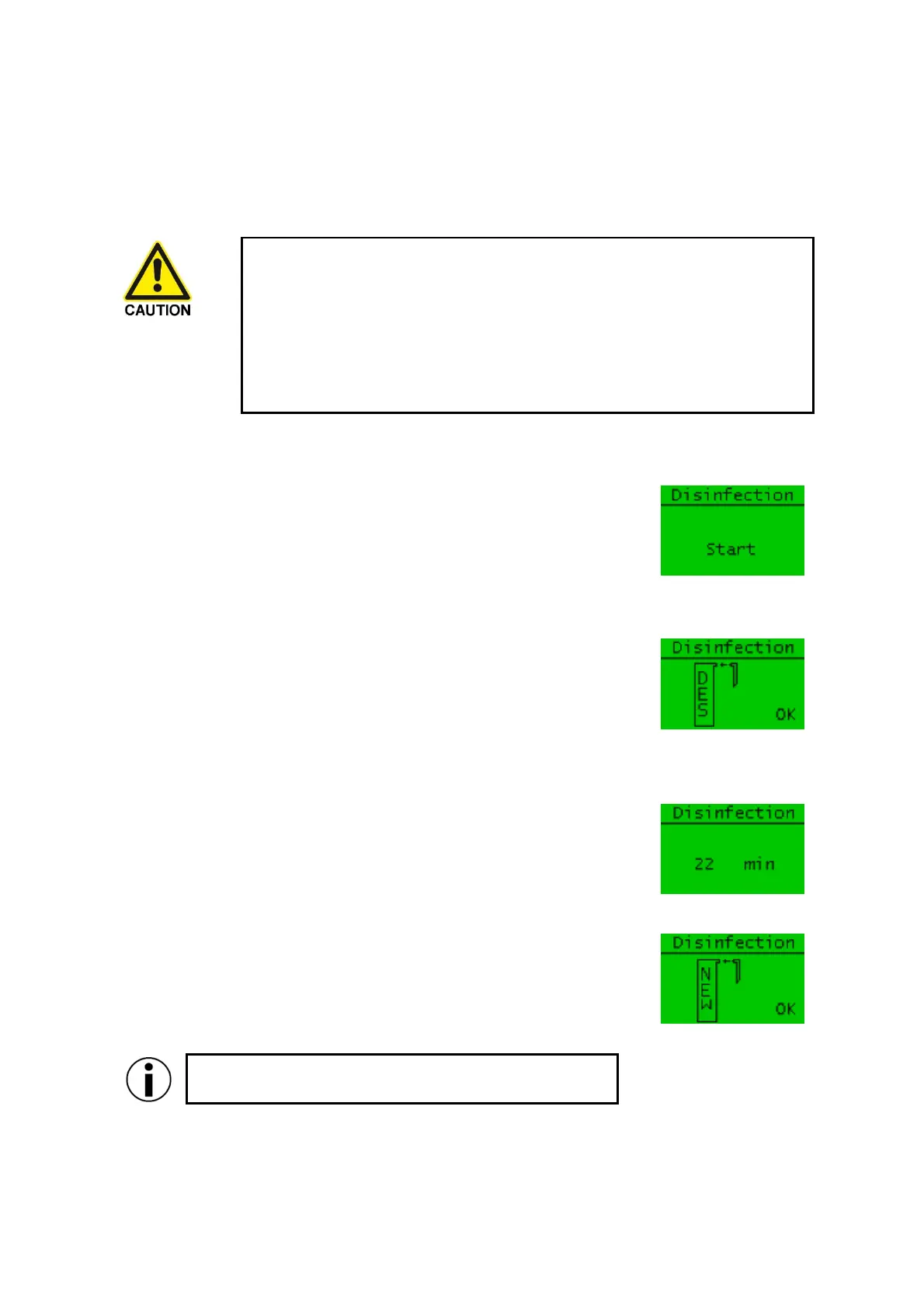
Open the "Disinfection" menu item in the "System" menu. Press the
Enter button to start the disinfection process.
You will now be prompted to insert the disinfection cartridge into the
device. If you want to cancel the process, you can do so by pressing the
Menu/Esc key. To proceed, first prepare the disinfection cartridge with
the disinfectant according to the instructions included with the
disinfection kit. Then remove the ultrapure water cartridge from the
system as described in the “14.2 Changing the cartridges" chapter. Insert
the disinfection cartridge in the ultrapure water cartridge location and
connect it with the quick-release fasteners. Confirm the insertion of the
disinfection cartridge by pressing the Enter key.
In the next step, the system starts circulating the disinfectant solution.
After the end of the circulation phase, the system is flushed
automatically. The remaining time is shown on the display, and the entire
process takes 30 minutes. This process cannot be cancelled and must be
completed.
After the disinfection is complete, you will be prompted to insert a new
ultrapure water cartridge. To replace the cartridges, proceed as
described in the “14.2 Changing the cartridges" chapter and end the
process by pressing the Enter key. The system now automatically
switches to the "Rinse" menu item.
Remember to flush the system with the new cartridge (see
14.2 step 9).


 To Next Page