Using the Monitor
M200 Fall Monitor – Setup & User Guide 23
Using the Monitor
Once connected to the pad, and with no patient/resident on the pad,
the monitor is ready for a patient/resident to get on the pad.
When a patient/resident has been detected on the pad, the Reset
Button flashes green for 3 seconds before arming, allowing time for
the patient/resident to shift around slightly until a comfortable position
is achieved. The arming is indicated by a Positive Confirmation Tone.
Any exit from the pad during the first 3 second flash period cancels the
arming process.
After arming, the monitor sounds a Pad alarm on a pad exit.
Note: The Floor Pad has no arming stage and alarms immediately upon
weight being applied.
Hold Mode (30 Seconds)
Hold Mode is used to allow the caregiver 30 seconds to remove a
patient/resident from a monitored pad without triggering an alarm.
If the patient/resident’s weight is applied to the pad (3 seconds of
constant weight pressure on the pad) while in Hold mode, normal
monitoring resumes. A positive tone is heard and the amber blinking stops.
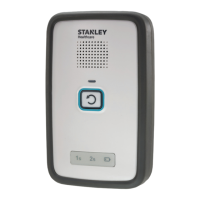
1. While the patient/resident is being monitored on the pad, press
and hold the Reset Button on the monitor for 2 seconds*. An
audible indication “Hold mode 30 seconds” is announced.
2. A 30 second timer is set. The patient/resident can now be
removed from the pad without triggering an alarm.
3. The Reset Button flashes amber once per second for 30 seconds.
When Hold mode is over, an audible positive indication is
announced.
4. To move out of Hold mode before the 30 seconds has passed,
press and hold the Reset Button for 2 seconds, or return the
patient/resident to the pad. The Reset Button stops blinking,
followed by a Positive Confirmation Tone. If there is weight
applied to the pad - the monitor will arm.
5. When the timer runs out, the monitor resumes normal operation.
* If you press for 2 seconds, and Suspend mode has been enabled,
a Positive Confirmation Tone is heard instead of the voice
announcement. If you continue to press for an additional 2 seconds,
the Monitor moves into Suspend mode with an audible indication
“Suspend Mode, 2 minutes.”


 To Next Page