Batteries
M200 Fall Monitor – Setup & User Guide 25
Batteries
• Batteries only: 90 days expected battery life with normal use.
• Power Supply with batteries: It is recommended to replace the
backup batteries once every 2 years. If the monitor’s Low Battery
Icon is lit, change the batteries immediately.
• It is suggested that you remove the batteries if the monitor will not
be used for an extended length of time.
• It is important to replace all the batteries together when you are
replacing the batteries. The Low Battery icon LED flashes yellow
(with a Negative Confirmation Tone) when the monitor batteries
are low (approximately within 7 days of depletion). The Low
Battery icon stays lit when using a power supply.
Replacing Monitor Batteries
Removing Batteries
1. Loosen the battery cover screw, and lift the cover.
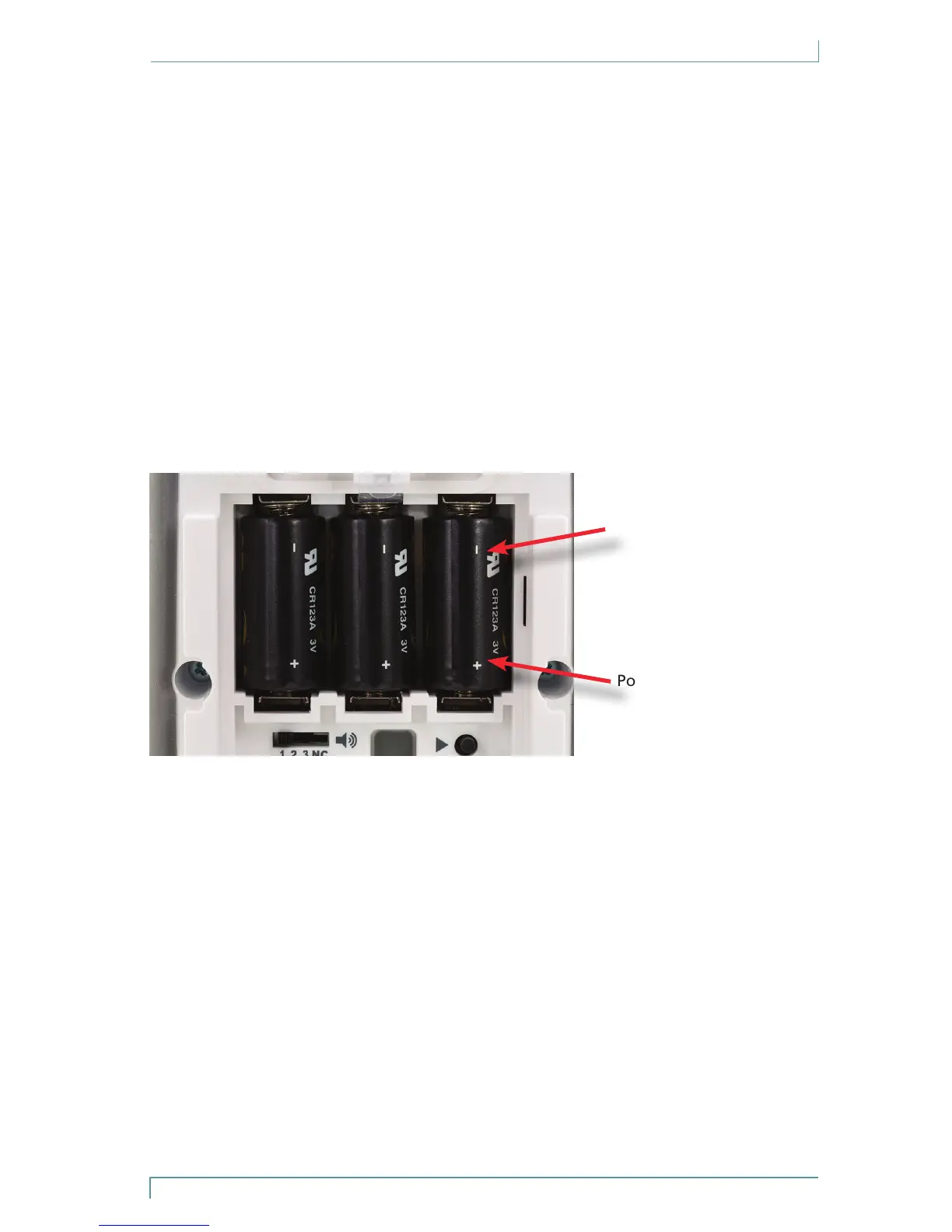
2. Remove the batteries, ensuring that you remove the positive (+)
end of each battery first.
Note: Dispose of used batteries according to your local environmental
laws and guidelines.
Inserting Batteries
1. Insert the batteries into the battery compartment, by pressing
the negative (-) end of each battery against the corresponding
spring, then sliding the positive (+) end into the contact.
The monitor immediately performs a self-test. The LED flashes
green and the speaker sounds a Positive Confirmation Tone.
2. Close the battery cover, and tighten the cover screw.
Negative (-)
Positive (+)



 To Next Page