63
MENU 5 5. —&
5. - Infrared function o
and on
5. 1
Enabling and disa-
bling the safety input for
photocells and light curta-
ins and activation of the
Auto Close function.
5.-
5.0
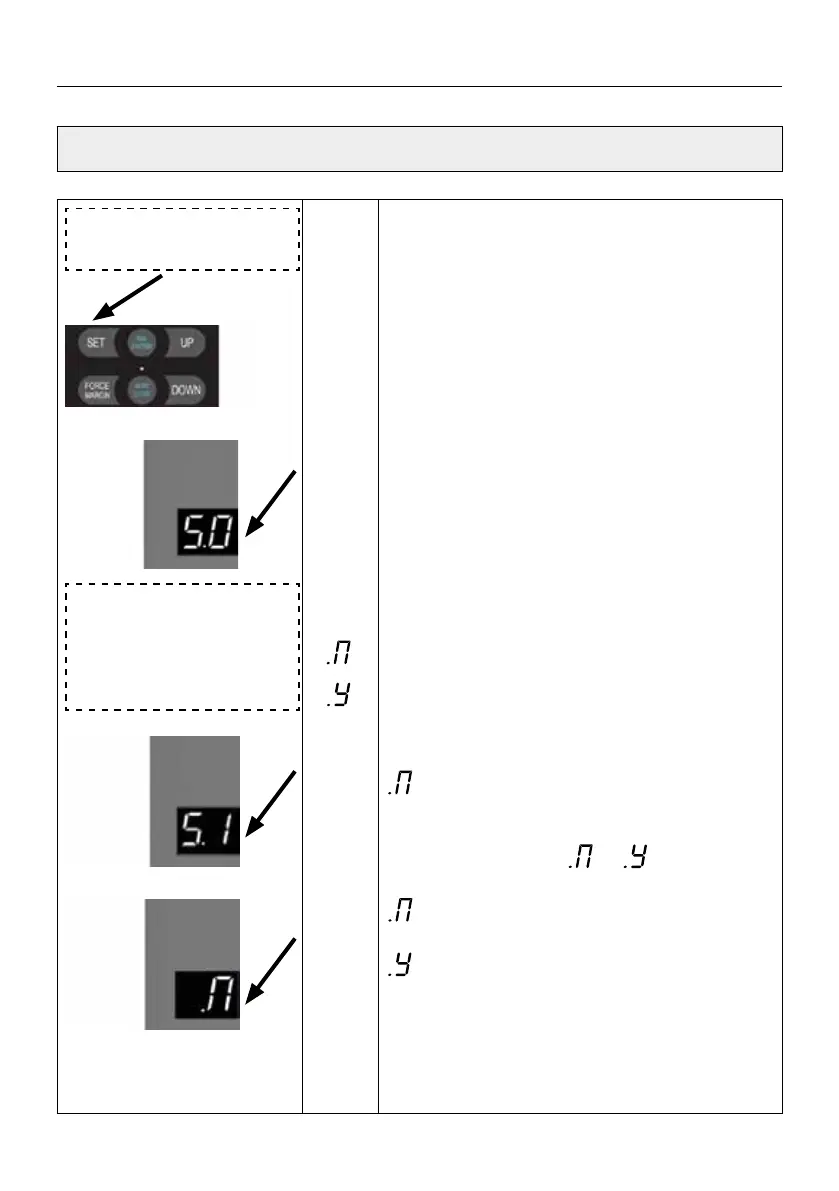
Press and hold SET button for about 6 seconds
to enter main menu until “0.-” appears on the
display then release the button.
Press UP till “5.-” appears on the display.
Press SET into the Infrared Beam
&
Light Curtain
function
Press SET to enter, the digital displays
5.0
(
default).
Adjust the stalls from5.0 to 5.1 5.2
by
buttons UP/DOWN.
5.0
means: The infrared interface function is
disabled.
5.1 means: The infrared function interface is
enabled.
5.2 means: The built-in infrared beam identi-
cation function (Built-in light curtain identi-
cation function) is enabled.
Select 5.0 function, (default) Press SET
to save and exit the function menu.
Select 5.1 function which means the infrared
beam function is enabled. Then after pressing the
SET button to save setting, the digital displays
immediately after this operation, which
means entering the coordination setting of inf-
rared function and Auto-close function.
Adjust the stalls from to by buttons +/-.
means: The infrared function is not related
to the AUTO CLOSE function.
means: The AUTO CLOSE function must be
enabled after the infrared function is turned on.
After selecting, press SET to save the setting
and exit the function setting.
SETTINGS OF FUNCTION PARAMETERS IN MENU



 To Next Page
 Loading...