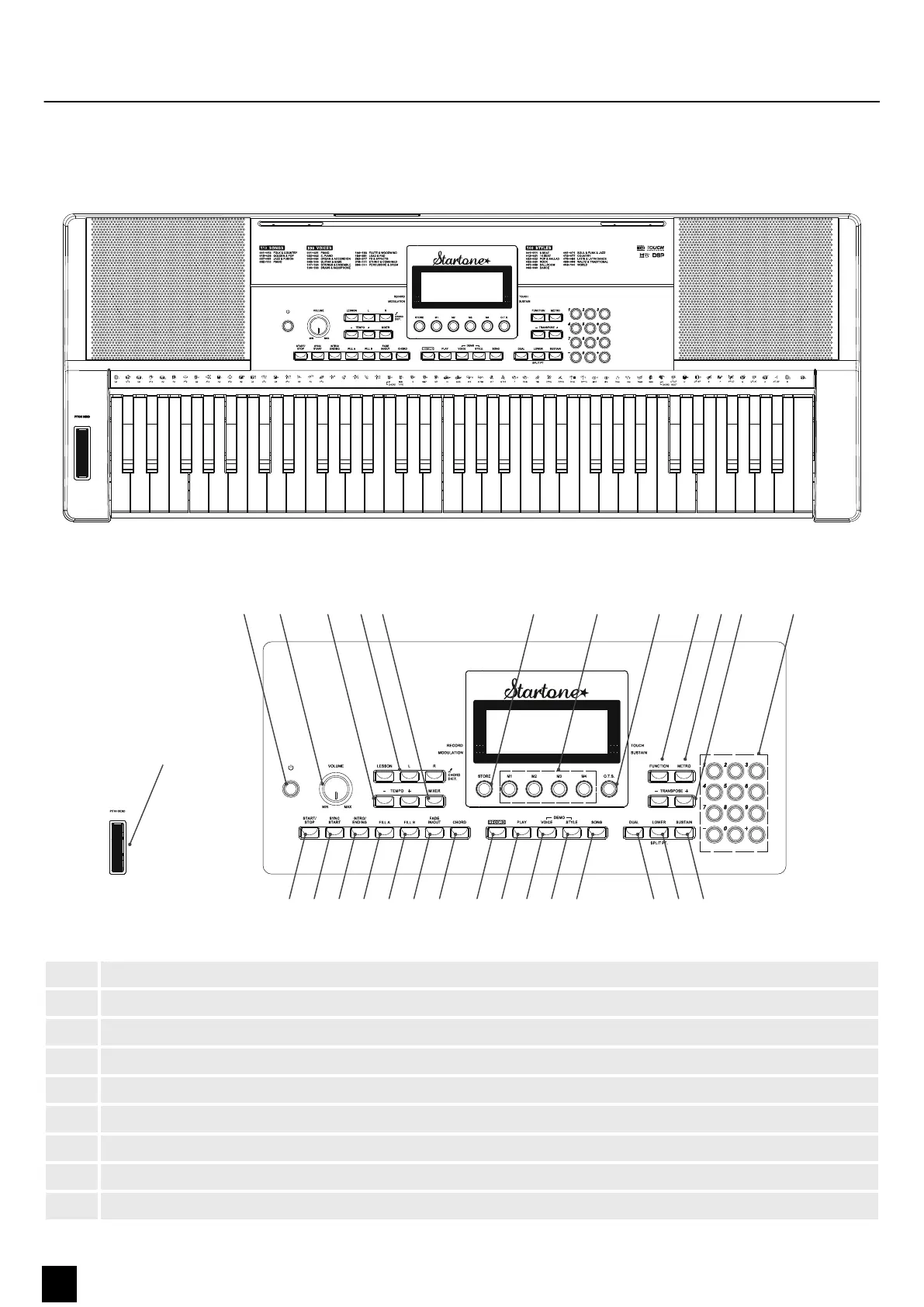
5 Control panel and connections
ä ( ) * + -, . / 0 1 2 9 : ;
ö # $ %& 3 4 5 6 7 <8
=
1 Button for turning the keyboard on and o.
2 [VOLUME] rotary control for setting the volume.
3 [TEMPO +]/[TEMPO –] buttons for increasing / decreasing the tempo.
4 [CHORD DICT./LESSON] buttons for activating learning mode and calling up the chord directory.
5 [MIXER] button for adjusting the volume of each component.
6 [START/STOP] button for playing practise songs in [SONG] mode and for starting and stopping styles in [STYLE] mode.
7 [SYNC START] button for enabling and disabling synchronous start for the auto accompaniment.
8 [INTRO/ENDING] button for selecting an intro or ending.
9 [FILL A] button for selecting Fill A/Main A.
Overview
Control panel
Control panel and connections
12
MK-300
Keyboard


 To Next Page