7 Switching on and o and basic operation
7.1 Switching on the keyboard
7.1.1 Switching on and o normally
Press the power button on the far left of the operating panel to turn the keyboard on
or o.
7.1.2 Automatic shuto
If the keyboard is not used for 30 minutes, it switches o automatically. To turn it on
again, press the on/o switch on the device.
Automatic shuto is activated automatically when the keyboard is switched on.
7.2 Adjusting the volume
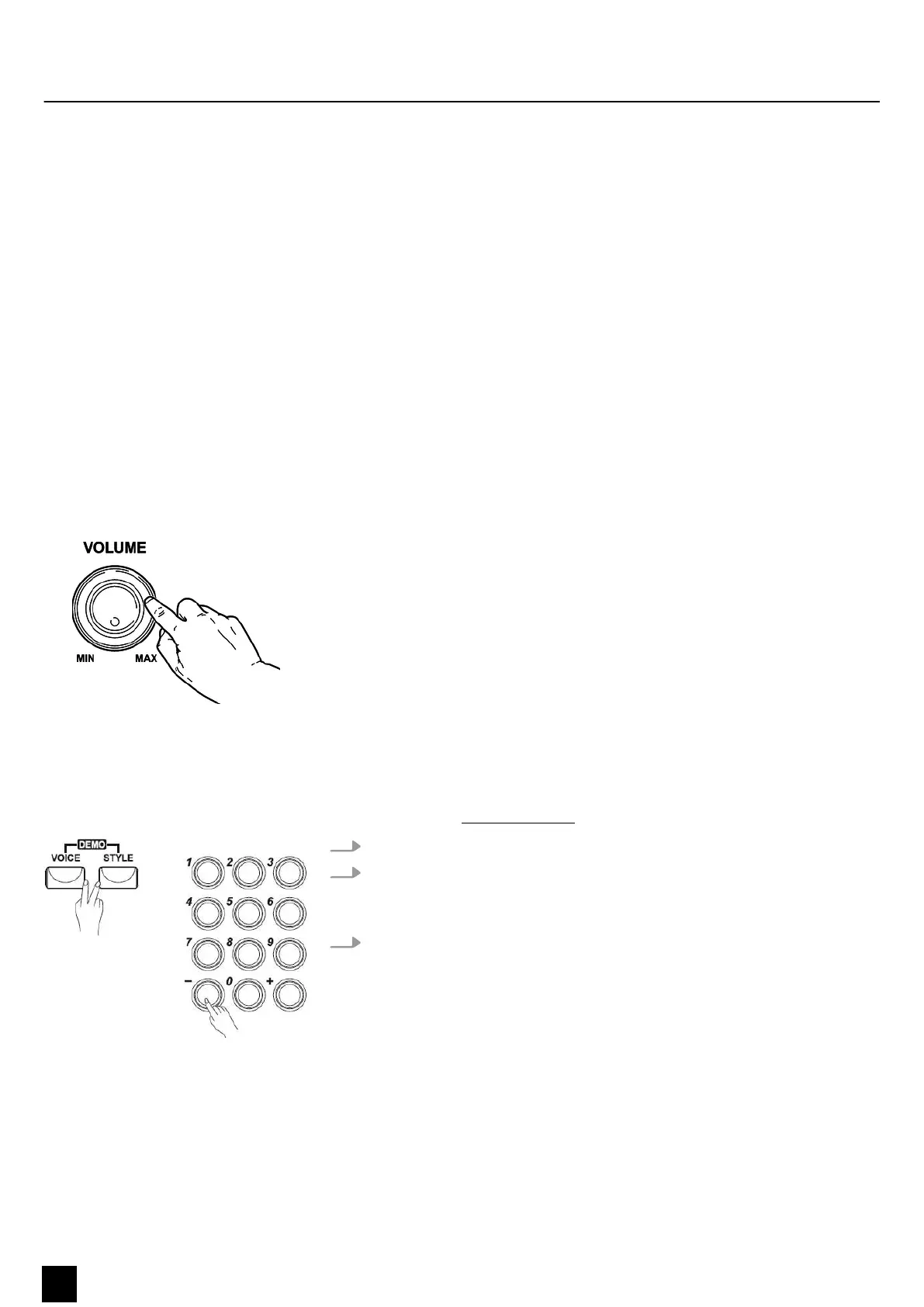
Adjust the [VOLUME] control for a pleasant volume for playback and practising. Turn
the control clockwise to increase the volume. Turn it anti-clockwise to reduce the
volume.
7.3 Demo songs
The eight demo songs integrated in the keyboard demonstrate the sound and the
pitch range of the instrument. The demo list is available for download on the product
page of our website www.thomann.de.
1. Press the [STYLE] and [VOICE] buttons simultaneously to enter DEMO mode.
2. Select a demo song using the number buttons or the [+] and [ –] buttons.
After four beats, the rst demo song starts and all eight demo songs are played
in an endless loop.
3. To stop playback and exit DEMO mode, press the [STYLE] and [VOICE] buttons
again or press the [START/STOP] button.
Switching on and o and basic operation
16
MK-300
Keyboard


 To Next Page