EasyManua.ls Logo

Startone MK-300 - User Manual

Startone MK-300
44 pages
Print Icon
To Next Page IconTo Next Page
Loading...
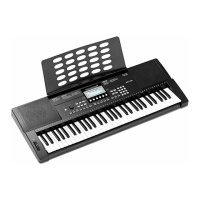
MK-300
Keyboard
User Manual

Questions and Answers

Summary

Safety instructions

Intended use

Defines the proper usage of the device and clarifies liability for damages from misuse.

Assembly instructions

Power supply

Guides users on powering the keyboard using batteries or the included power adapter.

Control panel and connections

Control panel

Details the layout and function of all buttons and controls on the keyboard's front panel.

Connections on the back

Describes the various input and output ports located on the rear panel of the keyboard.

Connection options

Switching on and off and basic operation

Switching on the keyboard

Provides step-by-step instructions for powering the keyboard on and off.

Adjusting the volume

Describes how to use the volume control knob to set the desired sound level.

Functions

Using the sustain pedal

Explains how to connect and use a sustain pedal to extend the duration of notes.

Selecting voices

Guide on browsing and choosing from the 390 instrument voices available on the keyboard.

Starting auto accompaniment (rhythm track only)

Steps to initiate the rhythm track for auto accompaniment without full band features.

Starting auto accompaniment (all tracks)

How to activate full auto accompaniment with chord recognition and sync start.

Chord recognition and fingering techniques

Explains how chords are recognized and played for auto accompaniment.

Chord detection modes

Setting chord recognition for single-finger and multi-finger playing styles.

Function menu

Guide to accessing and navigating the menu for various keyboard settings and parameters.

MIDI channels

Configuring MIDI channels for receiving and sending musical data.

Saving;loading parameters

Detailed steps for storing and retrieving custom keyboard settings.

USB connection

Step-by-step guide for connecting the keyboard to a computer via USB.

Troubleshooting

Addresses common issues and provides solutions for the keyboard.

USB precautions

Essential safety guidelines to prevent data loss and system crashes during USB use.

Startone MK-300 Specifications

General IconGeneral
BrandStartone
ModelMK-300
CategoryMusical Instrument
LanguageEnglish