ö # $% & ä ( ) * , -+
/ .12 0
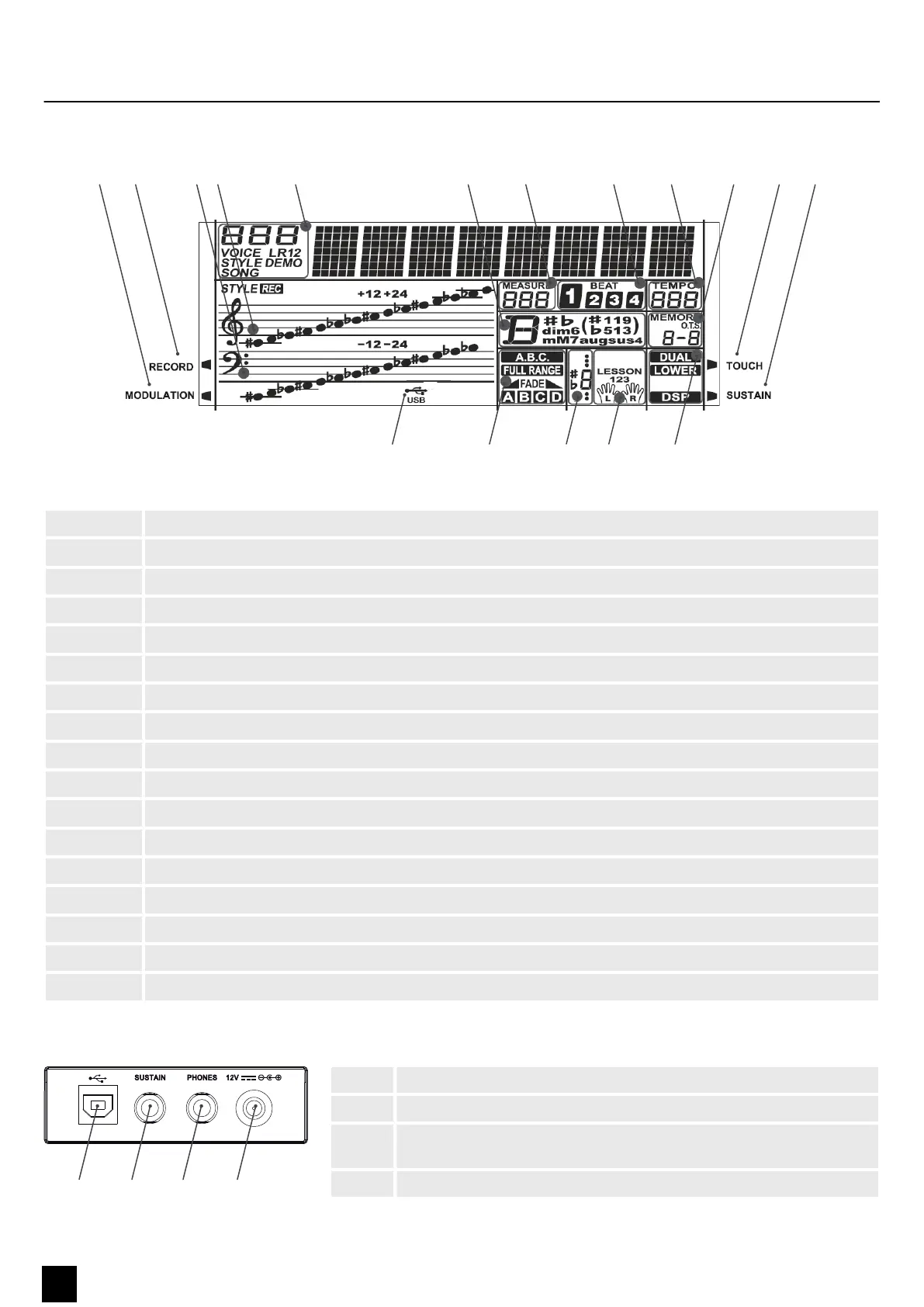
1 [MODULATION] LED lights up during modulation.
2 [RECORD] LED lights up during a recording.
3 Bass clef
4 Treble clef
5 ‘VOICE/STYLE/DEMO/SONG’ | Displays the number of the voice/style/demo/song
6 ‘CHORD’ | Displays the chord
7 ‘MEASURE’ | Displays the time signature
8 ‘BEAT’ | Displays the beats in the bar
9 ‘TEMPO’ | Displays the tempo
10 ‘MEMORY1/2/3/4 / O.T.S.’ | Display for memory slots 1 to 4 and O.T.S.
11 [TOUCH] LED lights up when velocity sensibility is being adjusted
12 [SUSTAIN] LED lights up if a sustain pedal is connected.
13 ‘DUAL/LOWER/DSP’ | Display for dual mode, left hand assignment and DSP
14 ‘LESSON 123 / L/R’ | Learning mode display for left and right hand
15 Note display
16 ‘A.B.C. / FADE / A/B’ | Display of automatic bass accompaniment / fade / A/B
17 ‘USB’ | Lights up if the device is connected to a computer via USB connection
1 [USB] | USB/MIDI interface for connecting a computer
2 [SUSTAIN] | Connection for a sustain pedal
3 [PHONES] | Output for headphones or external audio devices such as
active speakers or ampliers
4 [12 V] | Connection for the power supply
Display
Connections on the back
Control panel and connections
14
MK-300
Keyboard


 To Next Page