5.4.1 Registration
Calling up the Internet portal, entering the language and serial number
1. Enter the following address into the Internet browser (or click the address if you are reading
this document as a PDF on a computer monitor): www.steca.com/portal. Ensure that scripts
and cookies for www.steca.com/portal
are permitted in the browser.
ð
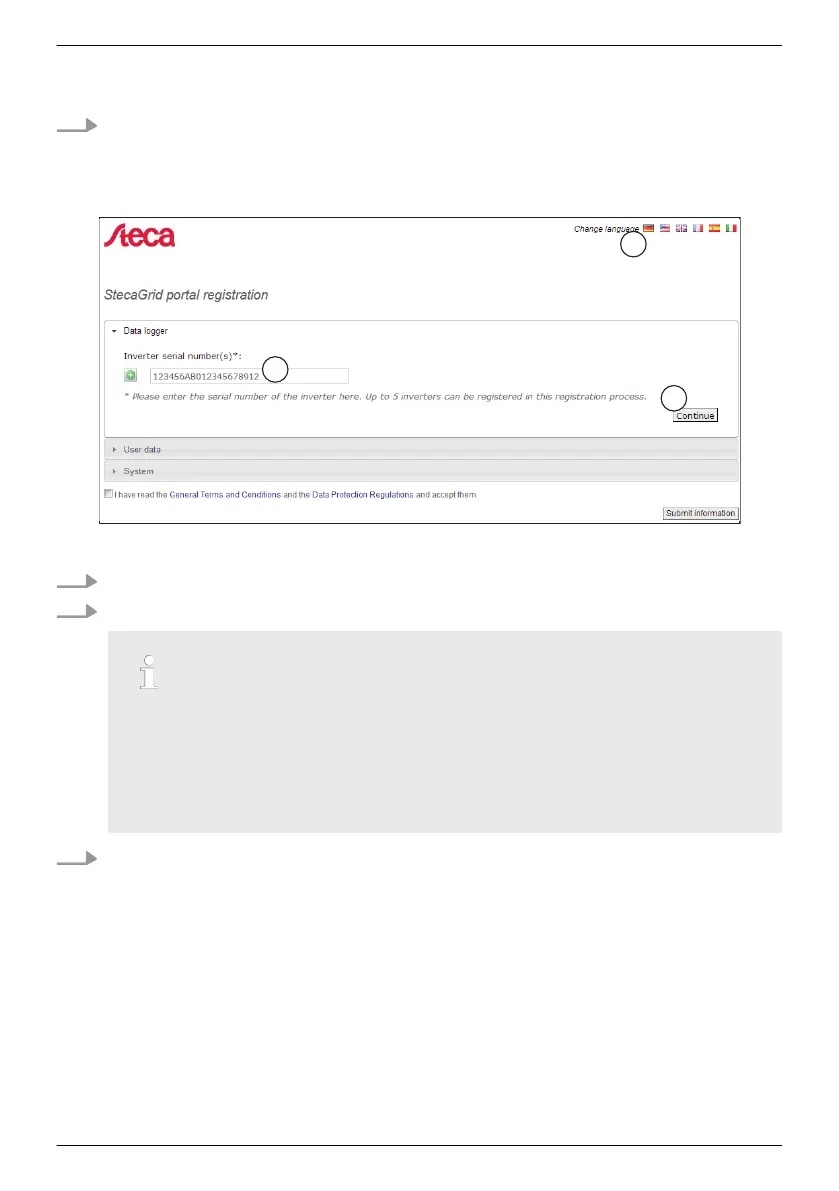
Fig. 14 appears.
Fig. 14: Language selection and data entry form for the serial number
2. Select your language using the buttons ① (in Fig. 14
). The language is set immediately.
3. Enter the serial number of the device into the field ②.
Notice
– The serial number always consists of a sequence with
6 numbers – 2 letters – 12
numbers, e. g. 123456AB123456789012.
– If you enter an invalid serial number, an error message is displayed and the login
process is cancelled.
– Press the green button "+" (at the left next to the field
②
), to enter the serial
numbers of further inverters (a maximum of 5 inverters are possible).
4. After entering the last serial number, press the button ③.
ð
Fig. 15, p.
55 appears.
EN
747,431 | Z09 | 2015-09-30
54










 To Next Page