Using the display
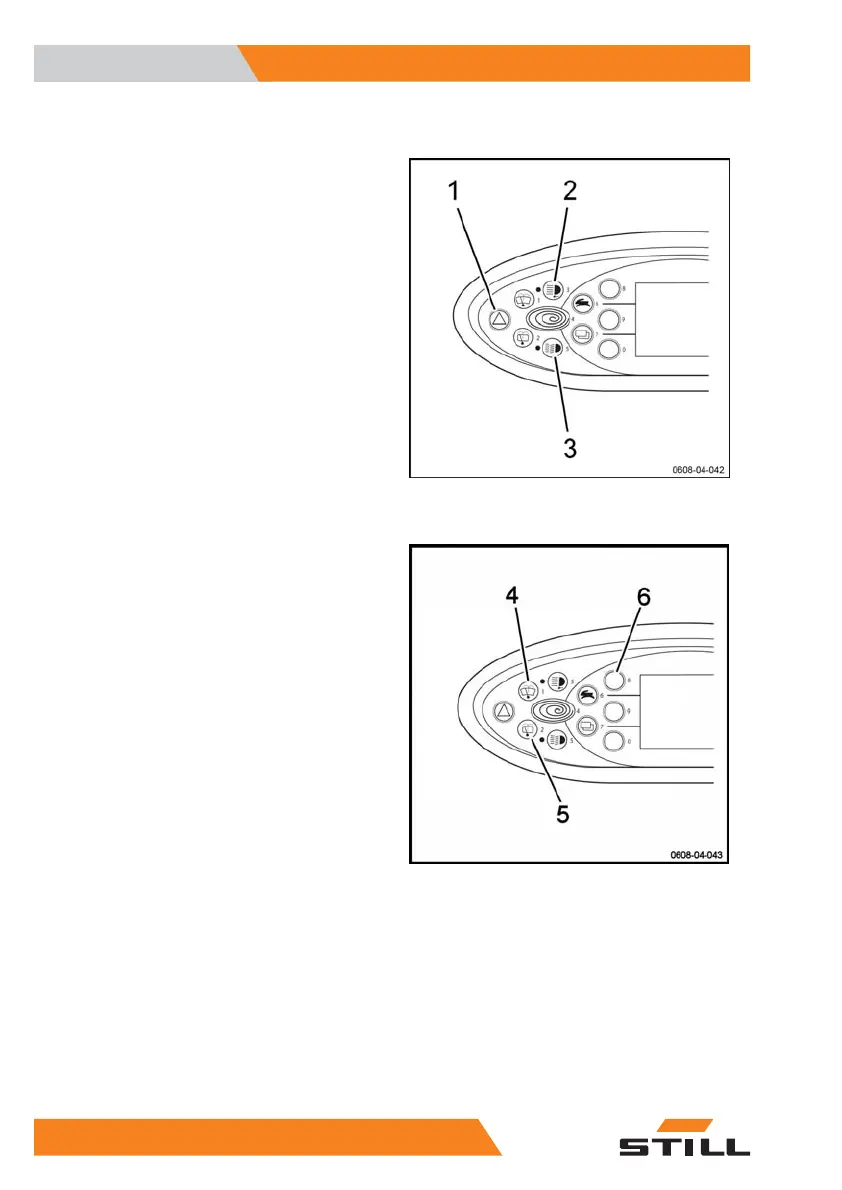
Tow tractor signal buttons
The
Hazard warning light
button (1) allows
you to switch on the hazard warning lights
(Warning) to warn other users of a potential
danger.
The
Work lights
button (2) allows you to
switch on the work lights.
The
Signal lights
button (3) allows you to
switch the side lights or main beam lights on
and off.
Proceed as follows:
– Press once: the side lights switch on.
– Press twice: the dipped beams switch on.
– Press three times: the side lights switch off
and the dipped beams switch off.
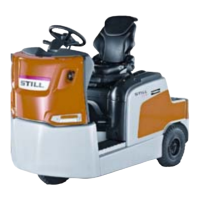
Buttons for the windows of the tow trac-
tor
The
Front windscreen wiper
button (4) allows
you to switch the front windscreen wiper on
and off.
– Press once briefly: the front windscreen
wiper starts.
– Press twice briefly: the front windscreen
wiper stops.
– Press once and hold (over 2 seconds) then
keep the button pressed: the washer func-
tion starts. Operating the button in this way
engages the washer systems for the front
and rear windscreen wipers at the same
time.
The
Rear windscreen wiper
button (5) allows
you to switch the rear windscreen wiper on
and off.
– Press once briefly: the rear windscreen wip-
er starts.
– Press twice briefly: the rear windscreen wip-
er stops.
– Press once and hold (over 2 seconds) then
keep the button pressed: the washer func-
tion starts. Operating the button in this way
Use
4
Display
42 1191 801 15 51 EN - 02/2021 - 10



 To Next Page