14
StingerElectronics.com
SiriusXM
Satelite Radio
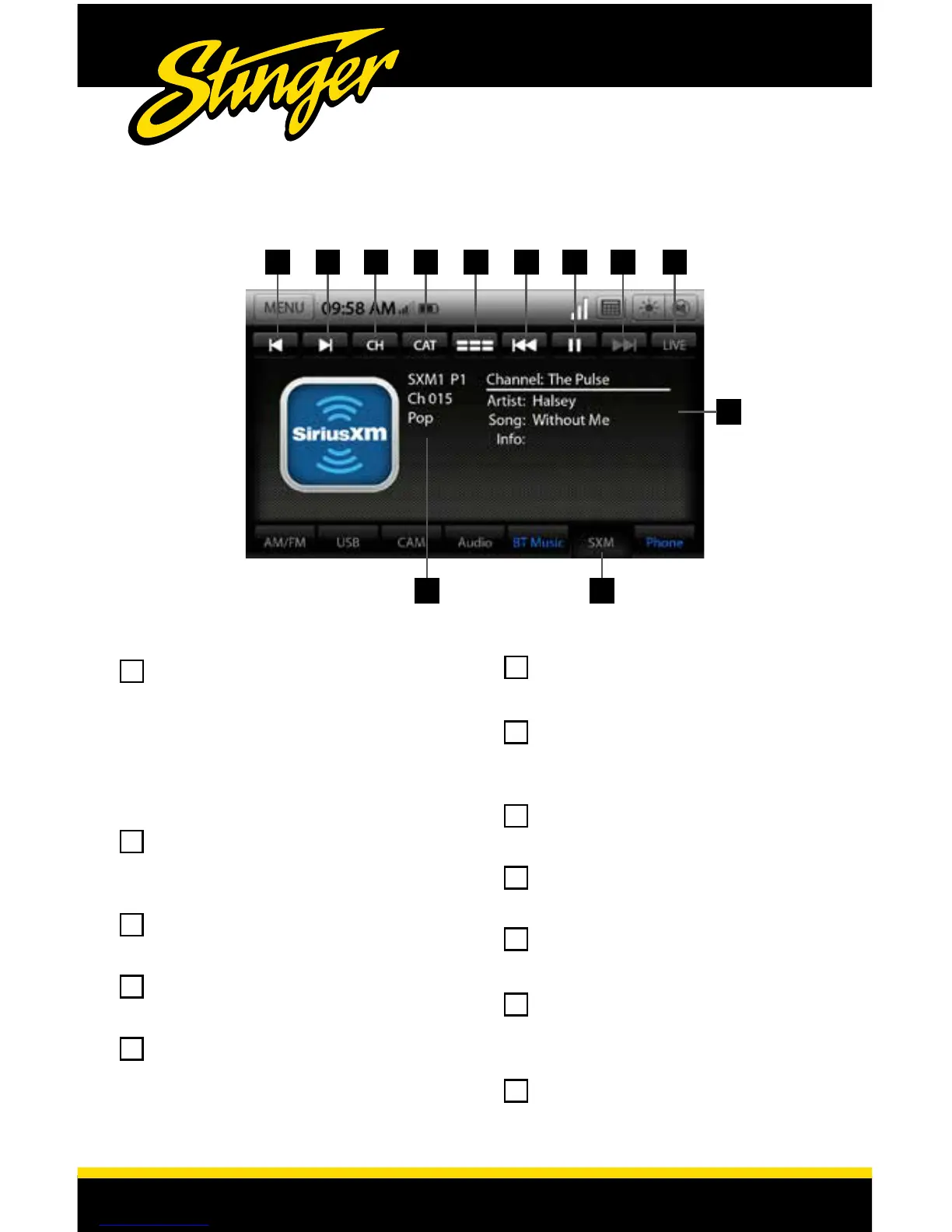
Touch the SXM Tab or press the
HOME BUTTON > SiriusXM to select
the optional SiriusXM Satellite
Radio source. Pressing the SXM
Tab repeatedly will cycle through
the SiriusXM preset banks (SXM1-
SXM2-SXM3).
SXM Info - Displays preset bank
number, channel number and
category.
Channel Down- Touch to go to
previous channel.
Channel Up- Touch to advance
to next channel.
CH - Touch to display a list of
available Channels with channel
information.
CAT - Touch to display a list of
channel Categories.
Preset/Channel View - Toggles
the display between Presets and
Channel/Song View.
Rewind/Track Down - Move
backwards through stored audio
Pause/Play - Pause live
broadcast / Play stored audio
Fast Forward/Track Up- Move
forward through stored audio
LIVE- Select to return to live
broadcast when listening to
stored audio.
Channel/Song Info- Displays
song info and channel name.
12
1
5
2
6
3
7
4
8
10
11
12
9
3 4 7 8 95 6
12
10 11














 To Next Page