27
StingerElectronics.com
AUDIO SETTINGS
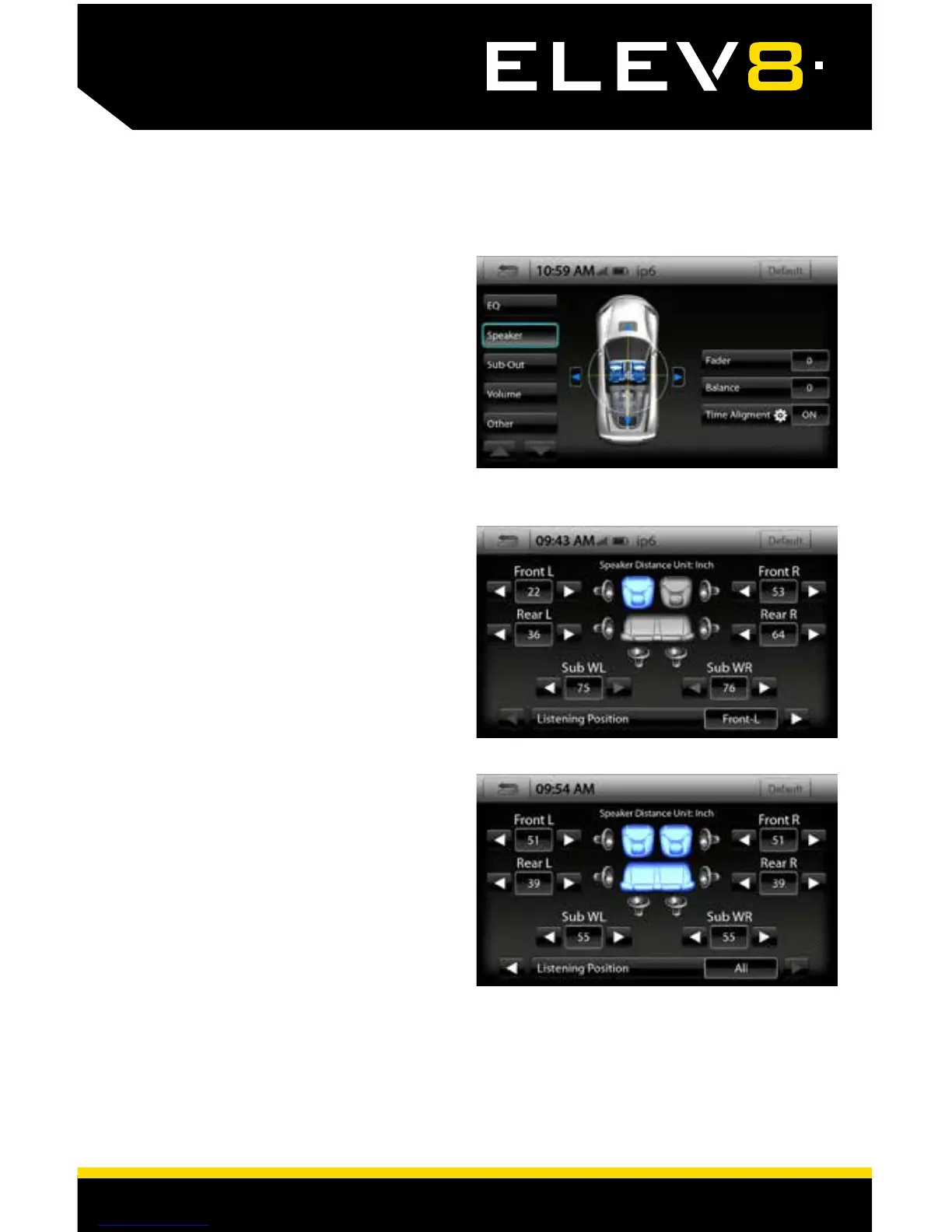
Audio > Speaker
Fader
[-9 - 0 - 9]
Using the blue Up and Down arrows, you can fade.
Balance [-9 - 0 - 9]
Using the blue Left and Right arrows, you can
adjust the speaker balance left and right.
Time Alignment [OFF-ON]
When set to ON, select the gear icon to adjust
Time Alignment settings.
Audio > Speaker > Time Alignment
Time Alignment compensates for the
uneven distances between the speakers
and a listener’s ears. Time Alignment delays
signals from the closest speaker(s), so that
all the sound arrives at the listening position
at the same time, giving the listener a more
accurate, life-like stereo image.
To set the Time Alignment, select a Listen-
ing Position, and then measure from each
speaker to the Listening Position. Input
speaker distance values in inches into the
appropriate positions.
Each Listening Position can have a unique
set of values.
Listening Positions
[Front-L - Front-R - Front - All]














 To Next Page