28
StingerElectronics.com
AUDIO SETTINGS
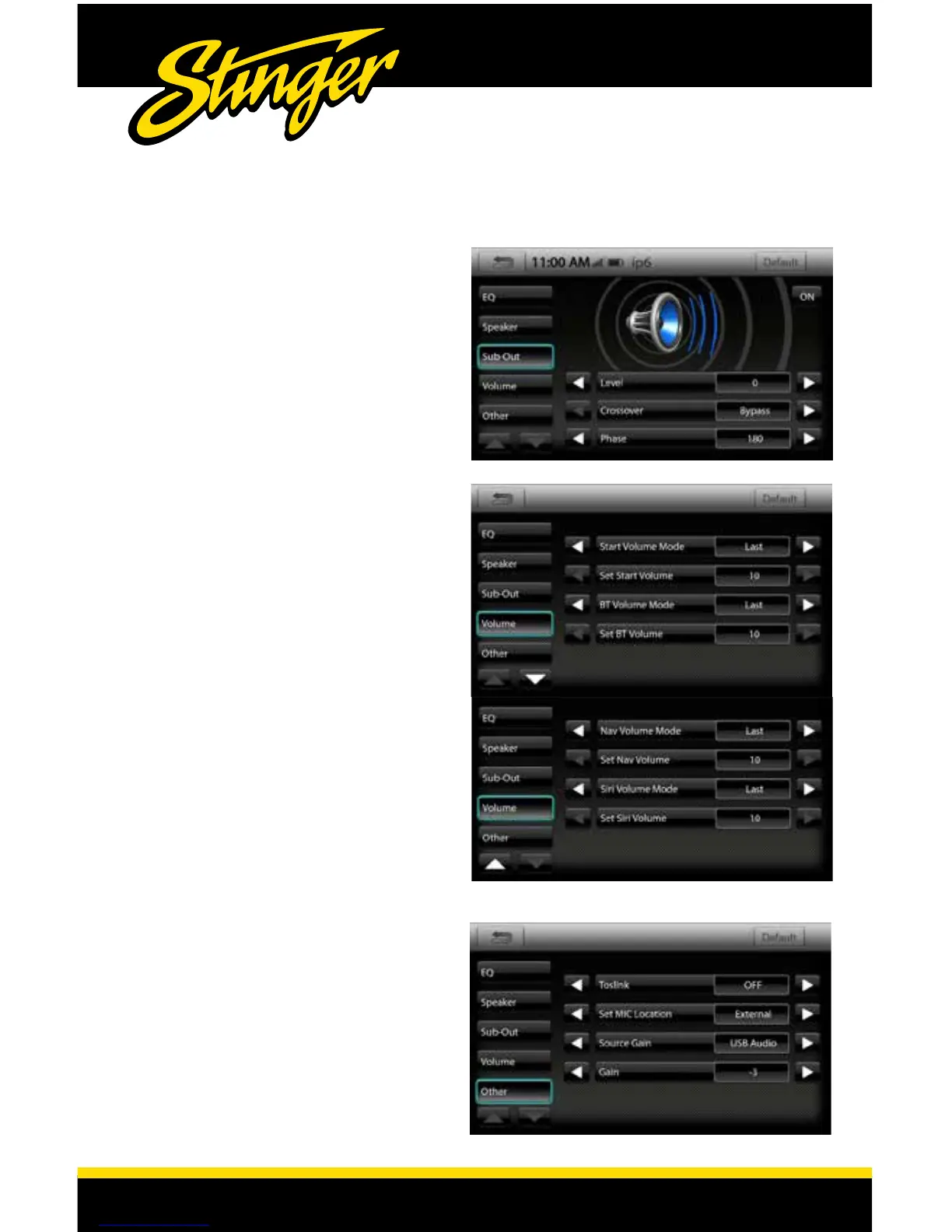
Audio > Sub-Out
Sub-Out
[ON-OFF]
Turns the subwoofer output ON/OFF.
Level [-14 - 7]
Adjusts the SUB OUT level.
Crossover
[BYPASS-25Hz-40Hz-63Hz-100Hz-60Hz-250Hz]
Adjusts crossover frequency of sub output. Fixed
12dB octave slope.
Audio > Other
Toslink
[OFF-ON]
Set MIC Location [EXTERNAL-INTERNAL]
Switch between microphones .
Source Gain [USB AUDIO-USB VIDEO-IPOD-
BT MUSIC-AUX-HDMI-SXM-AM/FM-CAMERA-
ANDRIOD AUTO-APPLE CARPLAY]
Selects Source to adjust Gain(volume level).
Gain [-12 - 6]
Adjusts Gain of selected Source.
Audio > Volume
Start Volume Mode
[LAST-SET]
Volume at start-up. LAST will be same level as
when unit was shut off. SET will be a preset level
adjusted below.
Set Start Volume [0-40]
Adjusts SET volume level to specic level.
The Volume Mode is adjustable for
Bluetooth(BT), Navigation(Nav) and Siri
using the same procedure.
Note: Use the arrow buttons at bottom of
screen to move between pages.














 To Next Page