POSITool over EtherCAT
Operation manual
ID 441896.05
WE KEEP THINGS MOVING
81
12
3. Select the EoE Support element.
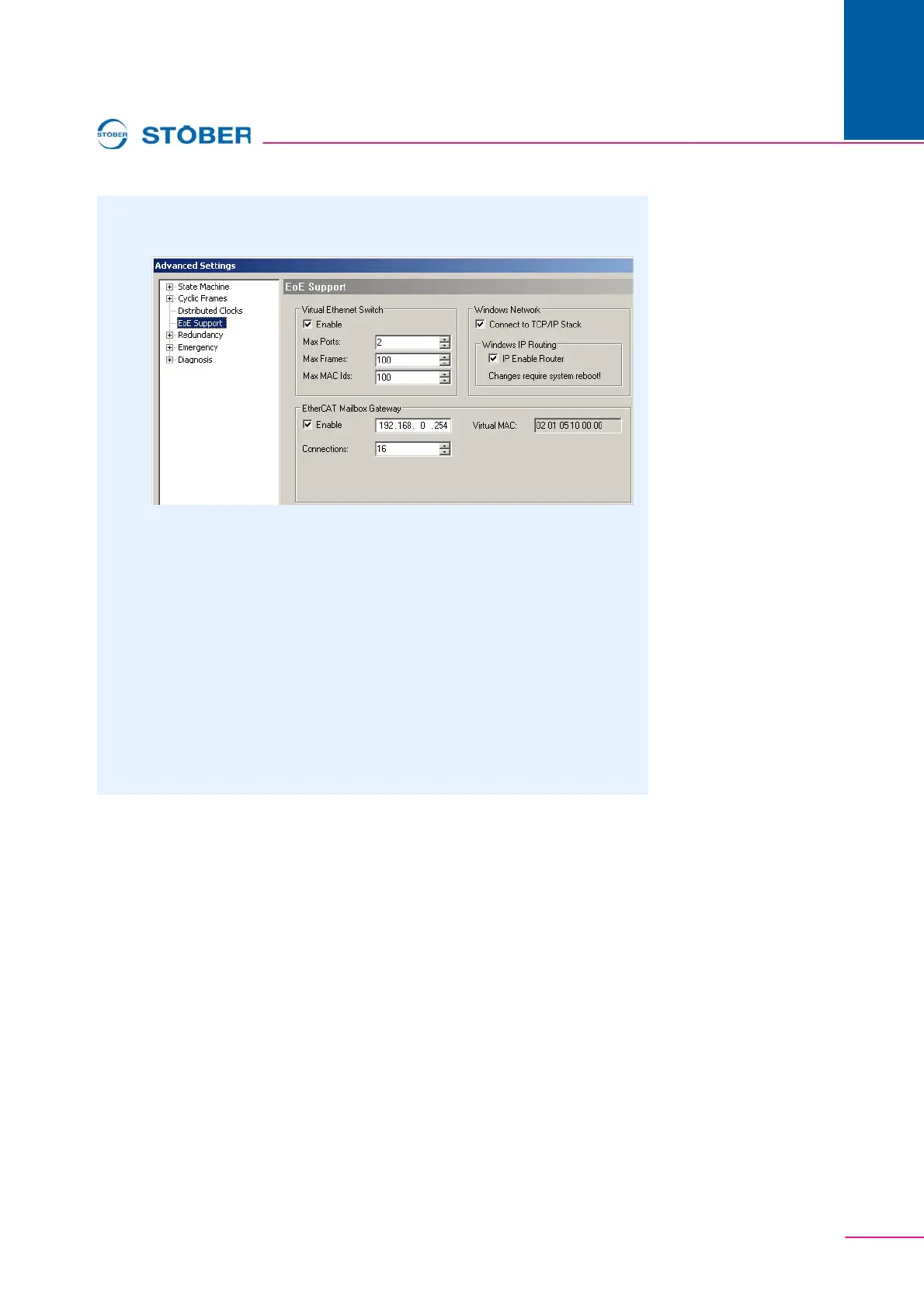
The following dialog screen is displayed:
4. Activate the Virtual Ethernet Switch function (Enable checkbox).
5. Select the Connect to TCP/IP Stack checkbox.
6. Select the IP Enable Router checkbox.
7. Activate the EtherCAT Mailbox Gateway function (Enable checkbox).
8. In the Connections field, enter a number which is equal to or larger than the
number of the inverter which is to be reached using POSITool via EtherCAT.
9. Make a note of the IP address for the mailbox gateway for subsequent entry
in POSITool.
10. Save these settings.
11. Re-start the PC.
You have activated the mailbox gateway.


 To Next Page
 Loading...




