POSITool over EtherCAT
Operation manual
ID 441896.05
WE KEEP THINGS MOVING
89
12
12.4 Management
To be able to use the POSITool over EtherCAT function in an existing project, you
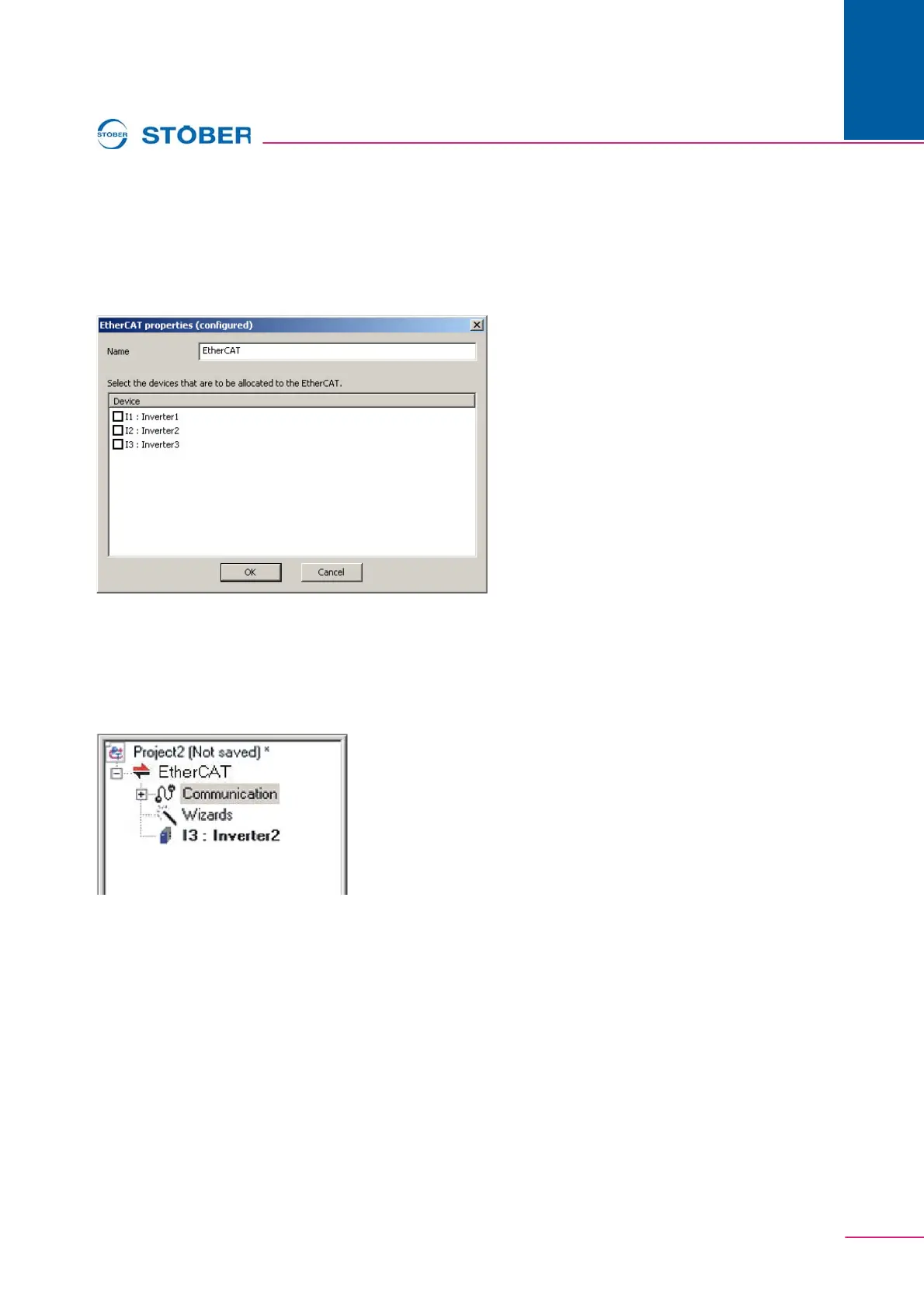
must add an EtherCAT entry to the project. For this purpose, on the File menu
choose the New EtherCAT… command. The following dialog screen is displayed:
Fig. 12-3 Adding EtherCAT entry
Here you can type a name for the EtherCAT entry in the Name field and in the list
below, select the inverters with which you want to communicate over POSITool
over EtherCAT. These inverters are, once you have accepted the dialog screen
using the OK button, displayed in the project view below the EtherCAT entry:
Fig. 12-4 Inverter in the EtherCAT entry
Note that using POSITool over EtherCAT you can only reach those inverters that
are allocated to an EtherCAT entry.
An SDS 5000 cannot be allocated to an IGB entry and an EtherCAT entry at the
same time. If you want to reach an SDS 5000 via POSITool over EtherCAT
instead of IGB, you must first delete the inverter from the IGB and then allocate it
to the EtherCAT entry as described above.
If, on the File menu you choose the Manage EtherCAT command, the following
dialog screen is displayed:



 To Next Page