41
Controls in detail
In case manual entries are needed
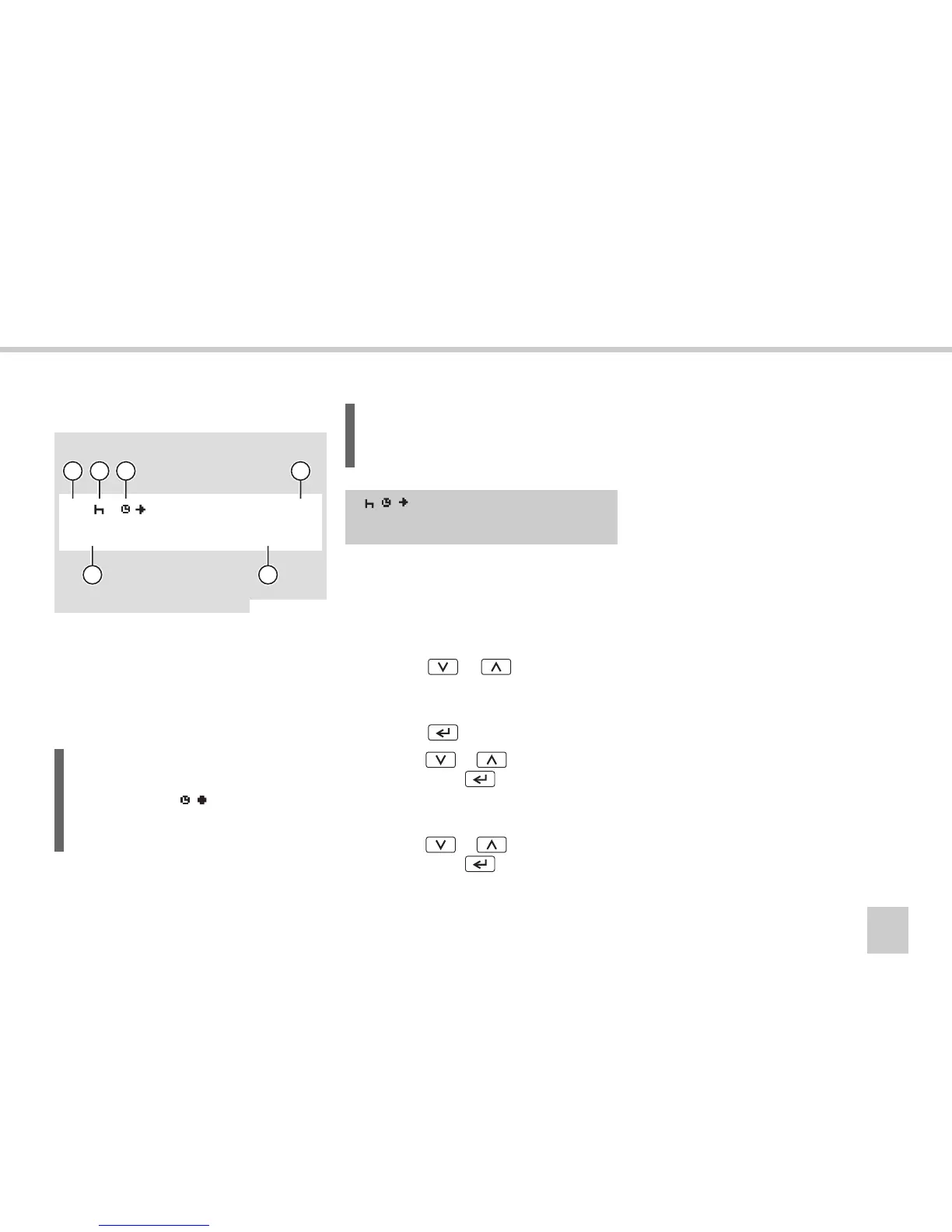
Activity type and start time
1
Driver
2
Type of activity
3
Start of the activity
4
Counter of manually entered activities
5
Date
6
UTC time at which the activity started
왘 The counter of manually entered activi-
ties initially defaults
01M
. The counter
will then increment
02M,03M
for each
manually entered activity.
왘 Press the or button to select
type of activity.
(컄 Working day activities‚ page 18)
왘 Press the button.
왘 Press the or button, followed
by pressing the button to set the
year and month respectively, if neces-
sary.
왘 Press the or button, followed
by pressing the button to set the
day and time respectively.
왘
After the time has been entered, the dis-
play moves on to enable you to enter the
end of the activity.
(컄 Activity end time‚ page 42)
L
During the time entering procedure the
local start time ( ) is shown in the
upper row simultaneously with the UTC
time in the lower row.
N54.61-2122-31
1
5
6
23
4
16:15
08.07.2005
01M
1
L
The activity start time initially defaults to
the last driver card withdrawal time.
1
01M
16:15
08.07.2005



 To Next Page