ZMEye is an application for Android (and iPhone) which can be used to view cameras on your network-connected
DVR. Your Android device must also be connected to the network for this service to function.
Visit www.storageoptions.com to download ZMEye software. Copy it to your Android device in the usual manner
and install the program.
Touch the ZMEye icon to load the program. On the bottom of the screen there is a settings icon:
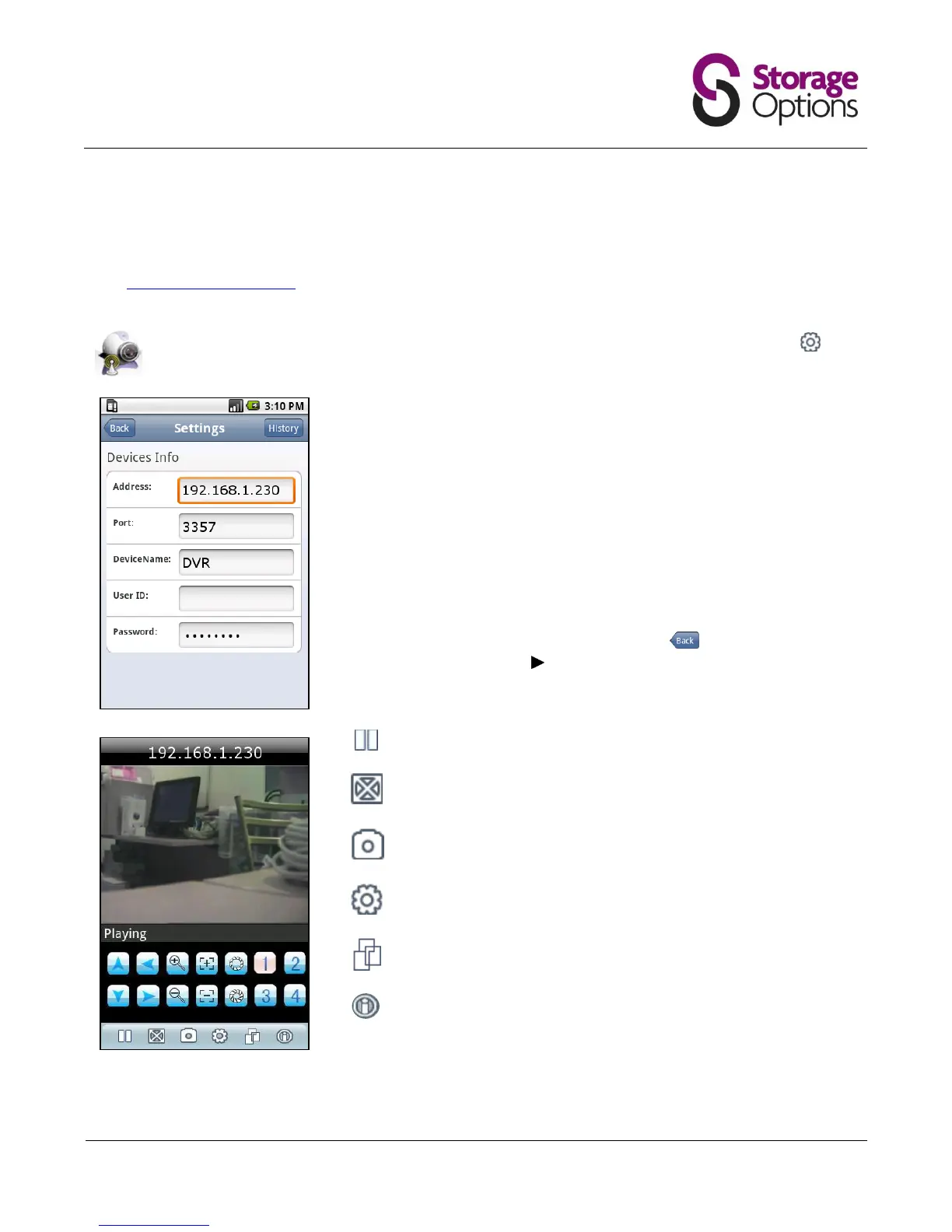
Press this to enter the configuration menu:
Address:
Port:
DeviceName:
User ID:
Password:
Enter the IP address of your DVR system here.
See Section 5.5 – Network for more information.
This must match with the port assigned to the DVR system.
Enter a friendly device name (not mandatory).
Leave this field blank.
Enter the pass code of the DVR account (default 88888888 for
the admin account).
Once these fields have been completed, press the button to return to the
camera screen, then press the button to connect to the camera stream.
Pause / play the live video stream.
View the video in full screen mode.
Take a snapshot of the video (stored on your Android device’s
memory card).
Enter the settings menu (see above)
Change camera group (1-4, 5-8, 9-12, 13-16).
Only cameras 1-4 are applicable on the Storage Options DVR.
Shows information about the ZMEye software.
Select the camera you wish to view.
ZMEye is also available for Apple iPhone products. Please visit the iTunes store to download.



 To Next Page