10. pq Switches to the next/previous channel in viewing mode. Moving the highlight up/
down in the menu.
11. tu Toggles between All and Favourites lists when the channel list is on screen.
12. OK Viewing mode: Displays the channel list. Menu: Conrming actions in the menu
13. MENU To open the main menu in viewing mode or to go one step back in the menu
14. EXIT Cancellation of current process/one step back in menu/exit from main menu to
viewing mode
15. 7 Searches backwards during playback/Timeshift*. Each pressing increases the speed
(x2 – x32)
16. 8 Searches forwards during playback/Timeshift*. Each pressing increases the speed
(x2 – x32)
17. USB Shortcut to the PVR menu
18. FAV To access your favourite channels.
19. 5 Jumps 10 places back in the program list and in Media Centre overview. Jumps to
the previous le during playback in Media Centre
20. 6 Jumps 10 places forwards in the program list and in Media Centre overview Jumps
to the next le during playback in Media Centre
21. 09 Channel number and numeric value input
22. TTX To open Teletext if available on the current channel.
23. SUBTITLE To select subtitles language out of available ones on the current channel
*This user manual describes the full functionality including the recording function and may not be applicable if the software for recording via
USB has not yet been installed.Installing the batteries
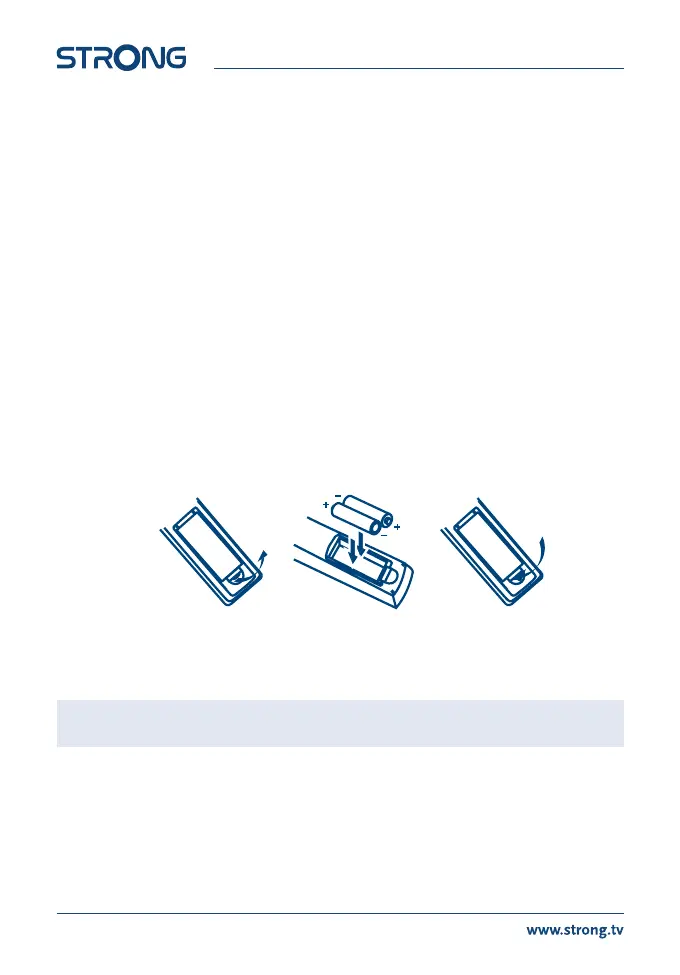
2.5 Installing the batteries
Fig. 4
Remove the battery cover from the remote control by sliding it downwards and put 2x AAA size batteries inside the
compartment. The diagram inside the battery compartment shows the correct way to install the batteries.
1. Open the cover
2. Install batteries
3. Close the cover
NOTE The batteries should not be recharged, disassembled, electrically short-circuited, be mixed or
used with other types of batteries.
8



 To Next Page