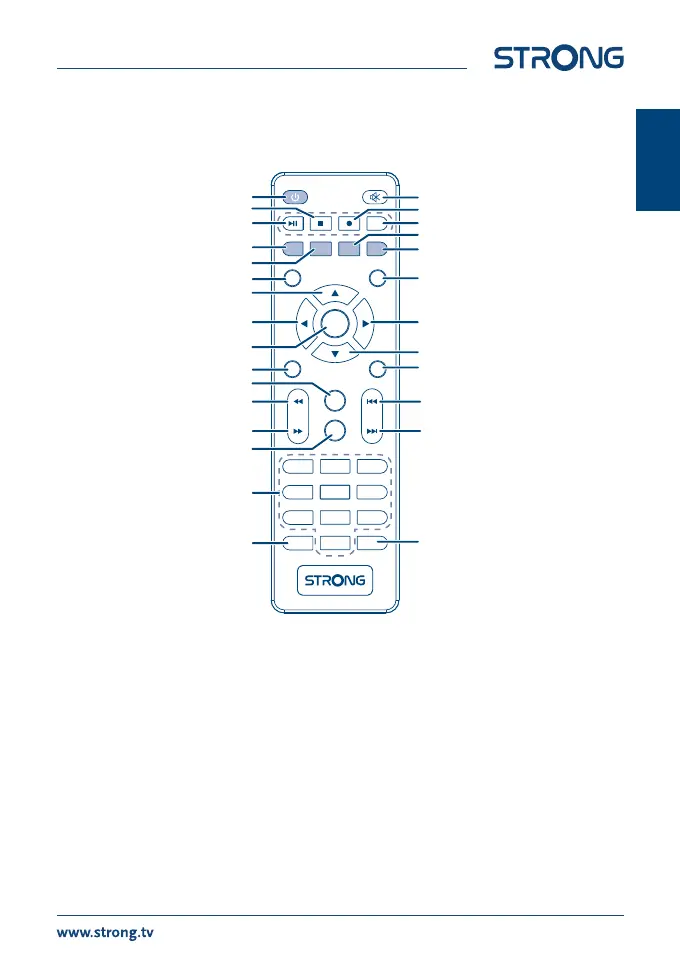
2.4 Remote Control Unit (RCU)
Fig. 3
1. q Turns the receiver ON/Standby
2. ! To turn the sound on or o
3. u2 Play/Pause Starts/resumes the playback/Timeshift*
4. 3 Stops playback of multimedia les and Timeshift*
5. 4 Starts recording of the currently watched programme*
6. INFO Press once to display program banner with channel number/name and current/
coming program information. Press twice to display detailed technical information
about the channel. Press again to get back to viewing mode
7. COLOURED BUTTONS Flexible functions in OSD menu and Teletext. Some coloured buttons have a double
function printed on them like:
TV/Radio (Red): Toggles between TV and Radio mode
Media (Green): Functions as a shortcut to the Media Centre menu
Audio (Yellow): Displays the audio selection menu with selections for available
languages and audio modes
Delete (Blue): Delete function in Menu
8. EPG Shortcut the Electronic Program Guide
9. BACK To switch between the last viewed channels
INFO
TV/
RADIO
MEDIA
AUDIO
EPG
MENU
EXIT
OK
USB
4
5
6
1
2 3
0
7
8
9
TTX
SUBT ITLE
FAV
BACK
1
4
7
8
11
13
16
15
22
10
2
6
7
9
14
11
18
17
23
10
3
7
19
15
20
5
7
21
7
English



 To Next Page