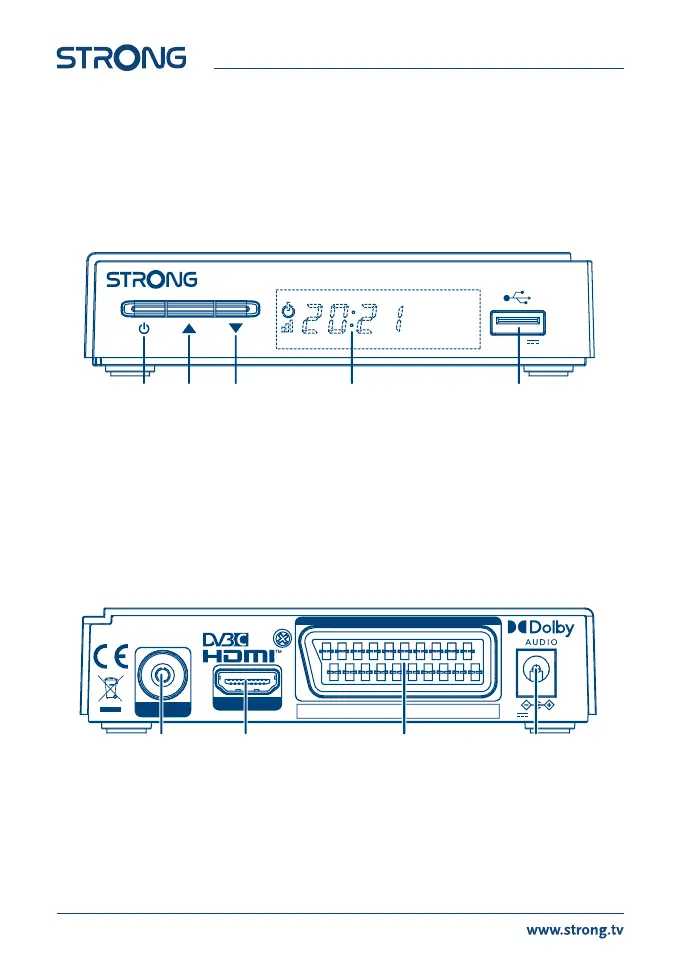
2.0 YOUR RECEIVER
2.1 DEFAULT PIN: 0000
2.2 Front Panel
Fig. 1
1. Power button: Switch the receiver to Standby or On.
2. CH-/CH+: To change channels without using the remote control
3. Standby indicator: Shows power state of the receiver: Red LED - receiver is in standby mode.
Orange signal LED – receiver is locked to signal.
4. LED display: Shows channel number in operation and time in Standby
5. Remote control sensor(hidden): Receives the signal from the remote control
6. USB A port For Media playback, record and timeshift.
2.3 Rear Panel
Fig. 2
1. CABLE IN To connect a cable from the wall outlet of your cable signal provider.
2. HDMI To connect to the HDMI input of your TV using a good quality HDMI cable.
3. TV SCART To connect to TV using a SCART cable.
4. Power input Connect the supplied Power Supply unit to the input.
4 5321
500 mA max.
USB: 5 V
Digital HD cable receiver SRT 3030
Supplied by STRONG Austria
CABLE IN
TV SCART
12 V , 1A, max 12W
HDMI
MANUFACTURED UNDER LICENSE FROM DOLBY LABORATORIES.
DOLBY, DOLBY AUDIO AND THE DOUBLE-D SYMBOL ARE TRADEMARKS OF DOLBY LABORATORIES.
1 2 3 4
6



 To Next Page