Control Panel and Display 12
2 Control Panel and Display
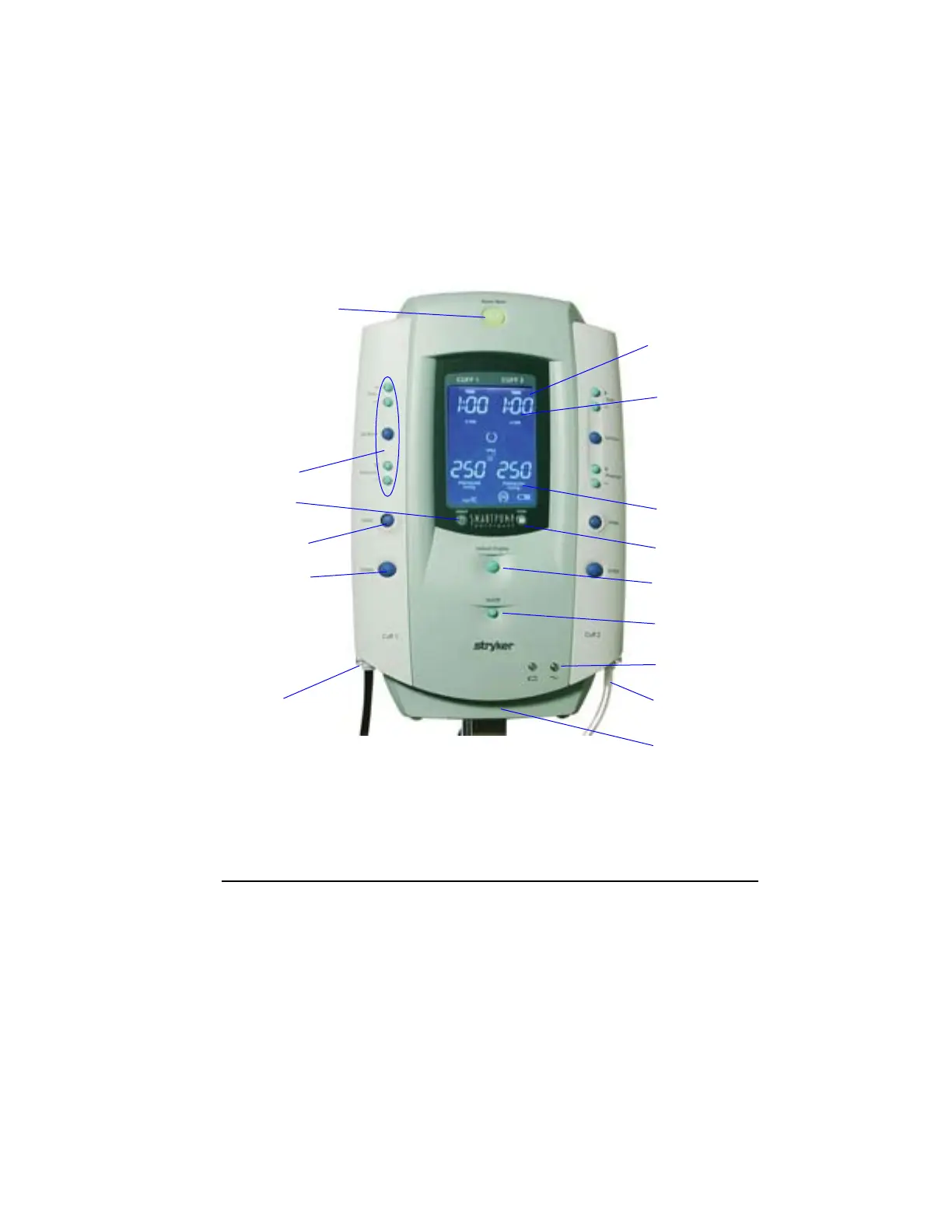
This section reviews the SmartPump’s interfaces, control panel layout,
display screen functions, and icons.
The control panel is the user’s interface to control, adjust, and set the
following: Procedure Timer and Cuff Pressure, Inflation, Deflation, and
Default Display. Cuff pressure and elapsed cuff time are displayed in
real-time.
LCD
Display Screen
Time display:
User Selectable:
Minutes or
Hours and Minutes
Pressure display:
mmHg
IVRA Lock
Alarm Indicator
Mute button
Default Display
button
On/Off (standby)
AC and Battery
Indicators
Cuff 1 Cuff 2
Fill line Fill line
Connector Connector
Serial Interface
Port (not shown)
Cuff Control
Buttons
Inflate Button
Deflate Button
Time and
Pressure
Adjustments
Print Button
Cuff I
Cuff 2



 To Next Page