General Use Procedure 29
Cuff Pressure Gauge
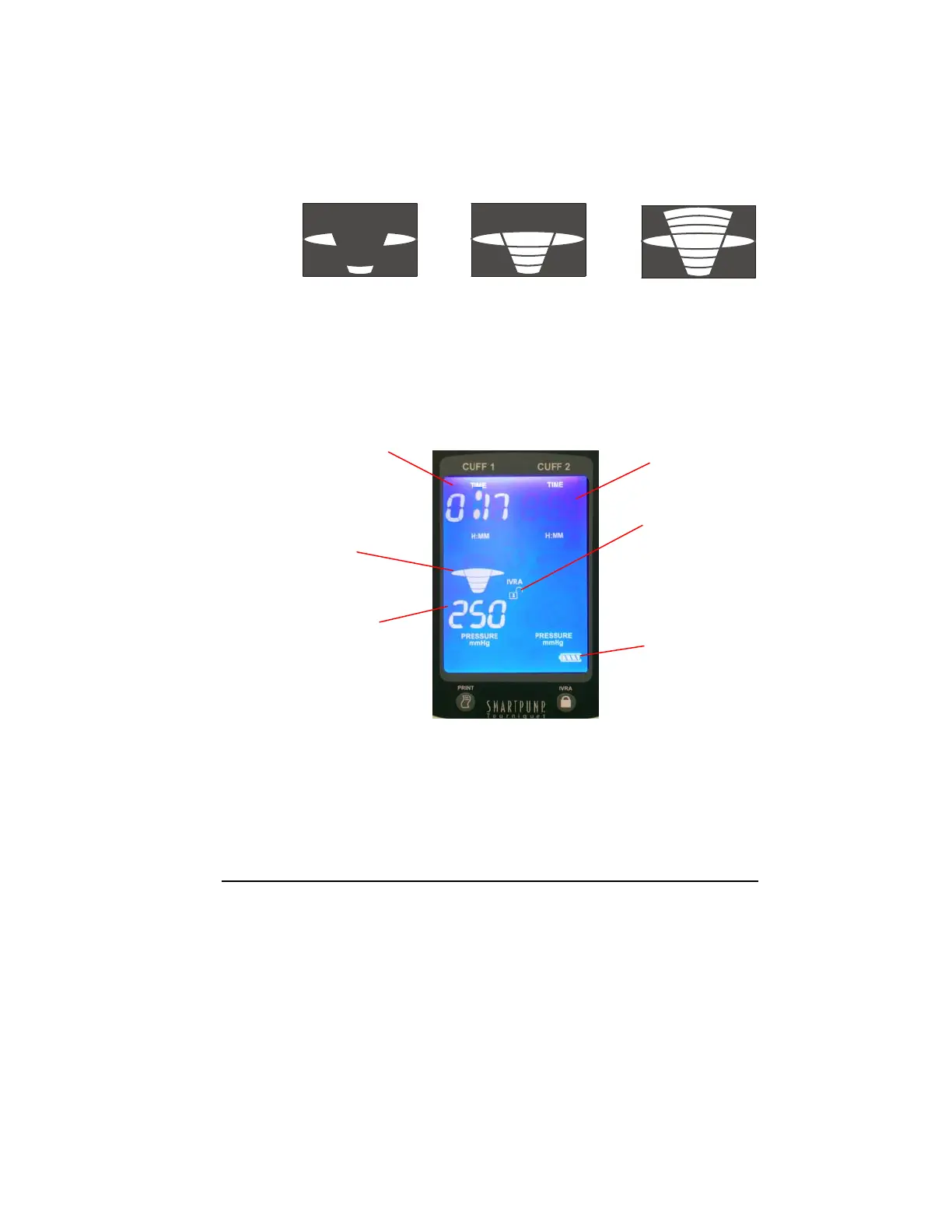
The pressure gauge displays the actual pressure in relation to the target
pressure. Target pressure has been reached when the wide oval
“mushroom” in the center of the gauge is illuminated. Pressure gauge
illustrations below depict various states of target pressure.
Under Target Target Pressure Over Target
Monitor Time and Pressure
The SmartPump display screen provides the information needed to monitor
the elapsed procedure time and the inflation pressure of the cuff(s) in use.
Time and/or pressure settings may be changed during a procedure.
Immediately after changing the setting(s) and pressing the Set/Save
button, the SmartPump adjusts the time and/or pressure to the new
setting(s). See Setting Timer and Cuff Pressure.
Inflation Time
(H:MM format)
Indicating
elapsed
inflation time of
17 minutes
Pressure
Gauge
Indicating cuff is
at target
pressure
Actual Cuff
Pressure
(mmHg)
Battery Status
IVRA Lock
Indicating the
IVRA lock is
unlocked
Active Ready
Cuff Cuff
Default Display
in minimization mode
(see Default Display
Viewing Preferences)



 To Next Page