Black plate (238,1)
北米Model "A1100BE-A" EDITED: 2010/ 3/ 23
5-46 Audio
the “TUNE/TRACK/CH” dial.
3. Select the “CONFIRM” menu by oper-
ating the “TUNE/TRACK/CH” dial. The
new passkey is displayed, the passkey is
changed and the mode changes to the
Bluetooth
®
audio setting mode.
! Deleting device
1. Select the “DELETE AUDIO” menu by
operating the “TUNE/TRACK/CH” dial. If
no devices are registered, “EMPTY” is
displayed and the mode changes to the
Bluetooth
®
audio setting mode.
2. Select the “CONFIRM” menu by oper-
ating the “TUNE/TRACK/CH” dial. “DE-
LETED” is displayed and the mode
changes to the Bluetooth
®
audio setting
mode.
& Bluetooth
®
audio operation
NOTE
Depending on the connected device, it
may not activate as per the following
items or not work smoothly.
! How to play back
Press the “CD/AUX” button and select the
“BT-A” mode.
! To select a track from its beginning
Select a track in the same way that a track
is selected when a CD is played. Refer to
“To select a track from its beginning” F5-
26.
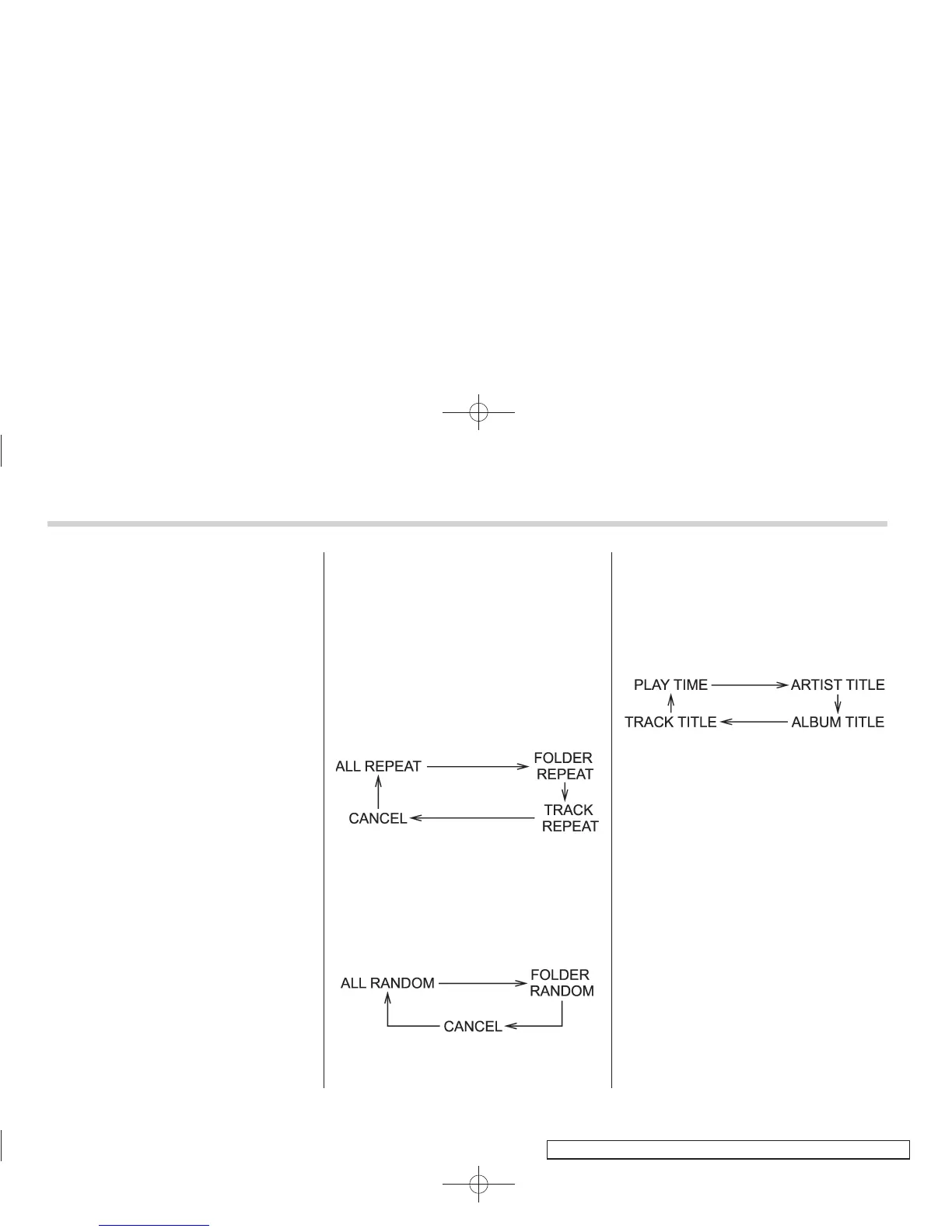
! Repeating
Repeating is operated in the same way a
CD is played. Refer to “Repeating” F5-28.
Each time you briefly press the “RPT/
RDM” button, the mode changes in the
following sequence.
! Random playback
Random playback is operated in the same
way a CD is played. Refer to “Random
playback” F5-29. Each time you press the
“RPT/R DM” button for 0.5 seco nd or
longer, the mode changes in the following
sequence.
! Display selection
Select an indication in the same way that
an indication is selected when a CD is
played. Refer to “Display selection” F5-
31. Each time you briefly press the “TEXT”
button, the indication changes in the
following sequence.
! Folder selection
Select a folder in the same way that a
folder is selected when a CD is played.
Refer to “Folder selection” F5-31.














 To Next Page