Black plate (242,1)
北米Model "A1100BE-A" EDITED: 2010/ 3/ 23
5-50 Audio
a full band and can avoid a band
used by a movable body identifi-
cation device.
& Using the Hands-free system
NOTE
You can select the menus by operating
the “TUNE/TRACK/CH” dial or using
the voice command system. Refer to
“Menu list of the Hands-free system”
F5-55 or “Voice command system”
F5-58.
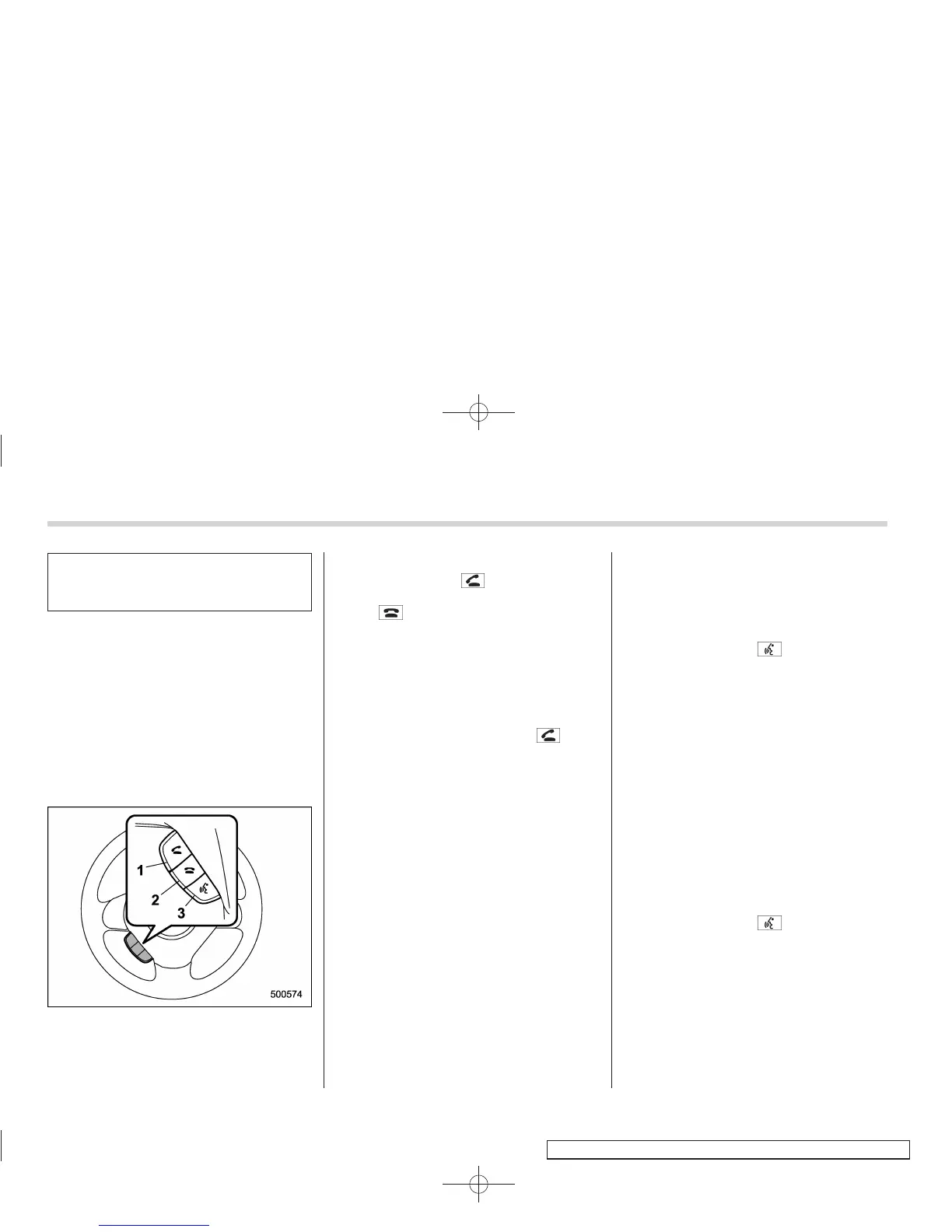
! Turning on/off the Hands-free mode
1) OFF hook switch
2) ON hook switch
3) Talk switch
To turn on the Hands-free mode, press the
OFF hook switch
. To turn off the
Hands-free mode, press the ON hook
switch
.
! Preparation for using the Hands-
free system
Before using the Hands-free system, it is
necessary to register a cell phone in the
system. Perform the following procedure
to register a cell phone.
1. Press the OFF hook switch
.
2. Select the “RECORD NAME” menu by
operating the “TUNE/TRUCK/CH” dial.
3. Say the name to be registered.
4. Select the “CONFIRM” menu. Then a
pass key is displayed.
5. Input the displayed pass key into the
cell ph one while “PASS KEY: ****” is
displayed. If you input the correct pass
key, “PAIRED” is displayed and the
registering procedure is finished. If you
input an incorrect pass key, “FAILED” is
displayed and the registering procedure
was not successful.
! Updating phonebook data
! Registering by voice
1. Select the “PHONEBOOK” menu.
2. Select the “ADD ENTRY” menu.
3. Select the “BY VOICE” menu.
4. Say the phone number to be regis-
tered.
5. Select the “CONFIRM” menu.
6. Select the “RECORD NAME” menu by
operating the “TUNE/TRACK/CH” dial or
press the talk switch
.
7. Say the name (voice tag) to be
registered.
8. Select the “CONFIRM” menu. Then
“STORED” is displayed and the mode
cha nges to the registering speed dial
mode. Refer to “Registering speed dial”
F5-52.
! Registering by phone
1. Select the “PHONEBOOK” menu.
2. Select the “ADD ENTRY” menu.
3. Select the “BY PHONE” menu.
4. Select the “CONFIRM” menu.
5. Select the “RECORD NAME” menu by
operating the “TUNE/TRACK/CH” dial or
press the talk switch
.
6. Say the name (voice tag) to be
registered.
7. Select the “CONFIRM” menu. Then
“STORED” is displayed and the mode
cha nges to the registering speed dial
mode. Refer to “Registering speed dial”
F5-52.














 To Next Page