Black plate (179,1)
北米Model "A1120BE-B" EDITED: 2011/ 10/ 28
toward you for more than 2 seconds.
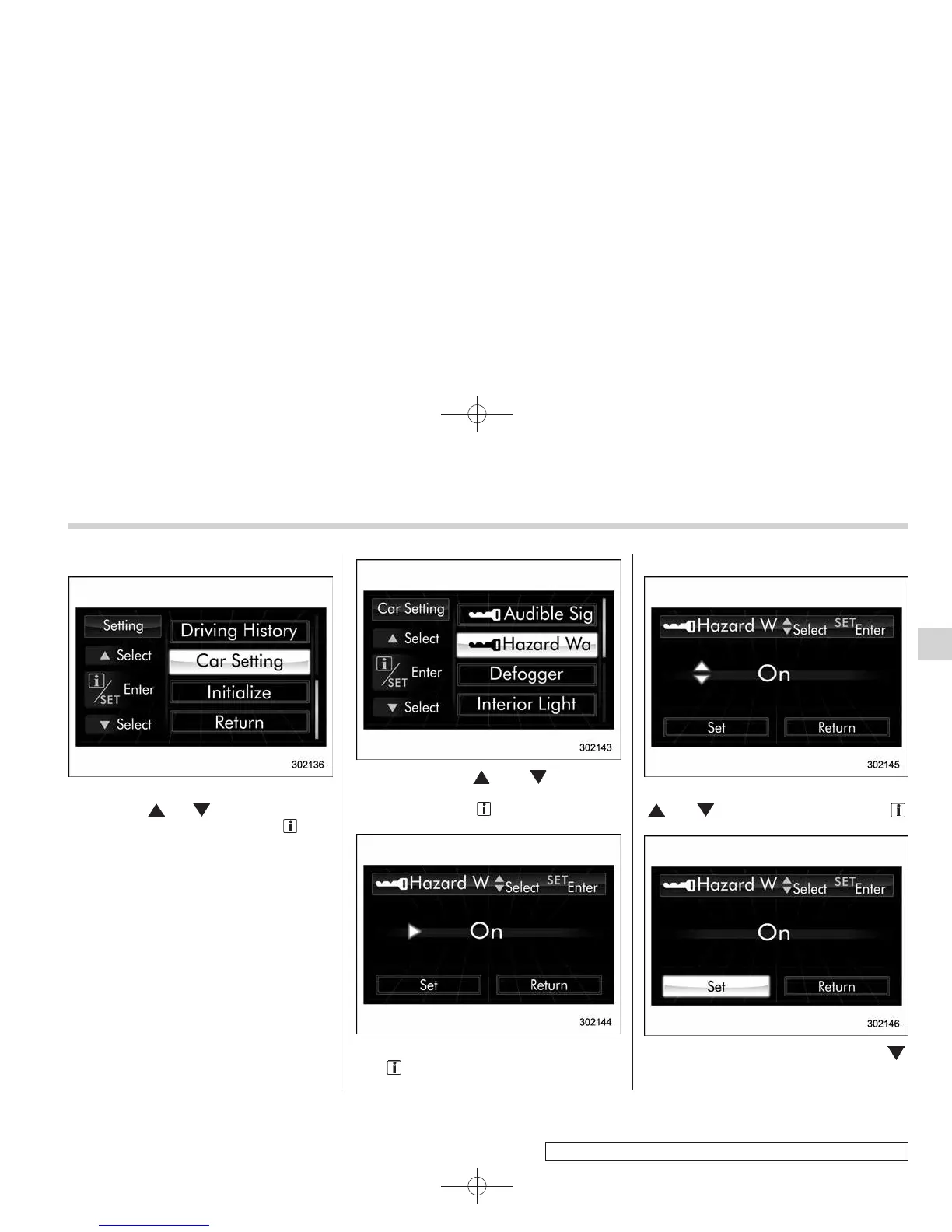
2. After the selection screen is displayed,
operate the “
” or “ ” switch to show the
“Car Setting” item. Then, pull the “
/SET”
switch toward you.
! Hazard warning flasher setting
1. Perform the preparation steps accord-
ing to “Preparation for car settings” F3-56.
2. Operate the “ ” or “ ” switch to
select the “Hazard Warning Flasher” item,
and then pull the “
/SET” switch toward
you.
3. The current setting is displayed. Pull
the “
/SET” switch toward you to enter
the selection mode.
4. Select “On” or “Off” by operating the
“
” or “ ” switch, and then pull the “ /
SET” switch toward you.
5. Select “Set” by operating the “ ”
switch, and confirm the setting by pulling
Instruments and controls 3-57
– CONTINUED –
3













 To Next Page