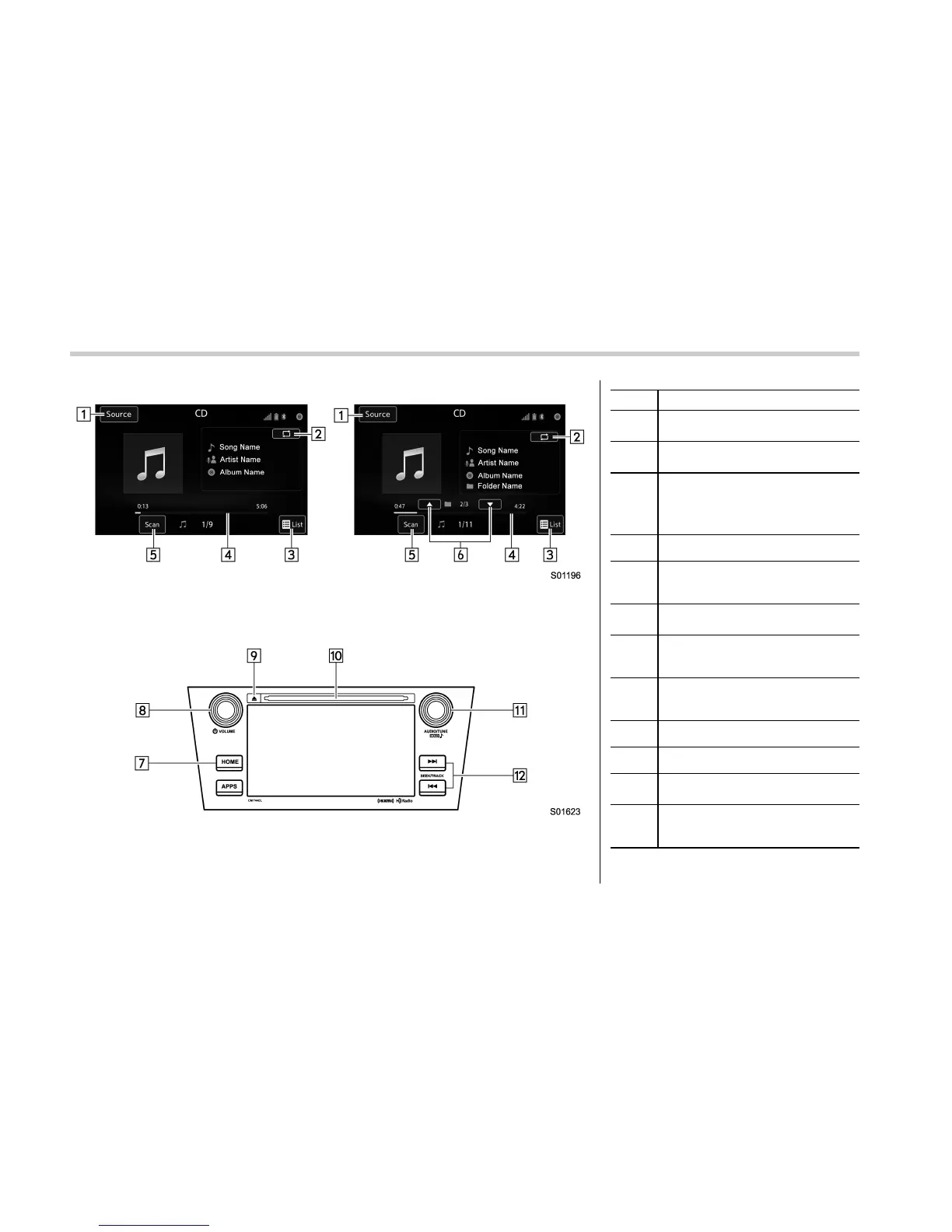
Audio/Media operation
Control screen
Left: Audio CD, Right: MP3/WMA/AAC disc
Control panel
No. Function
&
1
Select to display the audio source
selection screen.
&
2
Select to display Trick Play Settings
screen.
&
3
Audio CD
Select to display a track list.
MP3/WMA/AAC disc
Select to display a folder list
&
4
Shows progress.
&
5
The tracks in the disc are played
back for ten seconds each from the
beginning of the track.
&
6
MP3/WMA/AAC disc
Select to choose a folder.
&
7
Select to display the sound setting
screen. Refer to “Basic operation”
F5-11.
&
8
Turn to adjust volume.
Press to turn the audio system on/
off.
&
9
Press to eject a disc.
&
10
Disc slot
&
11
Turn to select a track/file.
Press to select an audio mode.
&
12
Select to select a track/file.
Select and hold to fast forward/
rewind.
5-50















 To Next Page